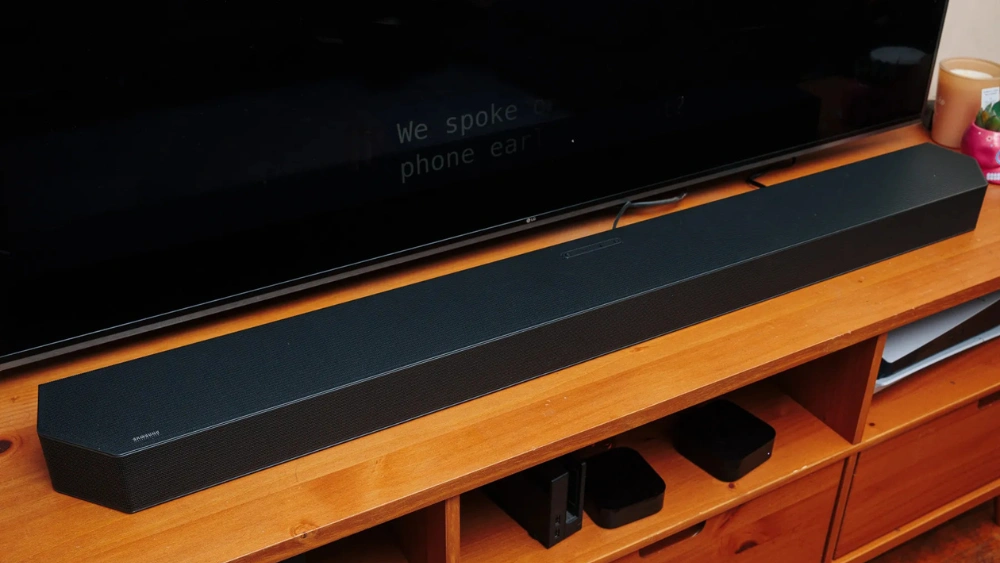
Looking to upgrade your home entertainment with a Samsung soundbar? Hanging it correctly can make all the difference in both sound quality and room aesthetics.
But if you’re unsure where to start, don’t worry—you’re in the right place. This guide will walk you through simple, step-by-step instructions to hang your Samsung soundbar safely and perfectly. By the end, you’ll have a sleek setup that not only looks great but delivers amazing sound.
Ready to transform your space? Let’s get started!
Choosing The Right Location
Choosing the right location to hang your Samsung soundbar affects sound quality and room aesthetics. The placement influences how well the sound travels and how it blends with your space. Picking a spot carefully helps you enjoy clear audio and avoids issues like echo or muffled sound.
Finding The Ideal Wall Space
Select a wall space that is solid and can support the soundbar’s weight. Avoid walls with weak drywall or thin panels. The spot should be near your TV or screen for a seamless audio-visual experience. Leave enough space around the soundbar to allow air circulation and easy access to ports.
Considering Viewing Angles
Place the soundbar at ear level when seated. This position ensures sound reaches your ears directly. Avoid placing it too high or too low to prevent sound distortion. Align the soundbar with the center of your TV screen for balanced audio. The sound should flow evenly across the room to cover all seating areas.
Avoiding Obstacles And Interference
Keep the soundbar away from large objects that block sound waves. Furniture, curtains, or decorations can absorb or reflect sound, reducing clarity. Avoid placing it near electronics that cause interference, like routers or cordless phones. Clear the area around the soundbar for the best performance and signal strength.

Credit: condomounts.com
Gathering Necessary Tools
Before you start mounting your Samsung soundbar, gathering the right tools can make the process smoother and safer. Having everything ready helps you avoid interruptions and keeps your focus on getting a perfect setup. Think about the last time you started a project without the right tools—didn’t it slow you down?
Essential Tools Checklist
Make sure you have these basic tools at hand to hang your soundbar properly:
- Drill:A cordless drill with various drill bits will help you make precise holes in your wall.
- Screwdriver:Both Phillips and flathead screwdrivers are useful for tightening screws.
- Stud Finder:Locating wall studs is crucial for a secure mount.
- Level:Ensure your soundbar sits perfectly horizontal to avoid uneven sound and a crooked look.
- Measuring Tape:Accurate measurements guarantee the soundbar aligns with your TV and room setup.
- Pencil:Mark spots on the wall without damaging paint.
Gathering these tools beforehand saves you from making multiple trips to the hardware store. Are you ready to make your soundbar the centerpiece of your entertainment space?
Optional Accessories For Stability
Sometimes, the basic tools aren’t enough to keep your soundbar steady over time. Consider these extra accessories for added security:
- Wall Anchors:Useful if you’re mounting on drywall without studs; they prevent screws from loosening.
- Mounting Brackets:Some soundbars come with them, but universal brackets can offer extra support.
- Adhesive Strips or Pads:These can reduce vibration and keep your soundbar snug against the wall.
- Cable Clips:Keep your wires tidy and out of sight, improving overall stability and aesthetics.
Have you thought about how vibrations might affect your setup? Adding these accessories can keep your soundbar secure and looking great long after installation.
Preparing The Soundbar
Getting your Samsung soundbar ready for mounting is a crucial step that sets the stage for a smooth installation. Proper preparation helps avoid surprises and ensures your soundbar fits perfectly where you want it. Let’s break down what you need to do before you start hanging it on your wall.
Removing Packaging And Protective Covers
Start by carefully unpacking your soundbar from its box. Avoid using sharp objects directly on the device to prevent scratches. Take off all foam inserts, plastic wraps, and any tapes that protect the surface during shipping.
Don’t rush this step. Sometimes, hidden under the packaging, you might find small accessories like screws or manuals that are easy to miss. Have a clean, flat surface ready to place the soundbar safely while you remove everything.
Identifying Mounting Points
Next, examine the back of your soundbar for the mounting points. These are usually threaded holes or brackets designed for wall mounts. Check your model’s manual to confirm their exact location and size.
Not all soundbars have visible mounting points, so look closely. If you don’t spot any, consider whether a mounting bracket that clamps or supports the soundbar might be needed. Knowing this upfront saves time and prevents damage during installation.

Credit: www.amazon.com
Marking And Drilling Holes
Marking and drilling holes is a crucial step when hanging your Samsung soundbar. Precision here ensures the soundbar stays securely mounted and looks professional. Taking your time now saves you from future adjustments or damage to your walls.
Measuring Mounting Bracket Placement
Start by holding the mounting bracket against the wall where you want the soundbar. Use a tape measure to check the distance between the bracket holes and confirm they align with your soundbar’s mounting points.
Double-check the height so the soundbar sits just below your TV or at ear level for the best audio experience. Mark the bracket’s hole positions lightly with a pencil.
Using A Level For Accuracy
Don’t guess if the bracket is straight—use a level. Place it on top of the bracket and adjust until the bubble is centered.
Mark your holes only after confirming the bracket is perfectly horizontal. A crooked soundbar not only looks off but can affect sound distribution.
Drilling Into Different Wall Types
Walls vary, so your approach to drilling should too. For drywall, use wall anchors to support the soundbar’s weight and prevent the screws from pulling out.
If you’re drilling into concrete or brick, a masonry drill bit is necessary. Take your time and drill slowly to avoid cracking.
Wood studs offer the strongest hold; try to drill directly into them if possible. Use a stud finder to locate them easily before marking your holes.
Installing The Mounting Bracket
Installing the mounting bracket is a crucial step in hanging your Samsung soundbar securely and safely. This bracket acts as the foundation, holding your soundbar firmly against the wall. Taking your time here can save you from future headaches like a crooked setup or worse, a soundbar that falls.
Securing Bracket With Screws
First, find the right spot on your wall, ideally near your TV for optimal sound. Use a stud finder to locate wall studs—these provide the strongest support for the screws. Mark the screw holes on the wall using the bracket as a template.
Before drilling, double-check that the marks are level. A crooked bracket can throw off your entire setup. Use a drill to create pilot holes, then secure the bracket with the screws provided in your soundbar’s mounting kit.
Don’t overtighten the screws; this can damage the wall or the bracket. They should be snug and firm, holding the bracket flush against the wall without any wiggle.
Checking Stability And Alignment
Once the bracket is secured, gently shake it to test stability. If it moves, tighten the screws or reposition the bracket over a stronger part of the wall. Stability is key to prevent your soundbar from detaching over time.
Next, check the alignment by placing the soundbar onto the bracket. Step back and ensure it looks straight and centered relative to your TV. A slight misalignment can affect both aesthetics and sound quality.
Have you ever noticed how even a tiny tilt can distract you during a movie? Take your time here—adjust the bracket or the soundbar until it feels just right. Your viewing experience depends on this small but important detail.
Mounting The Soundbar
Hanging a Samsung Soundbar requires precise positioning for optimal audio. First, ensure the wall mount bracket aligns with your TV’s height. Secure the bracket, then attach the soundbar, ensuring a stable and balanced fit. This setup enhances sound quality and keeps your space tidy.
Mounting your Samsung Soundbar can dramatically enhance your audio experience by optimizing sound direction and clarity. A well-mounted soundbar can create a seamless look in your living space, making your entertainment setup feel more integrated and professional. Imagine the satisfaction of crisp sound without clutter. Are you ready to achieve that? Let’s explore how you can securely mount your soundbar with ease.Attaching Soundbar To Bracket
Start by carefully aligning your soundbar with the bracket. Most Samsung soundbars come with dedicated mounting kits that include brackets designed for easy attachment. Ensure that the bracket is level and positioned correctly for optimal sound projection. Use a spirit level for accuracy. Secure the soundbar to the bracket using the screws provided in your kit. Make sure they are fastened tightly to prevent any wobbling or movement.Ensuring A Secure Fit
Once attached, give your soundbar a gentle shake to test its stability. If it feels loose, recheck the screws and tighten them if needed. A secure fit guarantees that your soundbar won’t vibrate or shift during use. Check that there’s no gap between the soundbar and the wall or the bracket. A snug fit enhances sound quality and prevents unnecessary echo. Consider using additional supports if your wall is uneven or if the soundbar is particularly heavy. Sometimes, a little extra reinforcement can bring peace of mind. Remember, the goal is not just aesthetic but also functional. How does it feel to have audio precision at your fingertips?Connecting Cables And Power
Connecting your Samsung soundbar properly is key to great sound. This section covers how to run cables and manage power. Follow these steps to get your setup clean and working well.
Running Hdmi And Audio Cables
Use the HDMI ARC port on your TV and soundbar for best audio quality. Connect the HDMI cable firmly to both devices. If your TV lacks HDMI ARC, use an optical audio cable instead.
Make sure cables are long enough to reach without tension. Avoid bending cables sharply; this can damage them. Test your connections before finalizing the setup.
Managing Cable Clutter
Keep cables neat to avoid a messy look and accidents. Use cable clips or ties to bundle cables together. Run cables along the wall or behind furniture for a clean finish.
Label each cable to identify them easily later. This helps when troubleshooting or upgrading your system. A tidy setup looks professional and lasts longer.
Powering On The Soundbar
Plug the soundbar’s power cord into a nearby outlet. Use a surge protector to protect your device from power spikes. Press the power button on the soundbar or remote to turn it on.
Check that the soundbar shows a power indicator light. Adjust the volume and settings to test sound output. Your soundbar is now ready to deliver clear, rich audio.

Credit: www.youtube.com
Testing Sound And Adjustments
After mounting your Samsung soundbar, the real test begins: how does it sound? Testing and adjusting the audio is key to getting the most out of your setup. Small tweaks can make a huge difference in clarity, bass, and overall experience.
Configuring Audio Settings
Start by accessing the soundbar’s audio menu using the remote or connected app. You’ll find options like sound modes, equalizer settings, and surround sound effects. Try switching between presets such as Movie, Music, or Standard to see which fits your room and preferences best.
Adjust the bass and treble levels to balance the sound. I once left bass too high, and the dialogue was drowned out. Lowering it slightly made voices clearer without losing depth. Don’t forget to check if your TV audio output matches the soundbar input type—optical, HDMI ARC, or Bluetooth—to avoid sync issues.
Fine-tuning Placement For Best Sound
Where you place the soundbar impacts sound quality more than you might expect. If it’s too close to the wall, bass might boom too much. Too far away, and you lose immersive effects.
Try moving the soundbar slightly left or right and listen for changes. Elevate it a few inches if possible, or angle it toward your main seating area. I noticed that tilting mine just a bit upward brought out clearer highs and richer mids.
Ask yourself: is the sound balanced across your room? If not, try adjusting placement before diving back into settings. Sometimes, a small shift in position beats complex audio tweaks.
Maintaining Your Soundbar Setup
Maintaining your Samsung soundbar setup ensures clear sound and long device life. Proper care keeps your soundbar working at its best. Regular checks and cleaning prevent common issues. Simple steps help avoid damage and maintain performance.
Cleaning And Care Tips
Dust can block speakers and reduce sound quality. Clean your soundbar with a soft, dry cloth. Avoid water or liquid cleaners to prevent damage. Keep vents clear of dust and debris. Turn off and unplug before cleaning. Place the soundbar away from direct sunlight and heat sources. Avoid placing objects on top that may scratch or block it.
Troubleshooting Common Issues
Soundbar not turning on? Check power connections and remote batteries. No sound or low volume? Ensure cables are secure and inputs match. Distorted sound? Reset the soundbar or update its firmware. Remote control not working? Replace batteries or re-pair the remote. No Bluetooth connection? Confirm pairing mode and device compatibility. Consult the manual for error codes or specific fixes.
Frequently Asked Questions
How Do I Mount A Samsung Soundbar On The Wall?
To mount a Samsung soundbar, use the included wall brackets and screws. Measure and mark holes on the wall. Drill pilot holes, insert anchors, and secure the brackets. Finally, attach the soundbar to the brackets firmly for a secure fit.
What Tools Are Needed To Hang A Samsung Soundbar?
You need a drill, screwdriver, level, measuring tape, and pencil. Also, use wall anchors and screws that come with the soundbar. These tools ensure precise placement and a strong mount for your soundbar.
Can I Hang A Samsung Soundbar Without A Tv Mount?
Yes, you can mount a soundbar independently using the wall brackets. Position it below or above the TV for optimal sound. Ensure it is securely fastened and level for best audio performance.
How High Should I Hang My Samsung Soundbar?
Mount the soundbar at ear level when seated for best sound quality. Usually, this is just below or above the TV screen. Proper height improves sound projection and enhances your listening experience.
Conclusion
Hanging your Samsung soundbar is easier than it seems. Follow the steps carefully for a secure fit. Use the right tools and check measurements twice. Keep cables organized to avoid clutter. Enjoy better sound and a cleaner look in your room.
Small effort, big difference. Now, your soundbar is ready to boost your audio experience.