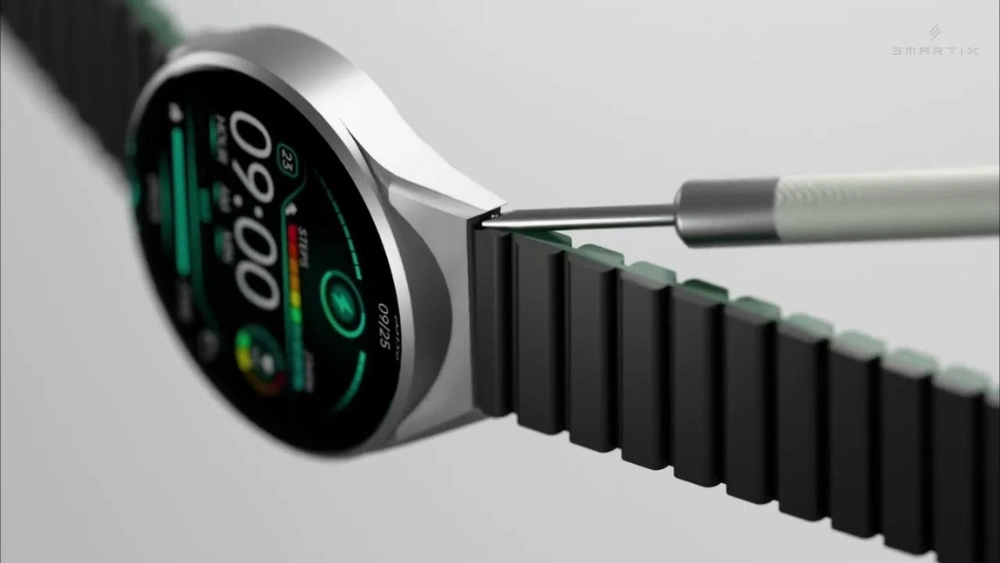
Want to give your smartwatch a fresh new look? Changing your smartwatch strap is easier than you think, and it can instantly upgrade your style.
Whether you want something sporty, elegant, or just a different color, swapping straps lets you match your watch to your mood or outfit. In this guide, you’ll learn simple, step-by-step tips to change your smartwatch strap quickly and safely—no special tools or skills needed.
Keep reading, and you’ll be ready to switch up your look anytime you want.

Credit: www.youtube.com
Choosing The Right Strap
Choosing the right strap for your smartwatch can completely change how it looks and feels on your wrist. It’s not just about style; comfort and compatibility play a huge role too. Picking a strap that fits well and matches your daily activities makes wearing your watch a pleasure, not a chore.
Materials And Styles
Straps come in various materials like silicone, leather, metal, and fabric. Silicone is perfect if you lead an active lifestyle since it’s water-resistant and easy to clean. Leather offers a classy look but may not hold up well during workouts or in the rain.
Metal straps add a sleek, professional touch but can feel heavy. Fabric straps, like nylon, are lightweight and breathable, great for casual wear. Think about where you’ll wear your watch most—will you be at the gym, in the office, or outdoors?
Measuring Strap Size
Getting the right strap size is key to comfort. You need to know both the width of your watch’s lug (where the strap attaches) and the length of the strap itself. Most smartwatches specify lug width in millimeters, so check your watch’s manual or look it up online.
Measure your wrist circumference to find the strap length that won’t be too tight or too loose. If your wrist is smaller or larger than average, many brands offer adjustable or extra-long straps. Have you ever worn a strap that pinched or slipped? Avoid that by measuring before buying.
Matching Strap With Watch Model
Not every strap fits every smartwatch. Some models have proprietary connectors, meaning you need straps designed specifically for them. Check compatibility before purchasing to avoid surprises.
Also, consider the watch’s design. A bulky watch might look odd with a slim strap, while a thin watch could be overwhelmed by a heavy metal band. Does your watch have a sporty or elegant design? Match your strap to maintain a cohesive look.
Tools You’ll Need
Changing your smartwatch strap is easier when you have the right tools at hand. Without them, you might struggle to remove the old strap or risk damaging your device. Gathering the necessary tools first can save you time and frustration.
Basic Tools For Strap Removal
- Spring Bar Tool:This small tool helps push and release the spring bars that hold the strap in place. It’s often the most essential item for strap removal.
- Small Screwdriver:Some smartwatches use tiny screws instead of spring bars. A precision screwdriver set with flathead and Phillips heads can handle these.
- Tweezers:Tweezers assist in gripping small parts like pins or screws. They add precision when handling delicate components.
- Soft Cloth or Mat:Place your watch on a soft surface to avoid scratches while working. This simple step protects your smartwatch during the strap change.
Optional Accessories For Easier Replacement
- Strap Holder or Watch Case Clamp:This accessory holds your watch steady, giving you better control when removing or attaching straps.
- Magnifying Glass or Head-Mounted Magnifier:If you have trouble seeing tiny parts, a magnifier can make the task less stressful.
- Replacement Spring Bars or Pins:Keep extras handy in case the original bars get damaged or lost during removal.
- Cleaning Brush:Dust and dirt can collect around the lugs. A small brush helps you clean these areas before attaching the new strap.
Have you ever tried changing a strap without a spring bar tool and ended up frustrated? Investing in these tools will make the process smoother and protect your smartwatch from accidental damage. What tools do you already have that could help with your next strap swap?
Removing The Old Strap
Removing the old strap from your smartwatch is the first step to giving it a fresh new look. It might seem tricky at first, but with the right approach, you can do it quickly and safely. Paying attention to the release mechanism ensures you won’t damage your watch or the strap during removal.
Locating The Release Mechanism
Most smartwatches have a small lever or button near where the strap connects to the watch body. This release mechanism is designed to make strap changes easy without tools. Take a close look at both sides of your watch’s strap connection to find this feature.
If you don’t see a lever, your watch might use a spring bar that requires a bit more care to release. Have you ever tried changing a strap without knowing where to push or pull? It often leads to frustration or scratches, so identifying the exact spot is crucial.
Safely Detaching The Strap
Once you find the release mechanism, gently press or slide it in the indicated direction. Avoid using excessive force; a smooth, firm movement usually does the trick. If your watch uses a spring bar, carefully compress it with a small tool or your fingernail to free the strap.
Hold the watch firmly to prevent accidental drops while detaching the strap. If the strap feels stuck, double-check for any hidden locks or screws before pulling hard. Have you noticed how a little patience here saves you from costly damages?
Installing The New Strap
Installing the new strap on your smartwatch is a simple process that refreshes your device’s look. It requires careful alignment and secure attachment to ensure comfort and safety. Follow these key steps for a smooth installation.
Aligning The Strap Correctly
Start by holding the new strap near the watch body. Match the strap’s pins with the watch’s lug holes. Make sure the strap’s buckle side goes on the top of the watch face. The other part attaches to the bottom. Check that the strap sits straight and fits the watch shape perfectly.
Securing The Strap In Place
Push the strap’s pins gently into the lug holes. You may hear a soft click, confirming it fits tightly. Tug lightly on the strap to ensure it is locked firmly. Repeat this for both sides of the watch. A well-secured strap keeps the watch safe on your wrist during activities.
Adjusting The Strap For Comfort
Adjust the smartwatch strap to fit snugly but comfortably around your wrist. Ensure it is not too tight to avoid irritation or too loose to prevent slipping. Simple adjustments can improve daily wear and usability.
Adjusting the strap for comfort ensures your smartwatch feels just right. A well-fitted strap can make all the difference in your daily wear. Whether you’re exercising or at work, comfort is key. Discover how to adjust your strap for the perfect fit.
Sizing The Strap To Your Wrist
To size your strap, measure your wrist accurately. Use a soft tape measure for precision. This helps you find the right strap size. Straps usually come with adjustable links or holes. Choose a strap that matches your wrist size. If the strap is too loose, the smartwatch might slide around. If it’s too tight, it can cause discomfort. Check the strap material as well. Some materials expand slightly with use. Ensure the strap is comfortable and not too snug.
Ensuring Proper Fit And Security
Once you have the correct size, focus on the fit. The strap should be secure but not restrictive. Adjust the buckle or clasp to secure the strap. Test the fit by moving your wrist. The smartwatch should stay in place without pinching your skin. Ensure the strap is fastened properly. A secure fit prevents the watch from falling off. Check the clasp regularly to avoid loose fittings. If your strap uses pins, ensure they are tightly secured. This guarantees safety and comfort throughout the day. Use these tips to adjust your smartwatch strap for maximum comfort.

Credit: www.youtube.com
Maintaining Your Smartwatch Strap
Maintaining your smartwatch strap is key to keeping both its look and comfort intact. A clean, well-cared-for strap not only feels better on your wrist but also lasts longer, saving you from frequent replacements. How often do you stop to think about the condition of your strap compared to your watch face?
Cleaning Tips For Different Materials
Each strap material needs a unique cleaning approach to avoid damage and maintain its appearance.
- Silicone and Rubber:Use warm water and mild soap. Avoid harsh chemicals that can degrade the material. Wipe with a soft cloth and let it air dry completely before wearing it again.
- Leather:Wipe gently with a damp cloth. For deeper cleaning, use a leather conditioner sparingly to prevent cracking. Keep it away from excessive water to avoid stains and deformation.
- Metal:Use a soft brush and mild soapy water to remove dirt from crevices. Dry thoroughly with a microfiber cloth to prevent rust and tarnish.
- Nylon and Fabric:Spot clean with mild detergent. Avoid soaking unless the strap is removable and washable. Air dry to keep the fabric from shrinking or losing shape.
Have you noticed how a quick cleaning session changes the feel of your strap almost immediately? Regular care prevents buildup of sweat and oils that can irritate your skin.
When To Replace Your Strap Again
Knowing the right time to replace your strap can save you from discomfort and maintain your smartwatch’s style.
- Look for visible signs like cracks, fraying, or discoloration that don’t improve with cleaning.
- Pay attention if the strap feels less secure or if the clasp starts to fail, as this risks losing your watch.
- If your skin reacts with redness or irritation around the strap area, consider replacing it with a hypoallergenic alternative.
- Change your strap to match new outfits or occasions, making your smartwatch more versatile.
How often do you check your strap’s condition? Setting a reminder every few months can keep you ahead of wear and tear, ensuring your smartwatch looks as sharp as the day you bought it.
Credit: www.tiktok.com
Frequently Asked Questions
How Do I Remove A Smartwatch Strap Safely?
To remove a smartwatch strap, locate the quick-release pins or buttons. Gently press or slide them to release the strap without damaging the watch or strap.
Can I Use Any Strap For My Smartwatch?
Not all straps fit every smartwatch. Check your watch’s model and size to find compatible straps for a secure fit.
What Tools Are Needed To Change A Smartwatch Strap?
Most smartwatches use quick-release pins, so no tools are needed. For others, a small spring bar tool or screwdriver may help.
How Often Should I Change My Smartwatch Strap?
Change your strap when it feels worn, uncomfortable, or you want a new style. Regular changes keep your watch looking fresh and comfortable.
Conclusion
Changing your smartwatch strap is simple and quick. Use the right tools and follow the steps carefully. Choose a strap that fits your style and wrist comfortably. Regularly changing straps keeps your watch looking fresh. Try different colors and materials to match your mood.
This small task makes your smartwatch feel new again. Enjoy your personalized look every day. Keep your watch secure and stylish with easy strap changes.