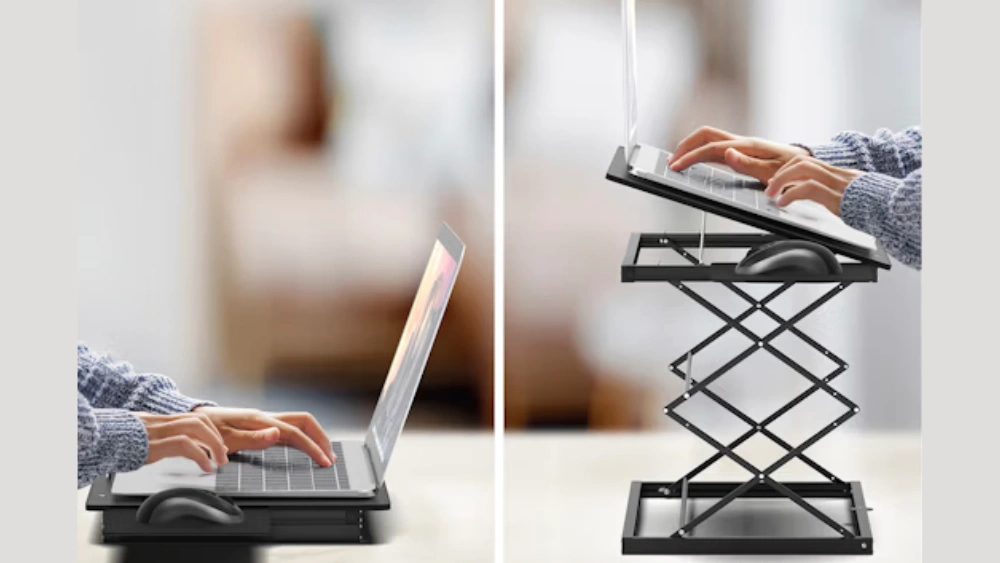
Are you struggling with neck pain or poor posture while working on your laptop? One simple change could make all the difference: adjusting the height of your laptop stand.
But how high should your laptop stand be to keep you comfortable and productive? Getting this right can reduce strain, improve focus, and even boost your energy throughout the day. Keep reading to discover the perfect laptop stand height tailored just for you—your body will thank you!
Ideal Laptop Stand Height
Finding the ideal laptop stand height is key for comfort and health. The right height helps prevent neck and back pain. It also improves posture and focus during work. Setting the laptop screen at eye level is a common goal. This reduces the need to bend your neck or hunch your shoulders.
Factors Influencing Height Choice
Body height plays a big role in choosing the laptop stand height. Taller people need higher stands to keep the screen at eye level. Desk height also matters. If the desk is low, a taller stand might be needed.
The type of chair used affects the height too. Adjustable chairs help find a better setup. Laptop weight and size can limit stand options. Portable stands are often shorter and lighter.
Work habits influence height choice. If you type a lot, the keyboard angle and height are important. For mostly reading or video calls, screen height matters more.
Ergonomic Guidelines
- Position the top of the screen at or just below eye level.
- Keep the screen about an arm’s length away.
- Maintain a straight neck and relaxed shoulders.
- Use an external keyboard and mouse if the stand raises the laptop too high.
- Adjust the stand so your elbows rest close to your body at a 90-degree angle.
Following these rules reduces strain and improves comfort. The goal is a natural posture that feels easy. Small changes in height can make a big difference.
Benefits Of Correct Laptop Stand Height
Setting your laptop stand to the right height can change how you feel throughout the day. It’s not just about comfort; the correct height supports your body in ways that keep you healthier and more focused. Let’s look at the real benefits you gain by adjusting your laptop stand properly.
Improved Posture
Your laptop screen should be at eye level to keep your neck straight. When you raise your laptop stand to the correct height, you naturally avoid slouching or leaning forward. This simple change encourages a healthier spine alignment and helps you sit upright without effort.
Think about how often you catch yourself bending your neck down to see the screen. Adjusting the height stops this habit and trains your body to maintain a better posture all day.
Reduced Neck And Back Strain
Constantly looking down at a low laptop screen puts strain on your neck and upper back muscles. Raising your laptop stand relieves this tension by reducing the angle your head needs to tilt. You’ll notice less stiffness and fewer aches after long working hours.
One user shared that after adjusting their laptop stand, neck pain that lasted for months almost disappeared in just a week. Could your discomfort be solved by simply lifting your laptop?
Enhanced Productivity
When you’re comfortable and free from pain, your mind stays sharp longer. The right laptop height reduces distractions caused by discomfort and helps you focus better on your tasks. You might find that tasks get done faster and with more accuracy.
Have you ever felt exhausted halfway through the day just because you were constantly adjusting your seating or stretching your neck? Proper laptop stand height can help you keep that energy and focus up, all day long.
Common Height Mistakes
Setting up a laptop stand at the right height is crucial for comfort and health. Many people make common height mistakes that lead to discomfort and long-term issues. Understanding these mistakes can help you adjust your setup for better ergonomics.
Too Low Setup Issues
A stand that’s too low can cause neck strain. You may find yourself hunching over to see the screen clearly. This posture can lead to back pain over time. It also affects your wrist position, increasing the risk of carpal tunnel syndrome.
Working with a low setup often leads to poor eye alignment. Your eyes should be level with the top of the screen. If the screen is too low, you end up looking down, which strains your neck muscles. Adjusting your laptop stand can help prevent these issues.
Too High Setup Problems
A stand that’s too high can cause shoulder and arm strain. You may have to lift your arms, leading to tension in your shoulders. This setup can also cause eye strain, as you might find yourself tilting your head back.
High setups often force unnatural arm positions. Your elbows should be at a 90-degree angle. A high stand makes it difficult to maintain this posture. It is important to lower the stand to a comfortable level for ease of use.

Credit: www.amazon.ae
Adjusting Laptop Stand Height
Adjusting the laptop stand height is key to a comfortable workspace. The right height reduces neck strain and improves posture. It helps keep your eyes level with the screen. Finding your ideal height can make long work sessions easier.
Measuring Your Ideal Height
Start by sitting at your desk with good posture. Your eyes should line up with the top third of the laptop screen. Measure the distance from your eyes to the desk surface. This gives a target height for the stand.
Consider your chair height too. Your elbows should rest at a 90-degree angle. Adjust the stand height so your wrists stay straight while typing.
Using Adjustable Stands
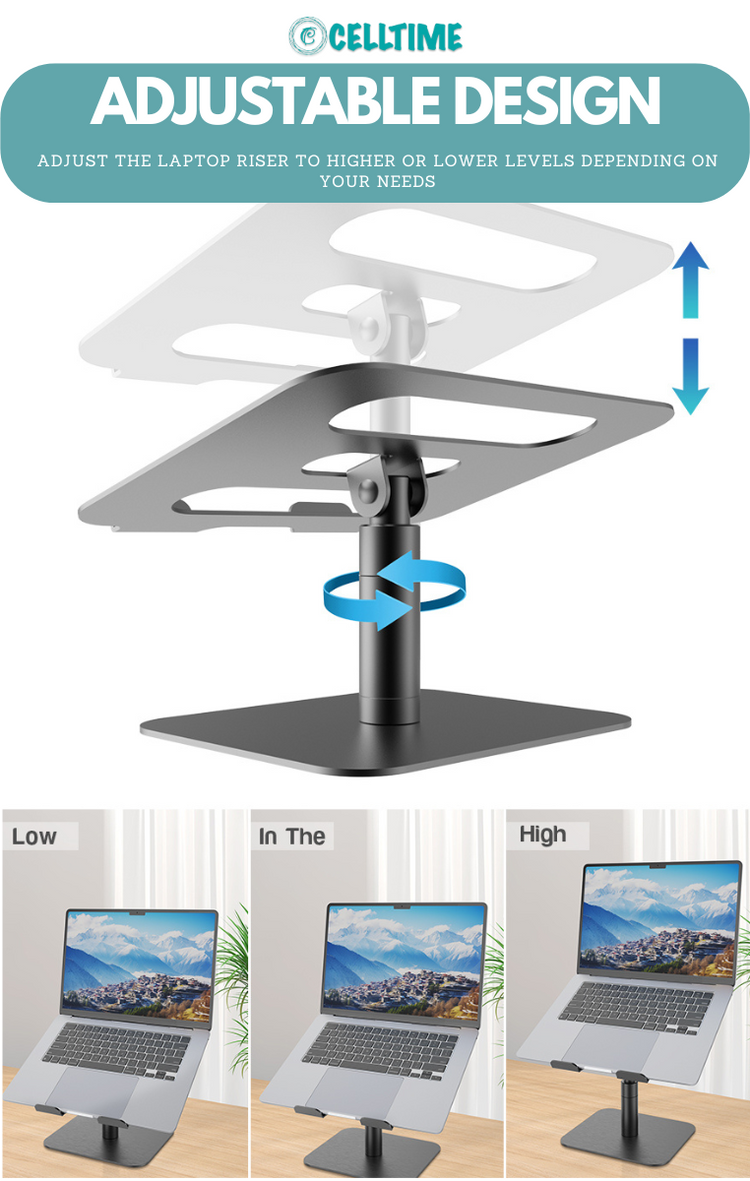
Adjustable laptop stands offer flexibility for different setups. They let you raise or lower the screen easily. Many have multiple height settings or tilt options.
Choose a stand with stable legs and a wide base. This prevents wobbling during use. Make small adjustments until your screen is at eye level.
Diy Height Solutions
DIY options work well when you need quick fixes. Use sturdy books, boxes, or trays to raise your laptop. Stack items evenly for a stable platform.
A non-slip mat can keep your laptop secure. Avoid unstable or uneven objects to prevent accidents. Test your setup before starting work.
Additional Comfort Tips
Setting the right laptop stand height improves comfort a lot. But small changes around your workspace also help. These extra tips reduce strain and keep your body relaxed. Comfort matters for long hours at your desk.
External Keyboards And Mice
Using an external keyboard and mouse prevents awkward hand positions. It lets you place your laptop higher for better screen view. Your hands stay lower, which eases wrist and shoulder tension. Choose devices that feel natural and easy to reach.
Proper Chair And Desk Setup
Your chair and desk must support good posture. Adjust your chair height so feet rest flat on the floor. Keep your back straight and shoulders relaxed. The desk height should allow your elbows to bend at about 90 degrees. This setup reduces back and neck pain.
Taking Regular Breaks
Breaks refresh your body and mind. Stand up and stretch every 30 to 60 minutes. Walk around to improve blood flow and reduce stiffness. Short breaks help maintain focus and prevent fatigue. Simple moves make a big difference.
Credit: celltime.co.za

Credit: www.amazon.com
Frequently Asked Questions
How High Should A Laptop Stand Be?
A laptop stand should be at eye level to reduce neck strain. Ideally, the top of the screen aligns with your eyes when sitting straight. This height promotes better posture and reduces discomfort during long work sessions.
Why Is Laptop Stand Height Important?
Proper laptop stand height prevents neck and back pain. It encourages ergonomic posture, reducing muscle strain. Adjusting height improves comfort and productivity while minimizing long-term health issues.
Can A Laptop Stand Reduce Eye Strain?
Yes, a correctly positioned laptop stand helps reduce eye strain. It keeps the screen at eye level, reducing glare and awkward viewing angles. This setup promotes comfortable and healthy screen viewing.
How To Measure The Ideal Laptop Stand Height?
Measure from your seated eye level to your desk surface. The laptop screen’s top should align with your eyes. Adjust the stand height accordingly for comfortable, ergonomic use.
Conclusion
Choosing the right height for your laptop stand helps your neck and eyes. Keep the screen at eye level to avoid strain. Your elbows should stay at a comfortable angle while typing. Adjust the stand to fit your chair and desk.
Small changes make long work hours easier and healthier. A good setup improves focus and comfort every day. Try different heights to find what feels best for you. Comfort matters more than strict rules. Your body will thank you for proper laptop height.