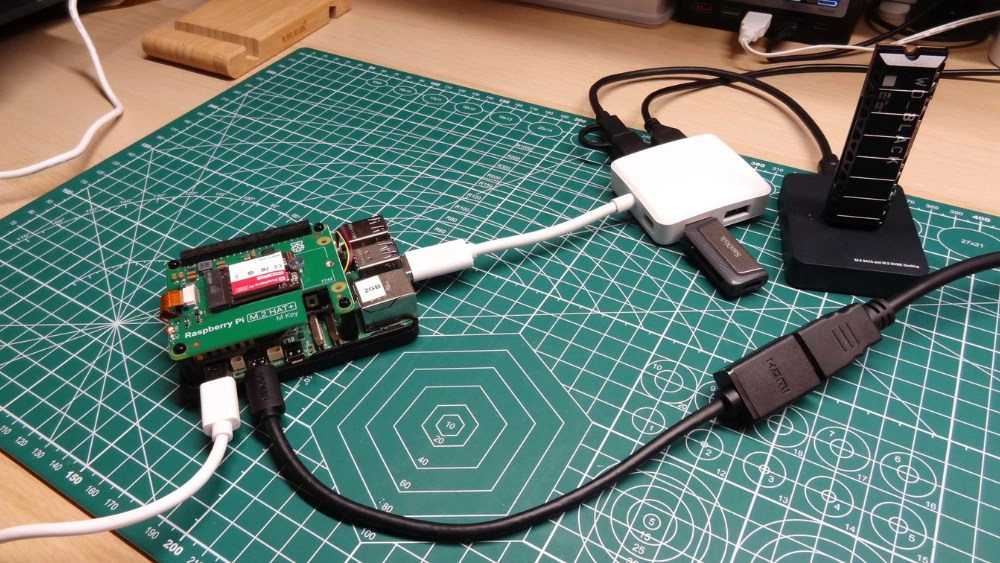
Are you wondering if you can use a USB hub with your Raspberry Pi? Whether you want to connect multiple devices or expand your Pi’s capabilities, this question is crucial.
Using a USB hub might seem simple, but there are important details you need to know to avoid frustration and get the best performance. Keep reading, and you’ll discover exactly how a USB hub works with your Raspberry Pi and what you should consider before plugging in.
This could save you time, money, and headaches.
Choosing The Right Usb Hub
Choosing the right USB hub for your Raspberry Pi can make a big difference in how well your projects run. It’s not just about adding more ports; it’s about finding a hub that matches your power needs, fits your device, and supports your setup without glitches. Let’s look at what you should consider before plugging in.
Powered Vs Unpowered Hubs
Powered USB hubs have their own power supply, which means they can provide enough juice to multiple devices without draining your Raspberry Pi’s limited power output.
Unpowered hubs rely solely on the Pi’s power, which might cause issues if you connect power-hungry gadgets like external hard drives or multiple peripherals.
If you’re running a simple setup with a keyboard and mouse, an unpowered hub might work fine. But for anything more complex, a powered hub is usually safer and more stable.
Number Of Ports Needed
Think about how many USB devices you want to connect now and in the near future. It’s tempting to buy a hub with many ports, but that can mean unnecessary bulk and more power consumption.
Start with a hub offering 4 to 7 ports if you only need to connect a few devices like a keyboard, mouse, and flash drive.
If your project grows to include cameras, sensors, or external storage, consider hubs with 7 or more ports to avoid swapping devices constantly.
Compatibility With Raspberry Pi Models
Not all USB hubs work seamlessly with every Raspberry Pi model. Some hubs might cause slow data transfer or even disconnects on older or less powerful versions.
Check if the hub supports USB 3.0 or USB 2.0 based on your Pi model’s USB ports. For example, Raspberry Pi 4 supports USB 3.0, offering faster speeds if paired with a compatible hub.
Also, look for hubs tested by the Raspberry Pi community or recommended in forums to avoid compatibility headaches.
Credit: www.amazon.com
Setting Up A Usb Hub With Raspberry Pi
A USB hub can expand the number of devices connected to a Raspberry Pi. It helps connect keyboards, mice, and storage without issues. Powering the hub may be needed for multiple devices to work smoothly.
Setting up a USB hub with Raspberry Pi is straightforward. It enhances your Pi’s connectivity. You can attach multiple devices, maximizing its potential. Whether keyboards, mice, or external drives, a USB hub is useful. Let’s dive into the setup process for seamless integration.Connecting The Hub
Plug the USB hub into the Raspberry Pi’s USB port. Ensure it’s securely attached. This connection allows your Pi to communicate with all devices linked to the hub. Use quality cables for reliable connections. Check the hub compatibility with your Raspberry Pi model.Power Supply Considerations
Choose a powered USB hub for optimal performance. Raspberry Pi’s ports have limited power output. A powered hub ensures all connected devices function properly. Verify the hub’s power adapter output. It should match your devices’ needs. Avoid overloading the Raspberry Pi’s power supply.Avoiding Common Setup Issues
Check device compatibility with the Raspberry Pi OS. Some devices may require drivers. Update your Raspberry Pi’s software for better support. Disconnect and reconnect devices if issues arise. Regularly check for updates on your Raspberry Pi. Ensure all connections are secure and stable.Performance And Limitations
Using a USB hub with your Raspberry Pi can expand your device’s connectivity, but it’s important to understand how this affects performance and what limitations you might face. The way data moves through your setup and how power is shared can impact your overall experience. Let’s look closely at these factors so you can make informed decisions for your projects.
Data Transfer Speeds
The Raspberry Pi’s USB ports share a limited bandwidth, which means adding a hub divides this bandwidth among all connected devices.
If you plug in multiple high-speed devices like external hard drives or cameras, you might notice slower data transfer rates. For example, transferring large files through a hub can take longer than connecting a single device directly.
Think about what you really need to connect and how much speed each device requires. Could some devices be used less frequently or connected only when necessary?
Power Distribution Challenges
Many USB hubs rely on the Raspberry Pi for power, but the Pi’s USB ports can only supply a limited current (usually around 1.2A shared across all ports).
This means power-hungry devices like external drives or certain sensors might not work reliably without an externally powered USB hub.
I once tried to run several hard drives from a bus-powered hub on my Raspberry Pi, only to face frequent disconnects. Switching to a powered hub solved this instantly.
- Powered hubs have their own power supply, easing the load on your Pi.
- They help avoid random resets or device failures caused by insufficient power.
Potential Bottlenecks
The USB controller on the Raspberry Pi can become a bottleneck when many devices are connected through a hub.
Even with a powered hub, the data still flows through the Pi’s limited USB controller, which may slow down if too many devices are active simultaneously.
Ask yourself: Are all devices active at once, or can you stagger their use? This might reduce bottlenecks and improve overall performance.
Choosing the right USB hub and managing your device usage can make a big difference. Have you tested your setup under load to see if performance meets your needs?

Credit: www.amazon.com
Popular Usb Hubs For Raspberry Pi
Choosing the right USB hub for your Raspberry Pi can enhance its connectivity and performance. Many USB hubs offer multiple ports to connect keyboards, mice, storage devices, and more. Some hubs provide extra power to support devices that need it, ensuring stable operation. Here are some popular USB hubs that work well with Raspberry Pi setups.
Top Recommended Models
- Anker 4-Port USB 3.0 Hub:Known for reliability and fast data transfer speeds. Compatible with Raspberry Pi USB 3.0 ports.
- Orico Powered USB Hub:Offers multiple ports with external power supply. Ideal for devices needing extra power.
- UGREEN USB Hub 4-Port:Compact design with good build quality. Supports plug-and-play on Raspberry Pi.
Budget-friendly Options
- HooToo USB Hub:Affordable with 3-4 ports. Works well for basic peripherals like keyboards and mice.
- Sabrent 4-Port USB 2.0 Hub:Simple and inexpensive. Suitable for low power devices and general use.
- AmazonBasics USB 3.0 Hub:A low-cost option with decent speed. Fits small Raspberry Pi projects.
High-end Choices
- Anker 7-Port USB 3.0 Hub with Power Adapter:Offers many ports and stable power. Great for advanced Raspberry Pi users.
- Plugable USB 3.0 Powered Hub:Robust design with fast data transfer and charging support.
- Belkin USB-C 7-Port Hub:Premium build quality and multiple connection types. Suitable for Raspberry Pi 4 with USB-C.
Troubleshooting Usb Hub Problems
Troubleshooting USB hub problems on a Raspberry Pi can be tricky. USB hubs expand connectivity but may cause issues like power shortages or device recognition errors. Identifying the exact problem helps fix it quickly. The following sections cover common problems and simple solutions to keep your setup running smoothly.
Detecting Hub Issues
Start by checking if the Raspberry Pi detects the USB hub. Use the command lsusbin the terminal to list connected USB devices. If the hub does not appear, try these checks:
- Ensure the hub is properly plugged into the Raspberry Pi.
- Test the hub on another device to confirm it works.
- Check for visible damage or loose connections on the hub and cables.
Sometimes, the hub may show up but connected devices do not. This indicates deeper issues with the hub or power supply.
Fixing Power Problems
Power issues are common with USB hubs on Raspberry Pi. The Pi’s USB ports supply limited power, which may not support many devices. Signs of power problems include devices disconnecting or not working.
- Use a powered USB hub with its own power supply.
- Check the hub’s power adapter and ensure it is plugged in securely.
- Reduce the number of high-power devices connected to the hub.
- Try connecting devices directly to the Raspberry Pi to isolate the problem.
Proper power ensures stable connections and prevents device failures.
Resolving Connectivity Errors
Connectivity errors can cause devices to malfunction or not be recognized. These errors may result from bad cables, incompatible hubs, or driver issues.
- Replace USB cables with known working ones.
- Update the Raspberry Pi’s software and firmware to the latest version.
- Avoid using USB hubs with known compatibility problems with Raspberry Pi.
- Reboot the Raspberry Pi to refresh the USB subsystem.
Following these steps often restores proper device communication and smooth operation.

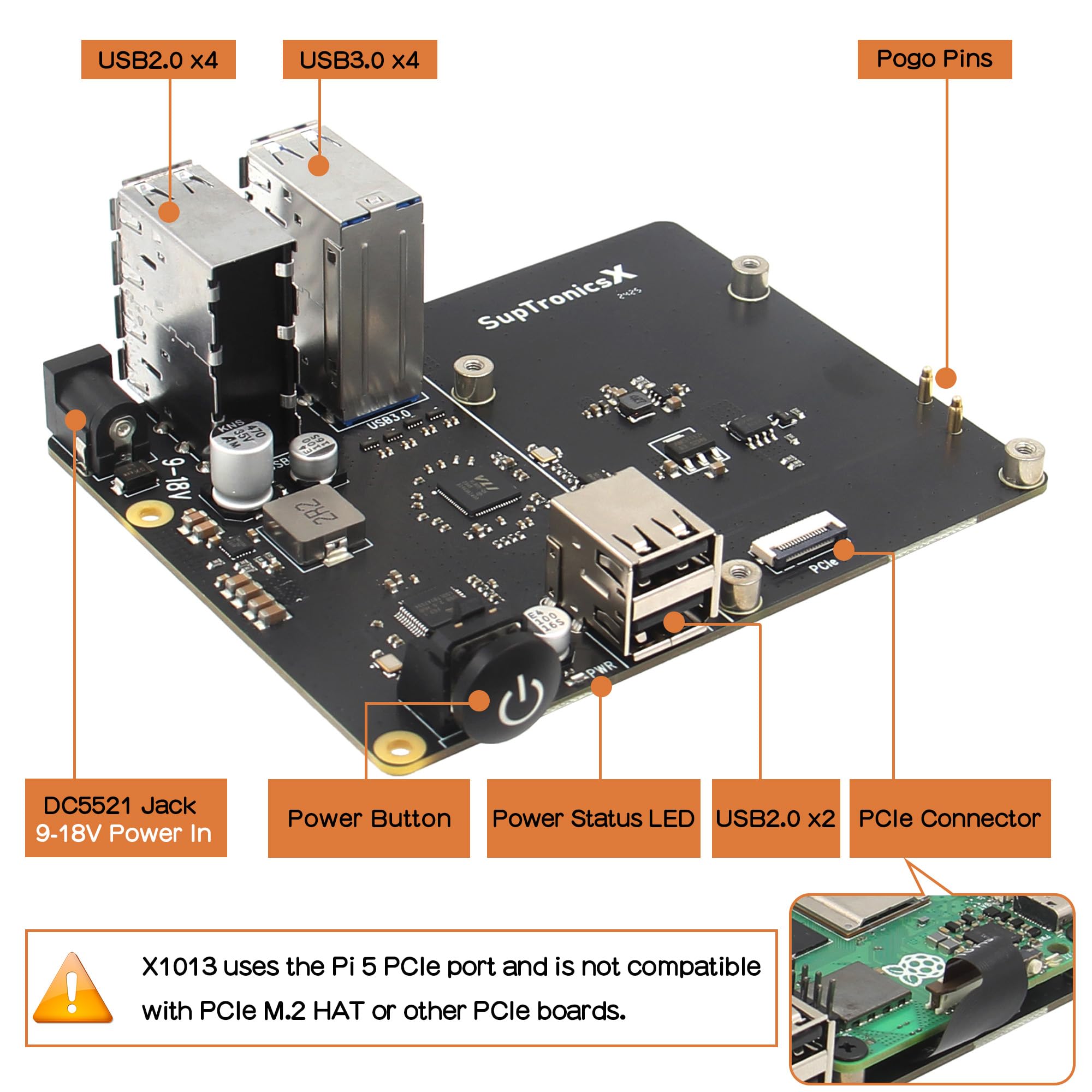
Credit: geekworm.com
Tips For Optimizing Usb Hub Use
Using a USB hub with your Raspberry Pi can expand your device’s capabilities, but it needs careful handling to avoid common pitfalls. Optimizing your USB hub use ensures smoother performance and fewer power issues. Here are some practical tips to help you get the most out of your setup.
Managing Power Consumption
Your Raspberry Pi has limited power output for USB devices. Connecting multiple devices that draw too much power can cause instability or even damage your Pi.
Use a powered USB hub with its own external power supply to avoid overloading the Pi’s USB ports. This setup reduces the risk of brownouts and sudden reboots caused by insufficient power.
Check the power requirements of each connected device. For instance, external hard drives and webcams often need more power, so don’t rely on a bus-powered hub for these.
Organizing Connected Devices
Think about the order and grouping of devices on your USB hub. Some peripherals communicate better when not sharing the same hub port chain.
Keep high-bandwidth devices, like cameras or external drives, directly on the powered hub or the Pi’s native USB ports. Low-bandwidth devices such as keyboards and mice can share hub ports.
Label cables or use color-coded USB hubs to quickly identify which device is connected where. This simple habit saves time troubleshooting connection issues later.
Maintaining Stability
Regularly update your Raspberry Pi’s firmware and operating system to ensure compatibility with USB hubs and devices. Outdated software can cause erratic behavior and disconnects.
Secure your USB hub physically to avoid accidental unplugging or loose connections. I once lost hours of work because my hub disconnected mid-session—don’t let that happen to you.
If you notice lag or device dropouts, try unplugging unnecessary devices or switching hub ports. Sometimes a simple rearrangement can restore stability without extra costs.
Frequently Asked Questions
Can I Connect Multiple Devices To A Raspberry Pi Usb Hub?
Yes, a USB hub allows you to connect multiple USB devices to your Raspberry Pi. It expands the number of available ports for peripherals like keyboards, mice, and storage devices.
Does A Powered Usb Hub Improve Raspberry Pi Performance?
A powered USB hub supplies external power, preventing overload on the Raspberry Pi’s USB ports. This ensures stable device operation, especially for power-hungry peripherals.
Will A Usb Hub Affect Raspberry Pi Data Transfer Speed?
Using a USB hub can slightly reduce data transfer speeds if it shares bandwidth. However, powered and high-quality hubs minimize speed loss for most typical uses.
Are All Usb Hubs Compatible With Raspberry Pi?
Most USB hubs are compatible, but powered and USB 3. 0 hubs offer better performance. Check the hub’s power requirements and compatibility before purchasing for Raspberry Pi.
Conclusion
Using a USB hub with a Raspberry Pi is simple and helpful. It lets you connect more devices at once. Choose a powered hub to avoid power problems. This keeps your Raspberry Pi running smoothly. Remember to check the hub’s quality for good speed.
USB hubs expand your project options easily. They make your Raspberry Pi setup more flexible. Try one to improve your device connections today.