Are you wondering if you really need to use the Spectrum router for your Wi-Fi at home? You might have questions like, “Can I use my own router?” or “Will switching affect my internet speed?” These concerns are common, and the answers can save you money and improve your connection.
Keep reading to discover what works best for your Wi-Fi setup and how to get the most reliable internet without unnecessary hassle. This simple guide will clear up the confusion and help you make the right choice for your home network.

Credit: www.youtube.com
Spectrum Router Basics
Understanding the basics of the Spectrum router can help you decide whether you need to use it for your Wi-Fi setup. Knowing what it is and how it works clears up confusion and helps you make a choice that fits your home or office network needs. Let’s break down the essentials in simple terms.
What Is A Spectrum Router
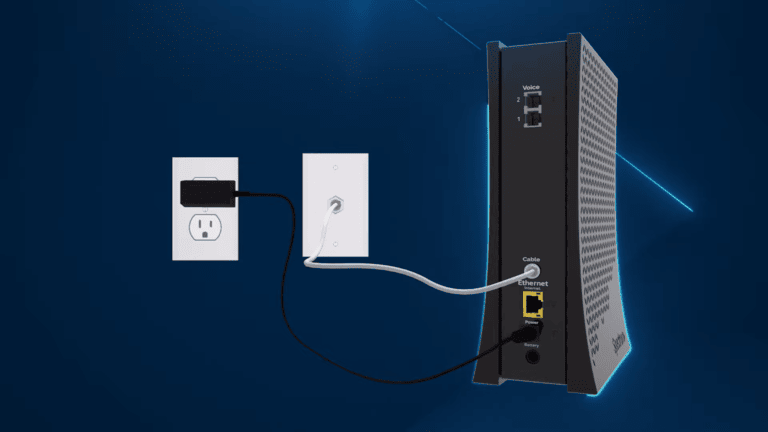
A Spectrum router is a device provided by Spectrum, an internet service provider, to connect your home or office devices to the internet. It combines a modem and router into one unit, allowing you to access the internet wirelessly or through wired connections.
You might wonder if you have to use their router. The short answer is no—you can use your own router if it’s compatible. But using Spectrum’s router often simplifies setup and troubleshooting since they offer direct support for their equipment.
How Spectrum Routers Work
Spectrum routers connect to the internet through the cable line that comes into your home. They translate the incoming internet signals into Wi-Fi that your devices can connect to wirelessly.
These routers also manage traffic between devices, making sure each gets the right amount of bandwidth. They come with built-in security features like firewalls to protect your network from unauthorized access.
Ever noticed how some routers slow down when many devices connect? Spectrum routers are designed to handle multiple devices without losing much speed, but performance can vary based on your plan and router model.
Using Your Own Router
Using your own router with Spectrum’s internet service can give you more control over your home network. It allows you to choose a device that fits your specific needs, whether it’s better speed, stronger signal, or advanced features. But before you unplug the Spectrum router, you need to understand how compatibility and benefits play out in real life.
Compatibility With Spectrum Service
Not every router works smoothly with Spectrum’s network. You must ensure your router supports the DOCSIS standard, which is crucial for cable internet connections like Spectrum’s.
Also, some routers may require specific settings to work properly. You might need to adjust the router’s configuration to match Spectrum’s requirements, such as setting up the correct IP addressing or enabling DHCP.
If you’re unsure, check your router’s manual or contact Spectrum’s support to confirm compatibility. Using an incompatible router can lead to slow speeds or frequent disconnections, which nobody wants.
Benefits Of A Personal Router
Using your own router often means better performance. Many personal routers have stronger antennas and faster processors than the ones provided by Spectrum, which can boost your Wi-Fi range and speed.
You also gain access to advanced features like guest networks, parental controls, and Quality of Service (QoS) settings. These help you manage your internet better, especially if your household has many devices.
I switched to my own router last year, and the difference was clear. My gaming sessions became smoother, and video calls no longer dropped unexpectedly. Have you noticed your current router limiting your internet experience?
Wi-fi Performance Factors
Wi-Fi performance depends on several key factors. These factors influence how well your internet works at home or office. Understanding them helps you decide whether to use the Spectrum router or another device. Below are important elements that affect Wi-Fi quality.
Signal Strength And Range
Signal strength determines how far your Wi-Fi reaches. Walls, floors, and furniture can block signals. The farther you move from the router, the weaker the signal becomes.
Using a router with strong signal power improves coverage. Placement matters too. Place the router in a central, open location for better reach. Avoid hiding it in cabinets or behind large objects.
Interference from other devices like microwaves or cordless phones can reduce signal quality. Choosing the right channel and frequency band helps reduce interference.
Speed And Reliability
Speed affects how fast your internet loads websites or streams videos. A router’s technology influences speed. Newer models support faster Wi-Fi standards, like Wi-Fi 6.
Reliability means your connection stays stable without frequent drops. Older routers may lose connection more often. Using a reliable router ensures fewer interruptions during work or entertainment.
Network congestion also impacts speed. Multiple devices using Wi-Fi at once can slow down your internet. A good router manages traffic better to keep speeds consistent.
Setup And Configuration
Setting up and configuring your Wi-Fi network can feel overwhelming, especially when deciding whether to use the Spectrum router or a third-party device. The setup process directly affects your internet speed, reliability, and overall experience. Knowing the differences and steps involved helps you make smarter choices for your home or office network.
Connecting A Spectrum Router
Connecting a Spectrum router is usually straightforward. After you receive the router, plug it into your modem and power it on. The router’s default network name (SSID) and password are often printed on a label, making it easy to find and connect your devices.
Access the router’s settings by typing its IP address into a browser, typically something like 192.168.1.1. You’ll be prompted to enter a username and password, which are usually “admin” and “password” unless changed. Here, you can customize your Wi-Fi name and password for better security.
Have you considered how often you update your router’s firmware? Keeping it current prevents security risks and improves performance.
Using A Third-party Router
You don’t have to stick with the Spectrum router if you prefer a different model. Many users choose third-party routers for enhanced features, better range, or improved speed. Setting one up requires connecting the third-party router to the Spectrum modem, then disabling the Spectrum router’s Wi-Fi to avoid conflicts.
Once connected, log into your third-party router’s admin panel to adjust settings like network name, password, and security options. Make sure to configure the modem in bridge mode if possible, so it functions purely as a modem and doesn’t interfere with your router’s capabilities.
Think about the benefits of advanced features such as parental controls, guest networks, or quality of service (QoS) prioritization. Do you need these extras to optimize your internet experience?
Cost Considerations
When deciding whether to use the Spectrum router for your Wi-Fi needs, cost considerations are a pivotal factor. Understanding the financial implications can help you make an informed decision that suits your budget and lifestyle. Let’s delve into the rental fees and weigh the pros and cons of buying versus renting.
Rental Fees For Spectrum Routers
Renting a router from Spectrum is a common choice for many subscribers. It offers convenience and immediate access to Wi-Fi without the upfront cost of purchasing a device. However, rental fees can add up over time. Typically, Spectrum charges around $5 to $10 monthly for router rental. While this might seem negligible at first, consider how quickly these fees accumulate annually. It’s essential to assess whether the convenience justifies the long-term expense.
Buying Vs Renting Routers
Buying your own router can be a cost-effective alternative, especially if you plan to stay with Spectrum for a significant period. A quality router can range from $50 to $200, depending on features and performance. Over time, purchasing a router might save you money compared to continuous rental fees. Moreover, owning a router offers freedom to choose models with advanced features, potentially enhancing your Wi-Fi experience.
On the flip side, buying a router requires an initial investment, which might be a hurdle for some. There’s also the responsibility of maintenance and updates. However, consider the long-term savings and the potential for better performance. What if you could enhance your home network with a router tailored to your needs, all while saving money in the long run?
Ultimately, the decision hinges on your budget and priorities. Renting offers ease but at a cost. Buying demands initial outlay but could yield savings. Evaluate your situation and make the choice that aligns with your financial goals and Wi-Fi requirements.

Credit: www.spectrum.com
Security And Updates
Security and updates are key factors in keeping your home Wi-Fi safe. Using a Spectrum router can help ensure your network stays protected. Regular updates fix bugs and add new security layers. Without these, your Wi-Fi may be vulnerable to hackers and malware.
Firmware Updates
Firmware is the software inside your router. It controls how your router works. Spectrum releases updates to improve performance and security. These updates fix security holes and add new features. Using the Spectrum router means you get these updates automatically. Other routers may not receive updates as quickly or at all. Keeping firmware updated helps protect your network from threats.
Network Security Features
Spectrum routers include built-in security tools. These features help protect your network from unauthorized access. Common security features include:
- Firewall protection to block harmful traffic
- WPA3 encryption for safer Wi-Fi connections
- Guest network options to keep visitors separate
- Parental controls to limit access for children
Using the Spectrum router ensures these security tools work well with their service. This reduces risks and keeps your data safe.
Troubleshooting Common Issues
Troubleshooting common issues with your Spectrum router can save you time and frustration. Many users face Wi-Fi problems that seem complicated but often have simple fixes. Understanding these issues helps you decide whether to fix them yourself or reach out for help.
Connection Problems
Are you experiencing slow speeds, frequent drops, or no connection at all? First, check if your router’s cables are securely plugged in. Loose connections often cause intermittent Wi-Fi issues.
Restarting your router can clear temporary glitches. Unplug it, wait 30 seconds, then plug it back in. This simple step often restores your connection quickly.
Interference from other devices can also disrupt your Wi-Fi. Try moving your router to a more central, open location away from microwaves, cordless phones, or thick walls.
If your device struggles to connect, forget the network and reconnect by entering your Wi-Fi password again. This refreshes the connection settings on your device.
When To Contact Support
What if none of these steps fix your Wi-Fi? Persistent issues like constant disconnections or no internet despite a strong signal mean it’s time to contact Spectrum support.
Before calling, note down error messages, when the problem started, and any troubleshooting steps you’ve tried. This info helps the technician diagnose the issue faster.
Remember, Spectrum support can remotely check your router and even schedule a technician visit if needed. Don’t hesitate to reach out—getting expert help can prevent prolonged downtime.

Credit: www.reddit.com
Frequently Asked Questions
Do I Have To Use Spectrum Router For Wi-fi?
No, you don’t have to use Spectrum’s router. You can use your own compatible router for Wi-Fi. Ensure it supports Spectrum’s network specs for optimal performance.
Can I Improve Wi-fi Speed Without Spectrum Router?
Yes, upgrading to a high-quality third-party router can improve Wi-Fi speed. Make sure it supports your internet plan’s speed and features.
Is Spectrum Router Mandatory For Technical Support?
Spectrum technical support generally assists only with their own routers. Using your own router may limit support options for device-specific issues.
Will Using A Personal Router Affect Internet Stability?
A personal router can maintain stable internet if properly configured. However, incorrect settings may cause connectivity problems or slower speeds.
Conclusion
Choosing the right router matters for your Wi-Fi experience. Spectrum’s router works well with their service. You can use your own router if it fits their rules. A personal router might offer extra features or better speed. Still, using Spectrum’s device makes setup easier.
Think about what suits your needs best. A strong, stable connection helps everyone in the home. Make a choice that keeps your Wi-Fi fast and reliable. Simple and smart.