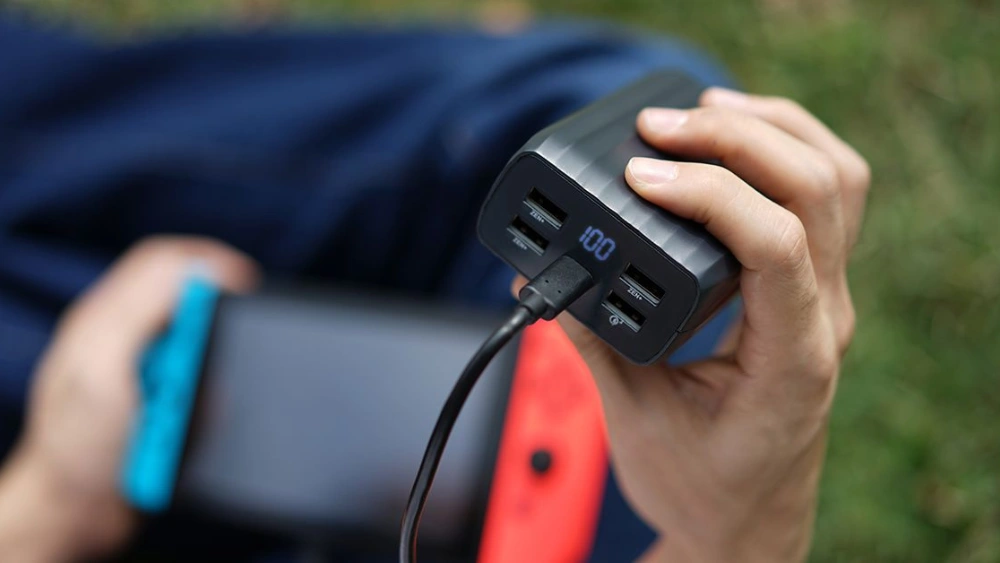
You rely on your portable charger power bank to keep your devices powered throughout the day. But do you know the best way to charge it so it lasts longer and works efficiently?
If you want to avoid common mistakes that drain your power bank or shorten its life, this guide is for you. Keep reading to discover simple, effective tips that will help you get the most out of your portable charger every single time.
Your devices deserve the best, and so does your power bank.
Choosing The Right Charger
Choosing the right charger for your portable power bank is crucial to ensure fast, safe, and efficient charging. Using the wrong charger can lead to slow charging times or even damage the battery. Let’s dive into what you should look for when picking a charger for your power bank.
Check Compatibility
Not all chargers work well with every power bank. Check the output voltage and current ratings on your power bank and match them with the charger’s specifications. Using a charger with lower output may cause slow charging, while a higher output charger could harm the battery if it’s not designed for it.
Have you ever plugged in a charger only to find it takes forever to fill up your power bank? That’s usually because of mismatched compatibility. Always read the labels carefully before connecting.
Use Original Cables
Original cables provided by the manufacturer are made to handle the exact power requirements of your device. Using these cables ensures stable and consistent charging. Third-party cables might look similar but could have poor build quality or incorrect wiring.
I once tried using a cheap cable with my power bank, and it overheated within minutes. Stick to original or certified cables to avoid risks like this.
Avoid Cheap Chargers
Cheap chargers may save money upfront but can cause long-term damage to your power bank. They often lack safety features like surge protection or temperature control. This can result in overheating, reduced battery life, or even hazards.
Instead, invest in a reliable charger from a trusted brand. Your power bank will thank you with longer life and safer charging sessions.
Preparing Your Power Bank
Before you plug in your portable charger power bank, taking a moment to prepare it can save you time and protect your device. Proper preparation ensures efficient charging and extends the life of your power bank. Let’s look at the simple checks and cleaning steps that help get your power bank ready for a smooth charging experience.
Inspect For Damage
Take a close look at your power bank’s body and cables. Are there any cracks, dents, or swelling? Even a small physical damage can affect performance or create safety risks.
Check the charging cables and connectors for fraying or bent pins. Damaged cables often cause slow or interrupted charging. If you spot any issues, replace the cables before plugging in your power bank.
Have you ever ignored a small crack only to find your device stopped charging later? Catching damage early avoids frustration and potential hazards.
Clean Charging Ports
Dust and lint can block the charging ports and disrupt the connection. Use a soft brush or a can of compressed air to gently clean the input and output ports on your power bank.
A clean port ensures the cable fits snugly and transfers power efficiently. Avoid using sharp objects that could damage the port’s delicate pins.
If your charging port looks dirty or feels loose, cleaning it might be the simple fix you need to improve charging speed and reliability.
Charging Steps
Connect the power bank to a charger using the correct cable. Wait until the indicator light shows full charge before unplugging. Store the power bank in a cool, dry place after charging.
Charging your portable charger power bank efficiently ensures it remains reliable and ready whenever you need it. Understanding the right steps for charging can extend its lifespan and keep your devices powered up when you’re on the go. Whether you’re new to using power banks or looking to optimize your charging process, following these steps can make all the difference.Connect Properly
Always start with a secure connection. Use the cable that comes with your power bank or a compatible one to ensure efficient charging. Insert the USB end into a reliable power source, such as a wall adapter or computer USB port, and connect the other end to the power bank. Double-check that the connections are snug. Loose cables can disrupt the charging process, which might leave you with a partially charged power bank.Monitor Charging Status
Keep an eye on the charging indicators. Most power banks have LED lights that show charging progress. These lights often blink or change color as the battery fills up. Checking these indicators periodically helps you know when the device is fully charged. Some advanced models even have digital displays showing the exact percentage of charge, making monitoring straightforward.Avoid Overcharging
Disconnect your power bank once it’s fully charged. Overcharging can reduce battery life and efficiency. It’s tempting to leave it plugged in overnight, but this can cause long-term damage to the battery. Set a timer or alarm to remind yourself to unplug it, especially if it doesn’t have an automatic shut-off feature. Consider how often you use your power bank and aim to charge only when necessary to maintain optimal battery health. Have you ever left your power bank charging for too long and noticed a decline in performance? Taking these steps can prevent future issues and keep your devices powered up without unnecessary hassle. Remember, proper charging habits not only save time but also extend the life of your portable charger.Safe Charging Practices
Safe charging practices protect your portable charger and extend its life. Charging in the right conditions avoids damage and keeps the battery healthy. Following simple tips helps prevent overheating and battery wear.
Charge In Cool Areas
Place your power bank in a cool, dry spot while charging. Avoid direct sunlight and hot surfaces. High temperatures can harm the battery and reduce its capacity. A cool area helps the charger stay safe and work well.
Unplug When Fully Charged
Disconnect the power bank once it reaches 100% charge. Leaving it plugged in wastes energy and strains the battery. Overcharging can cause the battery to swell or lose power faster. Unplugging keeps your charger in good condition.
Avoid Charging Overnight
Do not charge your power bank while you sleep. Charging overnight risks overheating and overcharging. It is safer to charge during the day when you can check it. This practice helps keep your device and home safe.
Troubleshooting Charging Issues
Charging your portable charger power bank should be straightforward, but sometimes issues pop up that can be frustrating. Troubleshooting these problems quickly helps you get back to full power without unnecessary delays. Let’s look at some practical ways to fix common charging issues you might encounter.
Check Cable And Port
Start by inspecting the charging cable and the port on your power bank. Look for visible damage like frayed wires or bent connectors. Even a tiny amount of dust or debris inside the port can block the connection.
Try using a different cable that you know works well. If your power bank charges with a new cable, the original one is likely the problem. Also, check the charging adapter and wall outlet by plugging in another device to make sure they deliver power properly.
Reset Power Bank
Sometimes, your power bank’s internal system might freeze or glitch, stopping it from charging correctly. Try resetting it by pressing the power button for 10-15 seconds or following the manufacturer’s reset instructions.
A reset can clear minor faults and restore normal charging. If you’ve ever had your phone freeze and restarting fixed it, this is a similar process for your power bank. After resetting, connect it to a power source again and watch for charging indicators.
Replace Battery If Needed
If your power bank still won’t hold a charge after checking cables and resetting, the battery itself might be worn out. Rechargeable batteries degrade over time, especially with heavy use or extreme temperatures.
Some power banks allow you to replace the battery, while others don’t. Check your model’s manual or contact customer support to see if a replacement battery is available. Continuing to use a failing battery can be unsafe and reduce charging efficiency.
Maintaining Battery Health
Maintaining the health of your portable charger’s battery is key to ensuring it serves you well for years. Batteries naturally lose capacity over time, but how you treat your power bank can slow this process significantly. Small habits make a big difference in keeping your device ready whenever you need it.
Charge Regularly
Leaving your power bank unused for long periods can cause its battery to degrade faster. Try to charge it at least once a month, even if you don’t use it often. This keeps the battery cells active and prevents deep discharge, which damages battery life.
Have you noticed your power bank not holding charge as long as before? Regular charging can often restore some of that lost capacity. It’s a simple step that many overlook but can greatly extend your battery’s effective lifespan.
Store Properly
Where and how you store your power bank matters. Keep it in a cool, dry place away from direct sunlight or damp areas. Avoid tossing it loosely in bags where it can get scratched or damaged physically.
Think about your last trip—did you toss your power bank in a backpack with keys and coins? Physical damage can affect internal components and reduce battery efficiency. Using a small pouch or dedicated compartment protects your charger and maintains performance.
Avoid Extreme Temperatures
Extreme heat or cold harms lithium-ion batteries inside your power bank. High temperatures can cause the battery to swell, while freezing cold slows the chemical reactions needed for charging. Both conditions reduce battery capacity and lifespan.
Have you ever left your charger in a hot car or outside on a winter day? These exposures can cause permanent damage. Try to keep your power bank at room temperature whenever possible and remove it from hot or cold environments quickly.
Frequently Asked Questions
How Long Does It Take To Charge A Portable Power Bank?
Charging time varies by capacity and charger output. Typically, it takes 4 to 8 hours for a full charge. Using a fast charger can reduce this time significantly. Always use the recommended charger for best results and battery health.
Can I Charge A Power Bank With A Phone Charger?
Yes, you can charge a power bank with a phone charger. Ensure the charger’s output matches the power bank’s input specifications. Using a low-power charger might increase charging time but won’t harm the power bank.
How Do I Know When My Power Bank Is Fully Charged?
Most power banks have LED indicators showing charge status. When all LEDs are lit or a specific light turns solid, the power bank is fully charged. Refer to your model’s manual for exact indicator meanings.
Is It Safe To Use A Power Bank While Charging It?
Using a power bank while charging is generally safe but may slow the charging process. Avoid heavy usage during charging to prevent overheating. Always use quality cables and chargers to maintain safety.
Conclusion
Charging your portable charger power bank is simple and quick. Use the right cable and plug it into a power source. Keep an eye on the charging lights to know when it’s full. Avoid overcharging to protect the battery. Store your power bank in a cool, dry place for longer life.
Regular charging keeps it ready to use anytime. Follow these easy steps to keep your devices powered on the go. Simple habits make a big difference. Your power bank will serve you well.