
Is your power bank acting up and not charging your devices like it used to? You’re not alone.
Sometimes, a simple reset is all it takes to bring your power bank back to life. But how do you reset it correctly without causing any damage? You’ll discover easy, step-by-step methods to reset your power bank quickly. By the end, you’ll have your charger working smoothly again, saving you money and frustration.
Keep reading to learn the secrets to fixing your power bank right now.
Credit: teamgeeky.com
Signs Your Power Bank Needs Resetting
Power banks are essential for keeping devices charged on the go. Sometimes, they stop working properly. Resetting can fix many common problems. Recognizing the signs helps you know when to reset your power bank.
Power Bank Not Charging
Your power bank may refuse to charge at all. You plug it in, but the battery percentage does not increase. This issue often means the internal system has frozen. Resetting can reboot the power bank’s circuits.
Inconsistent Power Output
Sometimes the power bank charges devices unevenly. The device may charge slowly or stop charging suddenly. This irregular power flow suggests a fault in the power management. Resetting can restore stable power delivery.
Led Indicators Malfunction
The LED lights may stop working or blink oddly. Lights might stay on even when the power bank is off. They could also fail to show the correct battery level. Resetting often fixes these LED display errors.

Credit: www.anker.com
Basic Reset Methods
Resetting a power bank can fix many common issues like charging problems or unresponsive behavior. Basic reset methods are simple and require no special tools. These methods help restart the device and restore normal function quickly. Following these steps can save time and avoid unnecessary repairs.
Soft Reset Using Power Button
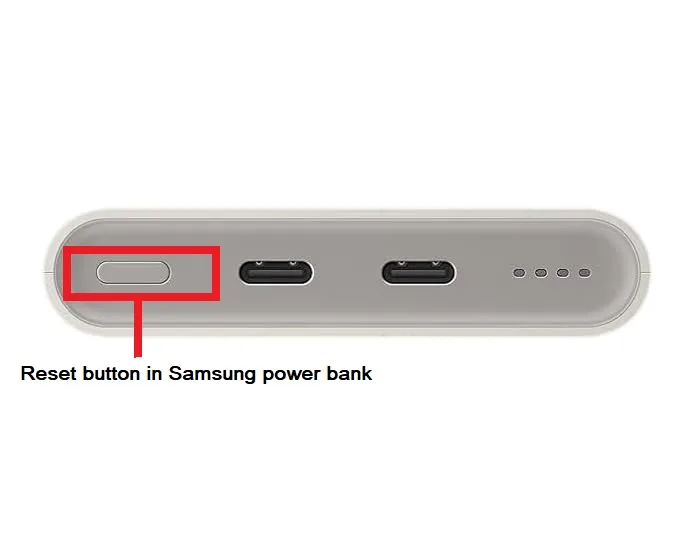
Press and hold the power button for about 10 seconds. This forces the power bank to turn off and restart. Release the button and then press it once more to turn it back on. This soft reset clears minor glitches without affecting the battery.
Disconnecting And Reconnecting
Unplug all cables from the power bank. Let it rest without any connection for a few minutes. Then, reconnect the cables and switch on the device. This simple action resets the internal circuits and can fix charging errors.
Using A Paperclip For Manual Reset
Locate the small reset hole on the power bank body. Use a straightened paperclip to gently press the button inside the hole. Hold it for about 5 seconds and release. This manual reset triggers the power bank’s built-in reset function and clears deeper faults.
Advanced Reset Techniques
Resetting a power bank can fix charging issues and restore normal function. Press and hold the power button for several seconds to trigger a reset. Some models may require unplugging and reconnecting or using a small pin to press a hidden reset button.
Resetting a power bank is not just about pressing a button; sometimes, you need to dive into advanced techniques to bring your device back to life. When your power bank starts acting up, basic resets might not be enough. Understanding and applying advanced reset techniques can be crucial, especially if you’re a tech enthusiast who loves to tinker. Let’s delve into some methods that could save the day.Deep Discharge Method
The deep discharge method involves draining your power bank completely. Use it until the last bit of charge is gone. This can help reset the internal circuits. Once drained, leave it unplugged for a few hours before recharging. This process can refresh the battery’s calibration. It’s a simple yet effective trick for stubborn power banks. Have you tried this method before?Firmware Reset Options
Some advanced power banks come with firmware reset options. Check the manufacturer’s website for software updates or reset tools. Updating or reinstalling firmware can resolve complex issues and restore functionality. Be sure to follow the instructions carefully. This method is perfect for tech-savvy users who aren’t afraid to get their hands dirty. Do you have experience with firmware resets?Resetting With External Charger
Using an external charger can reset your power bank’s charging cycle. Connect it to a reliable external charger instead of a USB port. This helps in resetting the power bank’s internal circuits. It’s surprising how a simple change in charging method can make a big difference. Ensure your external charger is compatible and provides the correct voltage. Have you explored this option yet? By applying these advanced techniques, you can potentially extend the life of your power bank and avoid unnecessary replacements. Which technique are you eager to try?
Credit: www.youtube.com
Preventing Future Issues
Preventing future issues with your power bank keeps it working longer and more reliably. Simple habits protect its battery and internal parts. These habits also help avoid sudden shutdowns or charging problems. Follow easy tips to maintain your power bank’s health every day.
Proper Charging Practices
Use the charger that came with your power bank. Different chargers have different voltage and current levels. Avoid cheap or uncertified chargers to protect the battery. Charge your power bank in a cool, dry place away from direct sunlight. Do not leave it charging overnight or for too long. Unplug the power bank once fully charged to avoid overcharging.
Avoiding Overuse And Overheating
Do not use the power bank while it charges. This causes extra heat and strains the battery. Avoid charging multiple devices at once to reduce load. Keep the power bank away from heat sources like heaters or car dashboards. If the power bank feels hot, stop using it and let it cool down. Overheating can damage the battery and shorten its life.
Regular Maintenance Tips
- Clean the power bank’s ports with a soft cloth regularly.
- Check for loose cables and connections before use.
- Store the power bank in a dry and cool place when not in use.
- Recharge the power bank every few months if unused to keep the battery healthy.
- Inspect the device for swelling or leaks; stop use if found.
When To Seek Professional Help
Knowing when to seek professional help for your power bank is vital. Some issues go beyond simple resets or basic troubleshooting. Attempting repairs without proper knowledge might cause more damage or void warranties. Recognizing signs that need expert attention saves time and ensures safety.
Identifying Hardware Failures
Hardware failures show clear signs. The power bank may not charge or hold power anymore. Buttons or ports might feel loose or broken. Strange smells or excessive heat can indicate internal damage. Physical cracks or swelling signal serious problems. These signs mean the device needs professional inspection.
Warranty And Repair Options
Check if your power bank is still under warranty. Most brands offer repair or replacement for defects. Avoid opening the device yourself to keep the warranty valid. Contact the manufacturer or seller for repair services. Professional repair ensures parts and work meet safety standards. Keep receipts and warranty papers ready for claims.
Safe Disposal Of Faulty Power Banks
Faulty power banks should never be thrown in regular trash. They contain chemicals that can harm the environment. Take them to electronic recycling centers or designated drop-off points. Some stores and manufacturers offer take-back programs. Proper disposal protects nature and prevents fire hazards.
Frequently Asked Questions
How Do I Reset My Power Bank Safely?
To reset your power bank, press and hold the power button for 10-15 seconds. This clears minor glitches and restarts the device safely.
Why Does My Power Bank Need A Reset?
Power banks may need resetting if they stop charging or show incorrect battery levels. Resetting fixes software bugs and restores proper function.
Can A Reset Fix A Power Bank Not Charging?
Yes, resetting can solve charging issues caused by firmware errors or power overloads. It refreshes the internal circuits for normal operation.
How Often Should I Reset My Power Bank?
Reset your power bank only when it malfunctions or stops responding. Frequent resets are unnecessary and won’t improve battery health.
Conclusion
Resetting a power bank can fix many common issues fast. Follow the simple steps carefully to avoid damage. Keep your power bank clean and dry for best results. Check the battery status regularly to know when to reset. This quick fix helps save money and extends device life.
Stay patient and try the process more than once if needed. A working power bank keeps your devices charged on the go. Simple care and occasional resets keep it ready anytime.