
Are you tired of waiting forever for your PS5 games to download? You’re not alone.
Slow download speeds can turn your gaming excitement into frustration. But why is your PS5 download speed so slow? Understanding the reasons behind this can help you fix the problem and get back to playing faster. Keep reading, and you’ll discover simple, effective tips to boost your download speed and enjoy your games without the wait.
Common Causes Of Slow Ps5 Downloads
Slow PS5 download speeds can be frustrating, especially when you’re eager to jump into a new game. Understanding the common causes behind these sluggish downloads can help you pinpoint the issue and fix it faster. Let’s look at some frequent culprits that might be holding back your PS5’s performance.
Network Congestion
Have you noticed your download speeds drop during certain times of the day? This often happens due to network congestion. When many users in your area are online simultaneously, your internet connection can become crowded, leading to slower speeds on your PS5.
Think about evenings or weekends when everyone streams, downloads, or plays games. Your internet provider’s network may struggle to handle the heavy traffic, causing delays in your downloads.
Wi-fi Signal Issues
Your PS5’s connection strength plays a big role in download speeds. If your console is far from the router or separated by walls, the Wi-Fi signal might weaken, reducing speed. Even small obstacles or interference from other devices can disrupt the signal.
Using a wired Ethernet connection or moving your console closer to the router can often improve download speeds dramatically. Have you checked your signal strength recently?
Isp Throttling
Some internet service providers (ISPs) limit your speed during heavy usage times or when they detect large downloads, a practice called throttling. This can slow down your PS5 downloads without you realizing it.
Contact your ISP or check your service terms to see if throttling affects your connection. Sometimes upgrading your plan or switching providers can remove these restrictions and speed up downloads.
Ps5 System Updates
System updates on your PS5 can run in the background and consume bandwidth. If your console is downloading or installing updates while you’re trying to download games, speeds may drop noticeably.
Try pausing or scheduling updates for a different time. Have you noticed faster downloads after fully updating your system?
Background Downloads And Updates
Your PS5 can download multiple games, patches, or apps at the same time. These background downloads share the available bandwidth, causing each download to slow down.
Check your download queue and pause unnecessary downloads to free up bandwidth. Managing your downloads actively can help you get your main game faster.

Credit: calllouder.com
Optimizing Your Internet Connection
Optimizing your internet connection is key to improving your PS5 download speed. A stable and fast connection reduces lag and long wait times. Simple changes in your setup can make a big difference in download performance.
Use A Wired Ethernet Connection
Connecting your PS5 directly to the router with an Ethernet cable offers better speed and stability. Wired connections avoid interference common in Wi-Fi signals. This helps keep your download speeds consistent and faster.
Restart Your Router And Modem
Turning off your router and modem for a few minutes refreshes your internet connection. This clears temporary glitches and can improve speed. Restarting often helps fix slow download issues without any extra tools.
Change Dns Settings
Switching your DNS to a faster, public server can reduce delays in connecting to download servers. Common options include Google DNS and Cloudflare DNS. Changing DNS settings on your PS5 is simple and may speed up downloads.
Limit Other Devices On Your Network
Multiple devices using the same network can slow down your PS5 downloads. Pause or limit streaming, downloads, and gaming on other devices. This frees up bandwidth, allowing your PS5 to download games faster.
Adjusting Ps5 Settings For Faster Downloads
Experiencing slow download speeds on your PS5 can be frustrating. Fortunately, adjusting settings can enhance your download speed effectively. This section explores simple tweaks to boost your PS5 download performance. Get ready to enjoy your favorite games faster.
Enable Rest Mode Downloads
Switching your PS5 to Rest Mode can speed up downloads. In Rest Mode, background processes reduce, allowing downloads to complete quicker. To enable this, go to Settings, select Power Saving, and then Set Features Available in Rest Mode. Ensure Stay Connected to the Internet is checked.
Pause And Resume Downloads
Sometimes, pausing and resuming a download can refresh your connection. Navigate to the download queue, select the download, and press the Options button. Choose Pause, then Resume to restart the process. This can resolve temporary network hiccups.
Clear Download Queue
A crowded download queue may slow your PS5’s download speed. Clear unwanted items to prioritize essential downloads. Press the Options button on each item and select Cancel to remove it from the queue. This helps free up bandwidth for important downloads.
Check For System Software Updates
Outdated system software can hinder download speeds. Regular updates improve system performance. To check for updates, go to Settings, select System Software Update and Settings, then Update System Software. Ensure your PS5 is running the latest version.

Credit: www.youtube.com
Advanced Network Troubleshooting
Advanced network troubleshooting can reveal hidden issues affecting your PS5’s download speed. Simple fixes might not cut it if your connection still feels sluggish after basic checks. Digging deeper into your network settings can help you pinpoint and solve problems that block smooth downloads.
Check Network Speed With Ps5
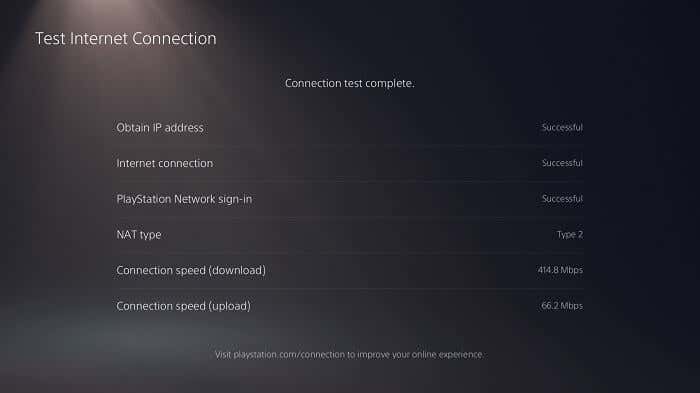
Your PS5 has a built-in tool to test your internet speed directly. Running this test gives you real-time data on your download and upload speeds, plus your connection’s stability. This helps identify if the problem lies with your internet provider or your console’s setup.
To run the test, go to Settings > Network > Connection Status > Test Internet Connection. If speeds are much lower than expected, it’s time to look beyond the PS5. Sometimes, your router or ISP is the bottleneck, not your console.
Port Forwarding For Ps5
Port forwarding opens specific channels on your router to improve data flow for your PS5. Without it, downloads can slow down due to blocked or restricted connections. This is especially true if you play games that require constant, fast communication with servers.
Identify the ports your PS5 needs (like TCP: 1935, 3478-3480 and UDP: 3074, 3478-3479), then log into your router’s settings to forward these ports to your PS5’s IP address. This step can feel technical, but it often boosts your download speed significantly.
Set Static Ip Address
Assigning a static IP to your PS5 ensures it always has the same network address. This makes port forwarding more reliable since your PS5 won’t change its IP and break the forwarded ports. It’s a simple step that stabilizes your network connection.
To set a static IP, first find your current IP in Settings > Network > Connection Status. Then, access your router’s DHCP settings to reserve that IP for your PS5. This prevents your console from getting a new IP that could disrupt downloads.
Disable Vpn And Proxy Services
Using a VPN or proxy can slow down your PS5’s download speed by routing traffic through extra servers. While these tools protect privacy, they often add delays and reduce bandwidth. If you rely on VPN or proxies, try disabling them temporarily to see if speeds improve.
Disabling these services might reveal if they are the cause of slow downloads. Many players find their connection speeds jump back up once they connect directly to their ISP. Have you checked if these services are running on your network?
When To Contact Your Isp Or Sony Support
Knowing when to contact your ISP or Sony support can save time and reduce frustration. Sometimes slow PS5 download speeds are due to issues beyond your control. Identifying the right time to seek help ensures a quicker fix. It also avoids wasting effort on steps that do not work.
Identifying Isp Issues
Check your internet speed using online tests on a computer or phone. Compare the results with your plan’s promised speed. If speeds are consistently lower, the problem might be your ISP. Look for service outages or maintenance announcements from your provider. Confirm if other devices on your network also run slowly. This helps isolate the source of the problem.
Reporting Persistent Download Problems
Contact Sony support if the PS5 downloads lag despite good internet speed. Provide details such as error messages, download times, and your network setup. Sony can check if their servers have issues or if your console needs updates. Keep a record of your calls or chats for reference. Clear communication improves the chances of a timely solution.
Exploring Alternative Internet Options
Consider switching to a different ISP if slow speeds continue. Look for providers with better coverage and faster plans in your area. Explore options like fiber-optic or 5G home internet for improved performance. Test the new connection with your PS5 before fully committing. A better internet choice can significantly enhance your gaming experience.
Credit: www.online-tech-tips.com
Frequently Asked Questions
Why Is My Ps5 Download Speed Suddenly Slow?
Your PS5 may experience slow download speeds due to network congestion, Wi-Fi interference, or server issues. Restart your router, connect via Ethernet, and check for background downloads to improve speed.
How Can I Improve Ps5 Download Speed Effectively?
Use a wired Ethernet connection instead of Wi-Fi for stable speeds. Pause other downloads, close apps, and update your router firmware to optimize performance.
Does Psn Server Status Affect Ps5 Download Speed?
Yes, if PlayStation Network servers are busy or undergoing maintenance, download speeds can slow down. Check the PSN status page to confirm server health.
Can My Internet Plan Limit Ps5 Download Speed?
Yes, your internet package speed caps your download rate. Verify your plan’s maximum speed and upgrade if necessary for faster downloads.
Conclusion
Slow PS5 download speeds can frustrate any gamer. Network issues, Wi-Fi limits, or server problems often cause delays. Restart your router and close background apps for better speed. Use a wired connection for more stable downloads. Keep your PS5 system updated to avoid bugs.
Small changes can improve your download experience. Patience helps, but fixing common problems speeds things up. Enjoy smoother gaming with these simple tips.