
Are you tired of slow Wi-Fi and dead zones in your home? A Wi-Fi mesh system might be exactly what you need to fix those frustrating connection problems.
Unlike traditional routers, a mesh system uses multiple devices working together to give you strong, reliable Wi-Fi everywhere. Imagine streaming your favorite shows, video chatting, or gaming without any interruptions, no matter where you are in your house. Keep reading to discover how a Wi-Fi mesh system can transform your internet experience and why it could be the smart upgrade your home needs.
Wi Fi Mesh Basics
Wi Fi mesh systems provide a modern way to improve home internet coverage. They solve common problems like weak signals and dead zones. This setup uses multiple devices to create a seamless network throughout your home.
Understanding the basics helps you see why mesh systems are growing popular. They offer a flexible and reliable connection, ideal for larger spaces or homes with thick walls.
How Mesh Networks Work
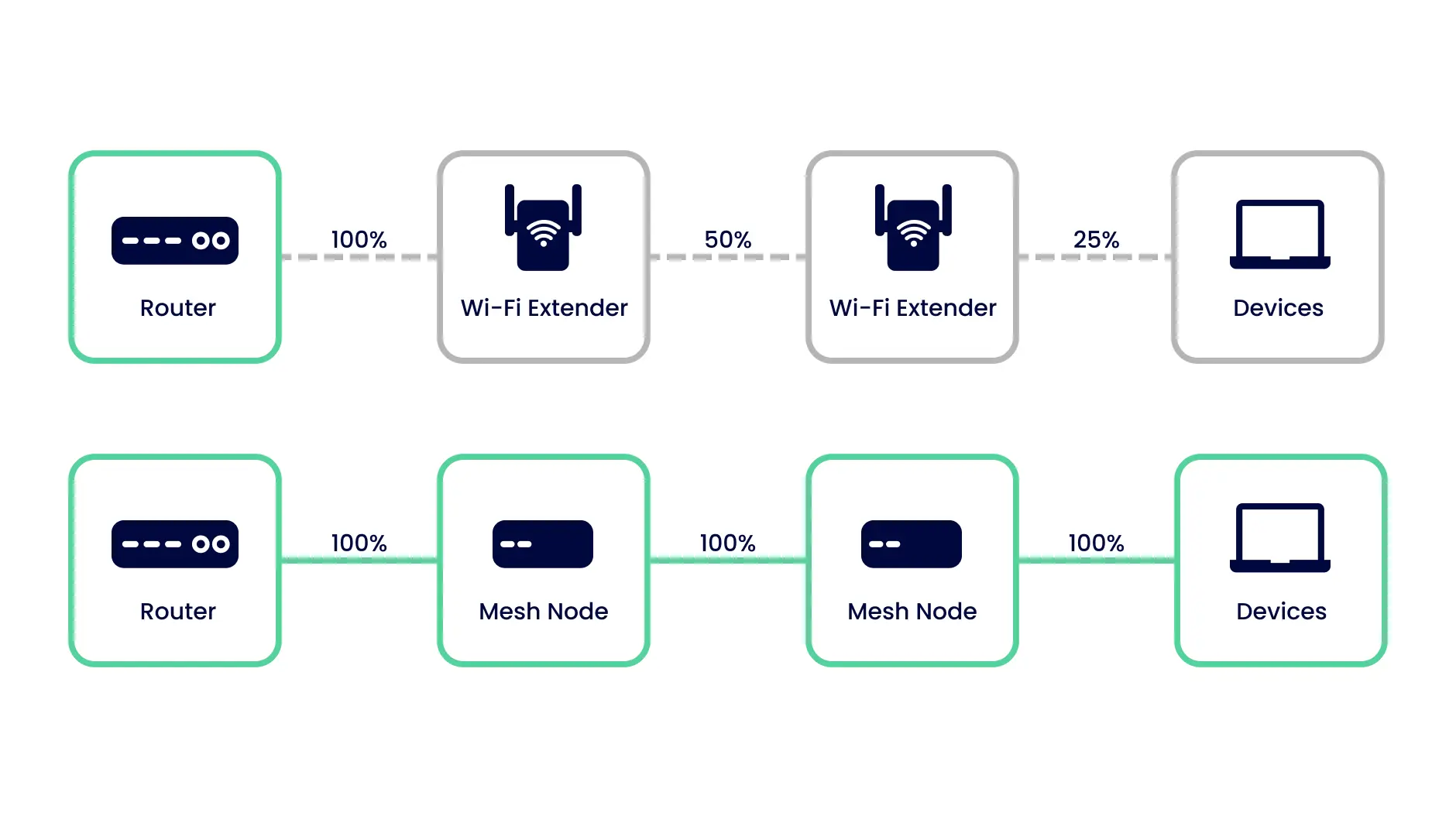
Mesh networks use several units called nodes. Each node communicates with others to spread the Wi Fi signal. This creates a single, strong network that covers a large area.
Nodes share data among themselves. This means your device connects to the closest node automatically. It keeps the connection fast and stable as you move around.
Components Of A Mesh System
- Main Router:Connects to your modem and starts the network.
- Satellite Nodes:Placed in different rooms to extend coverage.
- Mobile App:Helps setup, manage, and monitor the network.
Some systems include extra features like parental controls or guest networks.
Mesh Vs Traditional Routers
| Feature | Mesh System | Traditional Router |
|---|---|---|
| Coverage | Wide, covers large areas well | Limited, may have dead zones |
| Setup | Simple with app guidance | Often complex for beginners |
| Performance | Stable, smooth handoff between nodes | Can drop signal when far |
| Cost | Higher upfront cost | Usually cheaper initially |
Benefits Of Mesh Wi Fi
Mesh Wi Fi systems offer a smarter way to connect your entire home or office. They tackle common Wi Fi problems by spreading a strong signal everywhere you need it. Let’s look at the key benefits that make mesh Wi Fi stand out.
Improved Coverage
Traditional routers often leave dead zones where the signal is weak or non-existent. A mesh system uses multiple nodes placed around your space to create a wide, consistent network.
This means you can enjoy strong Wi Fi in your basement, backyard, or any tricky corner. Imagine streaming a movie in your garage without buffering—mesh makes that possible.
Seamless Roaming
Have you ever noticed your phone or laptop dropping Wi Fi when you move from room to room? Mesh systems let your devices switch automatically between nodes without interrupting your connection.
This seamless handoff keeps your video calls smooth and your online gaming lag-free. You won’t have to manually select a new network or deal with dropped signals.
Scalability And Flexibility
Mesh Wi Fi grows with your needs. Adding a new node is simple and instantly expands your coverage.
Whether you move to a bigger home or want better Wi Fi in your garden, you can scale your system without rewiring or complex setups. This flexibility gives you control over your network’s reach.
Choosing The Right Mesh System
Choosing the right Wi-Fi mesh system is key to a strong and reliable home network. The right system covers your entire space with a fast, stable signal. It avoids dead zones and slow speeds. Several factors affect your choice. These include the size of your home, device types, and internet speed. Understanding these helps you pick a system that fits your needs and budget.
Key Features To Consider
- Coverage area: Ensure the system covers your entire home.
- Speed: Match the mesh speed with your internet plan.
- Number of nodes: More nodes mean better coverage for large spaces.
- Ease of setup: Look for user-friendly apps and simple installation.
- Security: Choose systems with strong encryption and regular updates.
- Device support: Check how many devices can connect at once.
- Advanced features: Some systems offer parental controls and guest networks.
Popular Brands And Models
- Google Nest Wifi: Known for simple setup and good coverage.
- Netgear Orbi: Offers high speeds and large coverage areas.
- TP-Link Deco: Affordable option with solid performance.
- Amazon Eero: Easy to use with reliable connections.
- Asus ZenWiFi: Great for gamers and tech enthusiasts.
Budget Vs Performance
Higher price often means faster speeds and more features. Budget systems may lack some advanced options but still cover smaller homes well. Decide how much speed and coverage you need. Balance cost with the system’s capabilities. Avoid overspending on features you will not use. A mid-range mesh system suits most households for smooth internet.
Setting Up A Mesh Network
Setting up a mesh network creates a strong and seamless Wi-Fi connection throughout your home or office. It replaces the need for a single router by using multiple nodes that work together. Proper setup ensures the best coverage and fast internet speeds in every corner.
Placement Tips For Nodes
- Place the main node near your modem for direct connection.
- Position other nodes in open areas, avoiding walls and large metal objects.
- Keep nodes within a reasonable distance to maintain strong signals between them.
- Avoid placing nodes near microwaves, cordless phones, or thick furniture.
- Spread nodes evenly to cover dead zones and large spaces.
Step By Step Installation
- Connect the main node to your modem with an Ethernet cable.
- Power on the main node and wait for the indicator light to stabilize.
- Use the mesh system app or web interface to start the setup process.
- Add additional nodes one at a time, following the app’s instructions.
- Place each node in its intended location and power it on.
- Confirm each node connects successfully and shows a strong signal.
- Test the network by moving around with a device and checking Wi-Fi strength.
Optimizing Network Performance
- Update the mesh system firmware regularly for security and speed improvements.
- Use the app’s tools to check signal strength and adjust node placement.
- Set up guest networks to keep your main network secure.
- Limit connected devices if the network becomes slow or unstable.
- Restart nodes occasionally to refresh the connection and improve speed.
Troubleshooting Common Issues
Troubleshooting a Wi-Fi mesh system can seem tricky, but addressing common issues often comes down to simple fixes. Mesh networks are designed to improve coverage, yet sometimes problems like connectivity drops or slow speeds occur. Understanding these issues helps you keep your network running smoothly and makes your home or office experience hassle-free.
Connectivity Drops
Frequent disconnections can be frustrating, especially when you’re in the middle of important work or streaming. Check if the mesh nodes are placed too far apart—distance and obstacles like walls can weaken the signal between them.
Try moving nodes closer or repositioning them to open spaces. Also, interference from other electronics or neighboring Wi-Fi networks can cause drops. Changing the Wi-Fi channel in your mesh system’s settings often reduces interference and stabilizes connections.
Slow Speeds
Slow internet can feel like your mesh system is failing, but the cause is often simple. First, test your internet speed near the main router node to see if your ISP is delivering the promised speed.
If speeds are good there but slow at other nodes, check the backhaul connection—the link between your mesh units. If your system supports wired backhaul, connecting nodes with Ethernet cables can boost speed significantly.
Also, too many devices connected simultaneously can slow down your network. Consider limiting device connections or enabling Quality of Service (QoS) features to prioritize important traffic.
Firmware Updates
Firmware updates fix bugs and improve your mesh system’s performance. Neglecting updates can leave your network vulnerable to security risks or glitches.
Check your mesh system’s app or admin panel regularly for available updates. Some systems allow automatic updates, which can save you time and ensure your network stays current without manual intervention.
Have you ever noticed better performance right after an update? That’s often because the manufacturer resolved known issues you might have faced.

Credit: www.which.co.uk
Advanced Mesh Features
As homes become increasingly connected, the need for reliable and robust Wi-Fi coverage is more critical than ever. A Wi-Fi Mesh System offers not only seamless connectivity but also advanced features that can enhance your internet experience. These features provide you with greater control, security, and flexibility in managing your network, ensuring it meets the diverse needs of your household.
Parental Controls
Imagine having the power to manage your kids’ internet usage with just a few taps. Wi-Fi Mesh Systems come equipped with parental controls that let you set time limits, block specific websites, and monitor online activities. This feature can help you create a balanced digital environment for your children, where learning and entertainment coexist without overstepping boundaries. Have you ever wished for a tool that could give you peace of mind while your kids browse the web?
Guest Networks
Hosting a gathering at home often means sharing your Wi-Fi. With guest network capabilities, you can provide visitors with internet access without compromising your security. This feature creates a separate network for guests, ensuring they can’t access your personal devices or data. Think about the convenience of offering your friends their own Wi-Fi space while you keep your main network secure.
Security Enhancements
In today’s digital world, security is paramount. Wi-Fi Mesh Systems enhance security with features like automatic firmware updates, intrusion detection, and advanced encryption protocols. These tools help protect your network from potential threats and vulnerabilities. Consider how these enhancements can safeguard your digital life, giving you confidence in your online interactions.
With these advanced features, a Wi-Fi Mesh System not only extends your internet coverage but also enriches your control over your digital environment. As you explore these capabilities, reflect on how they can transform your home network into a secure, efficient, and user-friendly hub. What feature would make the biggest difference in your household?
Future Of Wi Fi Mesh Technology
The future of Wi Fi mesh technology looks promising and packed with innovations that will change how you connect at home or work. As more devices require fast, stable internet, mesh systems will evolve to meet these demands seamlessly. How will these advancements impact your daily online experience?
Integration With Smart Homes
Wi Fi mesh systems are becoming the backbone of smart homes. They ensure every device, from security cameras to smart speakers, stays connected without interruptions. Imagine walking from your living room to the backyard without losing signal on your smart thermostat or lights.
This integration also means easier control. You’ll manage your entire home network and devices through a single app, reducing the hassle of juggling multiple platforms. Isn’t it time your Wi Fi worked as smart as your home?
Wi Fi 6 And Beyond
Wi Fi 6 technology offers faster speeds and better performance in crowded environments. Mesh systems using Wi Fi 6 can handle more devices simultaneously without slowing down. This is crucial as homes fill with more gadgets every year.
Looking ahead, Wi Fi 7 promises even greater improvements. Expect lower latency and higher data rates, making lag during video calls or gaming a thing of the past. Wouldn’t you want your network ready for tomorrow’s demands?
Emerging Trends
New trends in mesh technology focus on AI-powered network management. These systems learn your usage patterns and optimize coverage automatically. Your Wi Fi could soon adjust itself to provide the best connection exactly where you need it.
Another trend is increased security measures built directly into the mesh system. As cyber threats grow, having a network that protects your data without extra setup is a major plus. Are you prepared to upgrade to a mesh system that keeps your information safer?

Credit: www.pcmag.com
Credit: inseego.com
Frequently Asked Questions
What Is A Wi-fi Mesh System?
A Wi-Fi mesh system uses multiple devices to create one seamless network. It improves coverage and reduces dead zones in your home or office.
How Does A Wi-fi Mesh System Work?
It connects several nodes that communicate wirelessly. These nodes spread the signal evenly, providing strong Wi-Fi across large areas.
What Are The Benefits Of A Mesh Wi-fi System?
Mesh systems offer consistent speed, wider coverage, and easy scalability. They automatically route traffic for optimal performance and reduce signal drops.
Is A Wi-fi Mesh System Better Than A Router?
Yes, mesh systems provide better coverage and reliability in large or multi-story buildings compared to single routers.
Conclusion
A Wi Fi mesh system helps spread internet all over your home. It uses several devices to cover dead spots. This means faster and steadier connections everywhere. Setting it up is simple and suits many home sizes. It fixes common Wi Fi problems like weak signals.
Choosing the right system depends on your space and needs. Overall, a mesh system offers better Wi Fi for daily use. It keeps you connected without interruptions or slowdowns. A smart choice for smoother online experiences.