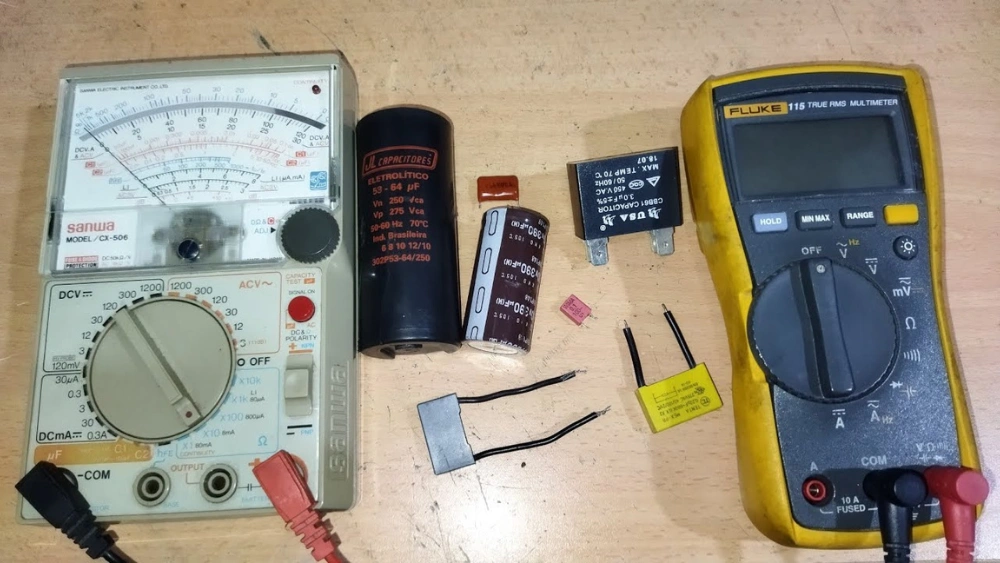
Are you wondering how to check if your capacitor is working properly? Measuring a capacitor might seem tricky at first, but with a digital multimeter, you can do it quickly and accurately.
Whether you’re fixing electronics or just curious about how things work, this simple skill can save you time and money. In this guide, you’ll learn step-by-step how to measure a capacitor using your digital multimeter, even if you’re a beginner.
By the end, you’ll feel confident testing capacitors like a pro. Let’s dive in and get your multimeter ready!
Tools Needed
Measuring a capacitor with a digital multimeter requires some basic tools. These tools ensure you get accurate readings and protect your equipment. Using the right tools also makes the process safer and easier.
Prepare all items before starting the measurement. This helps avoid interruptions and mistakes. The main tool is the digital multimeter, but some extra equipment can improve your experience.
Choosing The Right Multimeter
Choose a multimeter that can measure capacitance. Not all digital multimeters have this feature. Check the device’s specifications before buying or using it.
Look for a multimeter with a capacitance range suitable for your capacitor. It should have a clear digital display for easy reading. A multimeter with auto-ranging saves time and effort.
Ensure the multimeter has good battery life. Replace old batteries to avoid inaccurate results. A multimeter with a hold function can freeze the reading, which is helpful.
Additional Equipment
- Test Leads:Use clean and undamaged test leads. They connect the multimeter to the capacitor safely.
- Alligator Clips:These clips hold the capacitor terminals securely. They free your hands and improve contact.
- Safety Gloves:Wear gloves to protect against electric shock. This is important when working with charged capacitors.
- Discharge Tool:Use a resistor or discharge pen to safely release stored charge in the capacitor before testing.
- Magnifying Glass:Helps read small print on capacitors and multimeter settings clearly.

Credit: leetsacademy.blogspot.com
Safety Precautions
Safety is the top priority when measuring a capacitor with a digital multimeter. Capacitors store electrical energy that can cause shocks or damage if handled carelessly. Following proper safety steps protects you and your equipment from harm.
Always prepare the capacitor before testing. Use the right tools and avoid rushing the process. Careful handling reduces risks and ensures accurate measurements.
Discharging The Capacitor
Capacitors hold a charge even after power is off. Discharge the capacitor fully before measuring. Use a resistor or a discharge tool to safely release stored energy.
- Connect the resistor across capacitor leads
- Hold for several seconds to drain charge
- Use a multimeter to verify zero voltage
Never touch capacitor terminals directly before discharging. Avoid shorting leads with metal objects. This can cause sparks or damage the capacitor.
Handling Precautions
Wear insulated gloves to protect from shocks. Work in a dry area to prevent accidental conductivity. Keep fingers away from the probe tips during measurement.
- Use insulated tools for connecting probes
- Do not apply excessive force on capacitor leads
- Keep capacitor away from heat or moisture
Always switch off the multimeter after testing. Store capacitors safely to avoid damage or accidental discharge.
Preparing The Capacitor
Preparing the capacitor is a crucial step before measuring it with a digital multimeter. This process ensures accurate readings and prevents damage to the meter or the component. Careful preparation includes safely removing the capacitor from the circuit and correctly identifying its terminals.
Removing From Circuit
First, disconnect power from the device to avoid electric shock. Use a soldering iron to carefully melt the solder on capacitor leads. Gently pull the capacitor free from the circuit board once the solder is melted. Avoid bending or damaging the leads during removal. Place the capacitor on a clean surface for testing.
Identifying Terminals
Look for markings on the capacitor body to find the positive and negative terminals. Electrolytic capacitors usually have a stripe indicating the negative terminal. Ceramic capacitors may not have polarity, but check the datasheet if unsure. Use a magnifier if markings are small or faded. Correct terminal identification is essential for accurate measurement.
Setting Up The Multimeter
Setting up your digital multimeter correctly is key for accurate capacitor measurement. The process starts by choosing the right mode on the multimeter. After that, calibrate the meter to ensure precise readings. These steps prepare your tool for reliable testing of capacitors.
Selecting Capacitance Mode
First, turn on the multimeter. Look for the capacitance symbol, often marked as “F” or “CAP.”
Rotate the dial to this setting. This mode measures the capacitor’s ability to store charge.
Some multimeters have a dedicated button to switch to capacitance mode. Check your device manual if unsure.
Calibrating The Meter
Calibration adjusts the multimeter for accurate readings before testing.
Discharge the capacitor completely to avoid false readings. Use a resistor or short the leads.
Touch the meter’s leads together. Zero or reset the meter if it shows any value.
This step removes any residual charge or noise. It prepares the multimeter for precise measurement.
Measuring Capacitance
Measure capacitance easily with a digital multimeter by selecting the capacitance mode. Connect the multimeter leads to the capacitor terminals, ensuring polarity is correct, and read the displayed value.
Measuring capacitance is a straightforward process with a digital multimeter. Capacitors store electrical energy, and their capacitance is a measure of this storage capacity. Knowing how to measure capacitance is crucial for troubleshooting and designing circuits. Below, we delve into the steps to accurately measure capacitance using a digital multimeter.
Connecting Probes Correctly
Begin by ensuring your multimeter is set to the capacitance mode. Look for a symbol resembling two parallel lines. Connect the multimeter probes to the capacitor terminals. The red probe connects to the positive terminal. The black probe connects to the negative terminal. Make sure the capacitor is fully discharged before measuring. If not, it might damage the multimeter or give inaccurate readings.
Reading The Measurement
Once the probes are connected, observe the multimeter screen. It will display the capacitance value. This value is usually in microfarads (µF) or picofarads (pF). If the reading is stable, you have a correct measurement. A fluctuating reading might indicate a faulty capacitor. Always cross-check with the capacitor’s labeled value for accuracy. Adjust the multimeter settings if necessary to match the expected range.
Interpreting Results
After measuring a capacitor with your digital multimeter, the next step is to understand what those numbers mean. Interpreting the results accurately can save you time and prevent unnecessary replacements. It’s not just about reading the value; it’s about knowing how that value fits with the capacitor’s expected performance.
Comparing With Rated Value
Every capacitor has a rated capacitance printed on its body or datasheet. Your multimeter will show a value close to this rating if the capacitor is healthy. Small differences are normal because of measurement tolerances and temperature effects.
For example, if a 100µF capacitor reads between 95µF and 105µF, that’s usually acceptable. But what if you see a value like 50µF or 150µF? That’s a clear sign something is off. Always keep your capacitor’s tolerance in mind, which is often ±10% or ±20%.
Recognizing Faulty Capacitors
Values far outside the rated range often point to a bad capacitor. If your reading is close to zero, the capacitor might be shorted. If it shows an open circuit or no reading at all, the capacitor could be broken internally.
Sometimes, a capacitor might read near the correct value but still cause issues. This happens when the capacitor’s Equivalent Series Resistance (ESR) is high, which a basic multimeter won’t detect. In such cases, specialized ESR meters or substitution tests work better.
Have you ever replaced a capacitor that looked fine on paper but still caused a circuit failure? Knowing how to interpret readings beyond just numbers can help you avoid that frustration. Next time you test a capacitor, ask yourself: does this value make sense for how the capacitor is supposed to perform?
Troubleshooting Tips
Troubleshooting is essential when measuring capacitors with a digital multimeter. Errors can lead to wrong readings and confusion. Understanding common issues helps fix problems faster. Simple tips can improve measurement accuracy and reliability. Follow these guidelines to ensure better results and avoid frustration.
Common Errors
- Not discharging the capacitor before testing causes false readings.
- Using a multimeter with insufficient range leads to inaccurate values.
- Testing capacitors still connected in circuits gives wrong results.
- Ignoring the capacitor’s polarity may damage the meter or component.
- Holding the capacitor with bare hands adds resistance and noise.
- Using low battery power in the multimeter reduces measurement precision.
Improving Accuracy
Always fully discharge the capacitor before testing. Use a resistor or a short wire to do this safely.
Select the correct measurement mode and range on your multimeter.
Test capacitors outside the circuit for clear and accurate readings.
Keep your hands away from the capacitor leads to avoid interference.
Ensure your multimeter’s battery is fresh to maintain stable readings.
Calibrate your multimeter regularly to keep measurements precise.

Credit: www.ersaelectronics.com
Frequently Asked Questions
How Do I Measure Capacitance With A Digital Multimeter?
To measure capacitance, set the multimeter to the capacitance mode. Connect the capacitor leads to the meter probes. The display will show the capacitance value in microfarads or nanofarads.
Can I Test A Capacitor Without Removing It?
It’s best to remove the capacitor before testing. In-circuit testing can give inaccurate readings due to parallel components affecting measurement.
What If My Multimeter Has No Capacitance Mode?
If no capacitance mode exists, use a dedicated LCR meter for accurate measurements. Alternatively, use an analog multimeter with capacitance testing feature.
How To Know If A Capacitor Is Faulty Using A Multimeter?
A faulty capacitor shows zero, infinite, or fluctuating capacitance values. Also, check for physical signs like bulging or leakage before testing.
Conclusion
Measuring a capacitor with a digital multimeter is simple and useful. It helps check if the capacitor works well or needs replacing. Always discharge the capacitor before testing to stay safe. Use the right multimeter setting for accurate results. Practice these steps a few times to gain confidence.
This skill saves time and money in electronics work. Keep your tools ready and follow the instructions carefully. Testing capacitors becomes easier with experience and patience. Try it yourself and see how helpful it can be.