
Are you looking to try out new games without spending a dime on your PS5? Finding demos is the perfect way to explore exciting titles and see what suits your style before buying.
But where do you start? You might feel overwhelmed by all the options or unsure how to locate these hidden gems quickly. Don’t worry—this guide will show you exactly how to find demos on your PS5, step by step. By the end, you’ll be ready to dive into new gaming experiences with confidence and ease.
Keep reading to unlock the best demos waiting for you right now!
Credit: www.tiktok.com
Locating Demos On The Ps5
Finding demos on your PS5 can be easier than you think, even if you haven’t explored the console deeply yet. These trials give you a hands-on feel before committing to a purchase. Knowing exactly where to look saves you time and gets you into the action quickly.
Using The Playstation Store
The PlayStation Store is your go-to place for demos. Open the Store from the main menu and use the search bar to type “demo” or the name of a specific game you want to try.
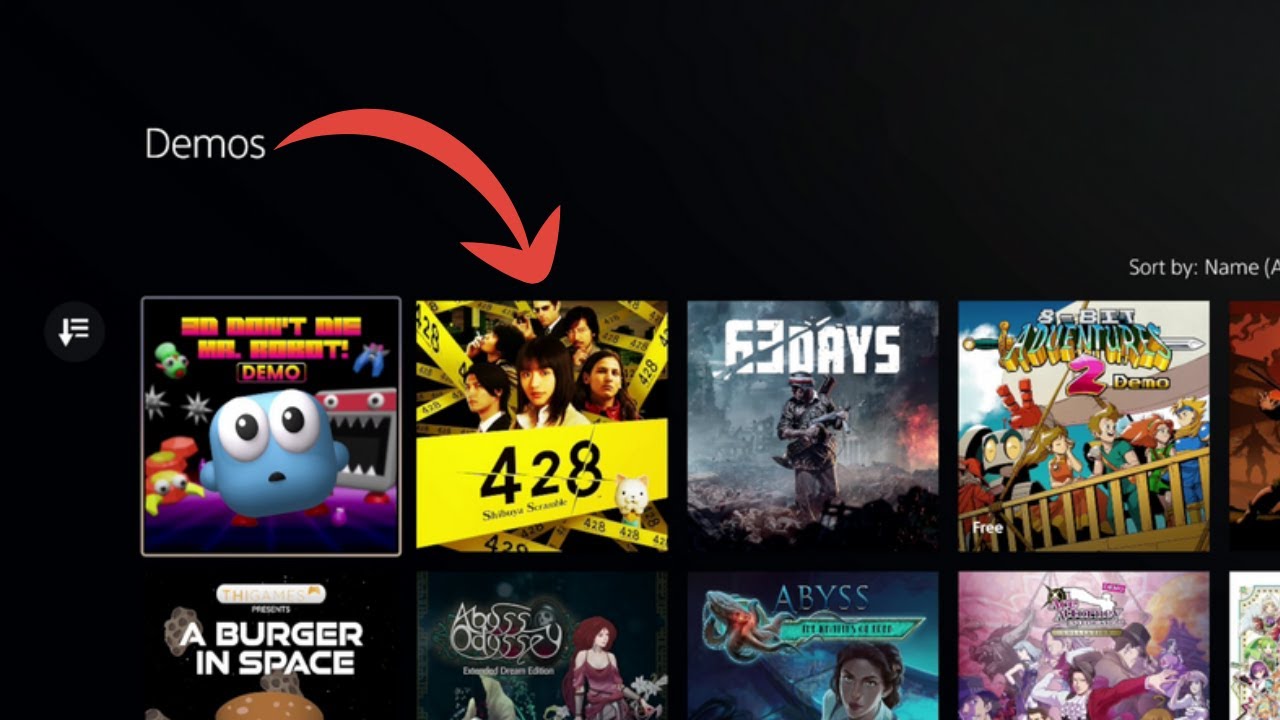
You can also filter results by selecting “Demos” under the game type category. This narrows down your options to just playable trials, making your search quicker.
Navigating The Game Library
Your Game Library isn’t just for games you own; it also shows free demos you’ve downloaded or accessed before. Check the “Purchased” tab to find demos you might have forgotten about.
Sometimes demos are bundled within game add-ons, so it’s worth exploring each game’s details. This approach helped me rediscover a demo I had never tried but really enjoyed afterward.
Exploring Featured Sections
The PS5 home screen often highlights new and popular demos in the Featured or New Releases sections. These are curated selections that change regularly, giving you fresh options every week.
Don’t overlook seasonal events or sales sections either; demos often appear alongside discounts. Have you noticed any interesting demos featured recently? Checking here can lead to unexpected finds.

Credit: www.facebook.com
Types Of Free Trials Available
Free trials on PS5 come in different forms, each designed to give you a taste of a game before you decide to buy. Understanding these types can help you make the most of your gaming experience without spending a dime upfront. Let’s look at the main categories and what you can expect from each.
Full Game Trials
Full game trials let you play the entire game, but only for a limited period. You get access to all features, levels, and modes, which means you can really dive into the gameplay.
Sony sometimes offers these trials during special events or promotions. For example, a popular RPG might be available for a weekend, giving you enough time to see if it fits your style.
Have you tried a full game trial and felt it helped you avoid a purchase regret? These trials are perfect for that.
Limited Time Demos
Limited time demos usually offer a smaller slice of the game. You might get a single level or a specific mission to explore.
These demos are often available permanently on the PlayStation Store, so you can download and try them anytime. They’re great when you want a quick feel for the game mechanics and graphics.
Think about the last time a demo made you excited to buy the full game. Did it give you enough information?
Beta Access And Early Releases
Betas and early releases give you a chance to play games before they officially launch. These trials often focus on multiplayer or core gameplay elements.
Joining a beta can also mean you’re part of the testing process, providing feedback to developers. This makes your gaming experience more interactive.
Have you ever joined a beta and noticed how it shaped the final game? It’s a unique way to connect with game creators and fellow players.
Setting Up Your Ps5 For Demos
Access the PlayStation Store on your PS5 to browse available game demos. Use the search bar or explore the demos section for free trials. Download and try games before buying to see which ones you enjoy.
Setting up your PS5 for demos is a simple process. Demos let you try games before you buy. You’ll need a PlayStation Network account and the right settings. Follow these steps to get started.
Creating A Playstation Network Account
To access demos, you need an account. Go to the PS5 home screen. Select “Settings,” then “Users and Accounts.” Choose “Account,” then “Sign In.” If you don’t have an account, select “Create Account.” Follow the instructions to set it up. Use a valid email address and choose a strong password. Remember to verify your email to complete the process.
Adjusting Download And Storage Settings
Ensure your PS5 is ready for downloads. Go to “Settings,” then “Storage.” Check available space. If it’s low, delete unwanted items. Next, select “Saved Data and Game/App Settings.” Adjust download preferences. Enable automatic downloads for convenience. Set notifications to alert you when downloads are complete. This helps manage storage efficiently. Always check for updates to keep your system ready.
Tips For Downloading And Playing Demos
Downloading and playing demos on your PS5 can be a smooth and enjoyable experience if you know a few handy tips. These tips help you avoid frustration, save time, and make the most out of each demo. Let’s look at ways to manage your download speeds, save your progress, and fix common issues that might come up while trying out demos.
Managing Download Speeds
Slow downloads can kill your excitement. To speed things up, make sure your PS5 is connected to a strong Wi-Fi network or use a wired Ethernet connection. You can also pause other downloads and updates running in the background to free up bandwidth.
Try restarting your router if downloads seem unusually slow. Sometimes, simply switching to a different DNS server like Google DNS or OpenDNS can improve your connection speed. Have you checked your internet speed recently? It might be time for an upgrade if it’s consistently lagging.
Saving Progress In Demos
Many demos allow you to save progress, but not all of them do. Check if the demo supports save files by reading its description or trying to save in-game. If saving is possible, use it to avoid replaying early sections, especially in story-driven demos.
Some demos save progress automatically, while others require manual saving. Keep an eye out for save icons or prompts within the demo. If you’re unsure, test saving early on, so you don’t lose hours of gameplay unexpectedly.
Troubleshooting Common Issues
If a demo won’t download or won’t start, try restarting your PS5 first. This simple step often fixes minor glitches. Clearing the cache by turning off the console and unplugging it for a minute can also help.
Check your storage space regularly. Demos can take up more room than you expect, and insufficient space may prevent downloads. If you see error codes, look them up on the official PlayStation support site for specific fixes.
Have you ever encountered a demo freezing or crashing? Try deleting the demo and downloading it again. Sometimes, corrupted files cause these issues, and a fresh install solves the problem quickly.
Finding Demos Outside The Playstation Store
Finding demos outside the PlayStation Store can open doors to exciting gaming experiences you might otherwise miss. While the PlayStation Store is the most obvious place to search, many developers and platforms offer demos through alternative channels. These options often provide early access or exclusive content that can help you decide if a game is right for you before committing to a purchase.
Official Game Websites
Many game developers host demos directly on their official websites. These demos might come as downloadable files or links that connect to external platforms. Checking a game’s official site can sometimes reveal exclusive demos or beta tests unavailable on the PlayStation Store.
For example, some indie developers use their sites to distribute demos as a way to gather player feedback. This approach gives you a chance to experience games straight from the source and sometimes even interact with the developers through forums or social media linked on the site.
Third-party Gaming Platforms
Third-party platforms like Steam or Epic Games occasionally offer demos for PS5-compatible titles, especially for cross-platform games. While these platforms are primarily for PC, they often announce demos that later become available on PlayStation through shared promotional events.
Keeping an eye on these platforms can alert you to upcoming demos that you can then look for on your PS5. Some services also provide codes or links redeemable on the PlayStation Store, bridging the gap between platforms.
Social Media Announcements
Game developers and publishers frequently announce demo releases on social media channels such as Twitter, Facebook, and Instagram. Following official accounts can keep you informed about limited-time demos or surprise releases.
Sometimes, these demos are part of contests, giveaways, or special events shared only through social media. Have you ever missed out on a demo simply because you weren’t following a developer’s Twitter? This is a simple way to stay ahead and never miss new gaming trials.
Maximizing Your Experience With Free Trials
Free trials on the PS5 offer a great way to explore games before buying. They let you play parts of a game without paying. This helps you understand gameplay and features clearly. Using free trials well can save money and avoid disappointment.
Testing Gameplay And Features
Free trials allow hands-on experience with game controls. Try different characters, weapons, or modes to see what fits you. Notice graphics quality and game speed. This helps decide if the game matches your style and expectations.
Sharing Feedback With Developers
Many demos have options to send feedback. Use this to report bugs or suggest improvements. Developers value player input to enhance games. Your feedback can shape future updates or fixes.
Planning Purchases Based On Demos
Playing a demo helps plan your purchases wisely. Decide if the full game is worth buying after testing. Check if the story and gameplay keep you interested. This avoids spending on games you might not enjoy.
Credit: www.youtube.com
Frequently Asked Questions
How Do I Find Ps5 Demos On The Playstation Store?
To find PS5 demos, open the PlayStation Store and navigate to the “Demos” section. Here, you’ll see all available game demos for PS5. You can also use the search bar and filter results by “Demos” to discover new game trials quickly.
Can I Download Free Ps5 Game Demos?
Yes, PS5 game demos are free to download. These demos let you try games before buying. Simply select the demo from the PlayStation Store and click “Download” to start playing without any cost.
Are Ps5 Demos Available Offline After Download?
Most PS5 demos work offline after downloading. However, some may require an internet connection for certain features. Always check the demo’s description for specific offline play details before downloading.
Where Can I Find New Ps5 Demo Releases?
New PS5 demos are featured regularly on the PlayStation Store’s “New Releases” or “Demos” section. Following official PlayStation social media and gaming news sites also helps you stay updated on the latest demos.
Conclusion
Finding demos on your PS5 can be simple and fun. Explore the PlayStation Store often to see new demos. Use the search bar to find specific game demos quickly. Check the “Demos” section for all available trials. Trying demos helps you decide which games to buy.
Enjoy testing games before spending money. Keep your console updated for the best experience. Happy gaming and enjoy discovering new adventures on your PS5!