
Got an old laptop gathering dust and wondering how to get rid of it safely? You might think tossing it in the trash is the easy way out, but your personal data and the environment could pay the price.
What if there was a way to completely destroy your old laptop so your information stays safe and the planet stays clean? You’ll discover simple, effective methods to destroy your old laptop the right way. Keep reading—you won’t want to miss these crucial steps that protect you and make disposal stress-free.
Reasons To Destroy An Old Laptop
Old laptops can pose hidden risks and challenges. Knowing why to destroy them helps protect your data and the environment. It also stops others from using your device without permission.
Data Security Concerns
Laptops store lots of personal and sensitive information. Simply deleting files does not erase them completely. Data recovery tools can retrieve deleted files easily. Destroying the laptop ensures your private data stays private. It prevents identity theft, fraud, and other cyber crimes.
Environmental Considerations
Old laptops contain harmful materials like lead and mercury. Throwing them in the trash pollutes soil and water. Proper destruction helps recycle valuable parts safely. It reduces electronic waste and protects natural resources. Responsible disposal supports a cleaner, healthier planet.
Preventing Unauthorized Use
Old laptops can be stolen or misused by others. They might access your accounts or install harmful software. Destroying the laptop blocks any chance of misuse. It protects your digital identity and personal safety. Avoid risks by making the device unusable for others.
Credit: www.familyhandyman.com
Preparing The Laptop For Destruction
Preparing an old laptop for destruction is a crucial step. It ensures your data stays safe and the process goes smoothly. Taking time to prepare helps avoid problems later. Follow these key steps to get ready.
Backing Up Important Data
Save all files you want to keep. Use an external hard drive or cloud storage. Check documents, photos, and videos carefully. Don’t forget emails and bookmarks. Double-check that backups work before moving on.
Removing Personal Information
Delete all personal files from the laptop. Empty the recycle bin or trash folder. Clear browser history and saved passwords. Uninstall software that holds your data. Use a data wiping tool for extra safety. This stops others from accessing your info.
Gathering Necessary Tools
Collect tools to break down the laptop safely. You might need:
- Screwdrivers (Phillips and flathead)
- Pliers
- Anti-static gloves
- Plastic bags for parts
- Protective glasses
Having the right tools makes the job easier and safer.
Safe Data Wiping Techniques
Destroying an old laptop isn’t just about smashing the hardware to pieces. Before you even think about that, consider the sensitive data stored within. Ensuring your personal information is thoroughly wiped is crucial. This means using safe data wiping techniques that are both effective and secure. Let’s explore some reliable methods to ensure your data is gone for good.
Using Software To Erase Data
Software solutions provide a straightforward way to wipe data. You can choose from various programs like DBAN or Eraser. These tools overwrite your data multiple times, making it virtually impossible to recover.
Why not give it a try? Install the software, follow the instructions, and watch as your laptop’s hard drive becomes a clean slate. It’s a satisfying process that leaves you with peace of mind.
Have you ever wondered if someone could access your data after you sell your laptop? With these programs, you can rest assured that your secrets are safe.
Physical Hard Drive Destruction
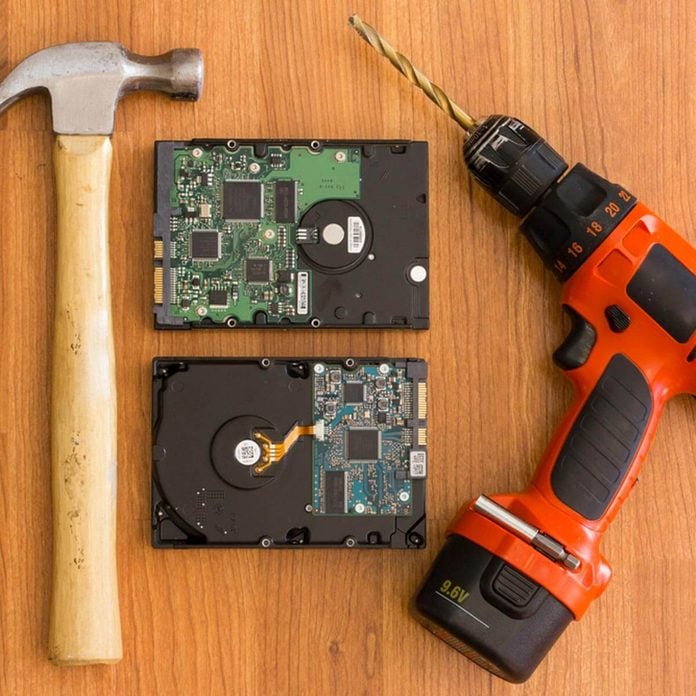
Sometimes, the best way to ensure data isn’t recoverable is through physical destruction. Removing the hard drive and smashing it with a hammer might sound extreme, but it’s incredibly effective.
Consider investing in a good pair of safety goggles and gloves. It’s an intense process that requires caution. But once you see the shattered pieces, you’ll know your data is gone forever.
Imagine the relief of knowing no tech-savvy individual can ever access your data again. Wouldn’t that be worth a few minutes of smashing?
Professional Data Destruction Services
If DIY isn’t your style, professional services can handle the job. Companies like Secure Destruction offer thorough and certified data wiping. They employ advanced techniques to ensure your data is completely erased.
Think of it as outsourcing your peace of mind. These professionals have the expertise and equipment to guarantee your data is unrecoverable. It’s a hassle-free option that leaves you worry-free.
Have you considered the convenience of letting experts take care of your data destruction? It’s a decision that could save you time and stress.
Effective Physical Destruction Methods
Physical destruction is one of the most reliable ways to make sure your old laptop’s data never gets into the wrong hands. It’s not just about throwing it away or deleting files; you want to be certain that the information is completely unrecoverable. Let’s break down some practical ways to destroy your laptop physically, focusing on the parts that matter most.
Disassembling The Laptop
Start by carefully taking apart your laptop. Remove the screws and separate the casing to access the internal components. This step is crucial because it exposes the hard drive, which holds all your data.
Using simple tools like a screwdriver set can make this easier. Don’t rush—pay attention to how pieces fit together in case you want to recycle parts later. Have you ever noticed how many screws laptops hide in tricky spots? It’s a small challenge, but worth the effort for secure destruction.
Destroying The Hard Drive
The hard drive is the heart of your data, so targeting it is essential. After removal, you can damage it physically by scratching the disk platter or drilling holes through it. This prevents any data recovery attempts, even by professionals.
Keep in mind, solid-state drives (SSDs) need different treatment—they store data differently and require thorough shredding or crushing. If you want to be extra sure, combine multiple damage methods, like scratching and bending the drive. Have you ever thought about how much data your old laptop still holds? This step ensures it’s gone for good.
Shredding And Crushing Options
If you want to skip manual destruction, look into electronic shredding or crushing services. These companies use powerful machines to shred laptops into tiny pieces, making data recovery impossible. Some local recycling centers offer this service at a low cost or even for free.
Alternatively, you can buy a small, hand-held crusher designed for hard drives. It’s a quick and satisfying way to physically destroy the drive yourself. Would you trust a machine over your own hands when it comes to data security? Choosing the right crushing method depends on your comfort and available resources.
Recycling And Disposal Options
Recycling and disposal are key to safely getting rid of an old laptop. Proper disposal protects the environment and recovers valuable materials. Understanding your options helps you choose the best way to handle your device.
E-waste Recycling Centers
E-waste recycling centers specialize in handling old electronics. They break down laptops into parts that can be reused or safely discarded. Many centers accept laptops for free or a small fee. These facilities ensure harmful materials do not pollute soil or water.
Find a center near you by searching online or checking local listings. Drop off your laptop at the center and ask about data removal policies. Many centers also recycle batteries separately for safety.
Manufacturer Take-back Programs
Many laptop makers offer take-back programs. These programs allow customers to return old laptops directly to the manufacturer. Some offer prepaid shipping labels to make the process easy. The company then recycles or refurbishes the device responsibly.
Check your laptop brand’s website to see if they offer a take-back option. This method guarantees professional handling of your device. It also supports corporate responsibility efforts in managing e-waste.
Local Disposal Regulations
Local laws often govern how to dispose of electronics. Some areas ban throwing laptops in regular trash. Violating these rules can lead to fines. Always check your city or county website for guidelines.
Many communities hold special e-waste collection events. These events provide safe, free disposal options. Following local rules protects your community and environment. Stay informed to avoid penalties and ensure proper disposal.
Credit: blog.onelaunch.com
Precautions To Keep In Mind
Destroying an old laptop requires care and attention to safety. Precautions protect you and the environment. Follow these tips to handle your device correctly.
Handling Hazardous Materials
Laptops contain harmful substances like batteries and heavy metals. Avoid breaking the battery to prevent leaks or fires. Remove the battery carefully before destruction. Keep these parts away from children and pets. Dispose of hazardous parts at special recycling centers.
Using Protective Gear
Wear gloves to protect your hands from sharp edges and chemicals. Use safety glasses to shield your eyes from flying debris. Consider a mask to avoid breathing dust or fumes. Dress in long sleeves and pants for extra protection. Safety gear lowers the risk of injury during destruction.
Avoiding Environmental Harm
Do not throw laptop parts in the trash. Toxic materials can pollute soil and water. Use certified e-waste recycling services for disposal. Follow local laws for electronic waste handling. Recycling parts reduces harm and saves resources for new products.
Frequently Asked Questions
How Can I Safely Destroy An Old Laptop?
To safely destroy an old laptop, remove and physically damage the hard drive first. Use a hammer or drill to ensure data is unrecoverable. Dispose of electronic parts following local recycling rules to protect the environment and comply with regulations.
What Are The Best Tools To Destroy A Laptop?
The best tools include a hammer, screwdriver, and drill. Use the screwdriver to remove screws and access the hard drive. Then, use the hammer or drill to destroy the hard drive physically. Always wear safety gear to avoid injury during the process.
Can I Recycle An Old Laptop After Destruction?
Yes, you can recycle a laptop after destruction. Many recycling centers accept electronic waste safely. Ensure all data is destroyed before recycling. Recycling helps reduce environmental harm and recovers valuable materials like metals and plastics.
Why Should I Destroy My Laptop Before Disposal?
Destroying your laptop protects your personal data from theft or misuse. It ensures sensitive information cannot be recovered from the hard drive. Proper destruction also complies with privacy laws and prevents identity theft or data breaches.
Conclusion
Destroying an old laptop safely protects your personal data. Always remove batteries and storage drives first. Use simple tools like hammers or screwdrivers carefully. Wear safety gear to avoid injury during the process. Recycling parts helps the environment and reduces waste.
Remember, careful destruction keeps your information secure. Take your time and follow these easy steps. Your old laptop won’t cause problems after this. A little effort now saves trouble later.