
If you’re thinking about upgrading your workstation, you might be wondering how good the Dell Precision 3620/T3620 desktop really is. You want a computer that can handle demanding tasks without slowing you down.
You need reliability, speed, and power all wrapped into one machine. This article will help you discover if the Dell Precision 3620/T3620 is the right fit for your work and creativity. Keep reading to find out what makes this desktop stand out—and whether it can boost your productivity like you expect.
Design And Build
The design and build of the Dell Precision 3620/T3620 desktop leave a strong impression on anyone who values both functionality and a clean look. This workstation balances professional aesthetics with practical features that make everyday use straightforward and efficient. Whether you’re setting it up in a busy office or a home workspace, the design choices Dell made clearly aim to support productivity without unnecessary bulk.
Chassis And Aesthetics
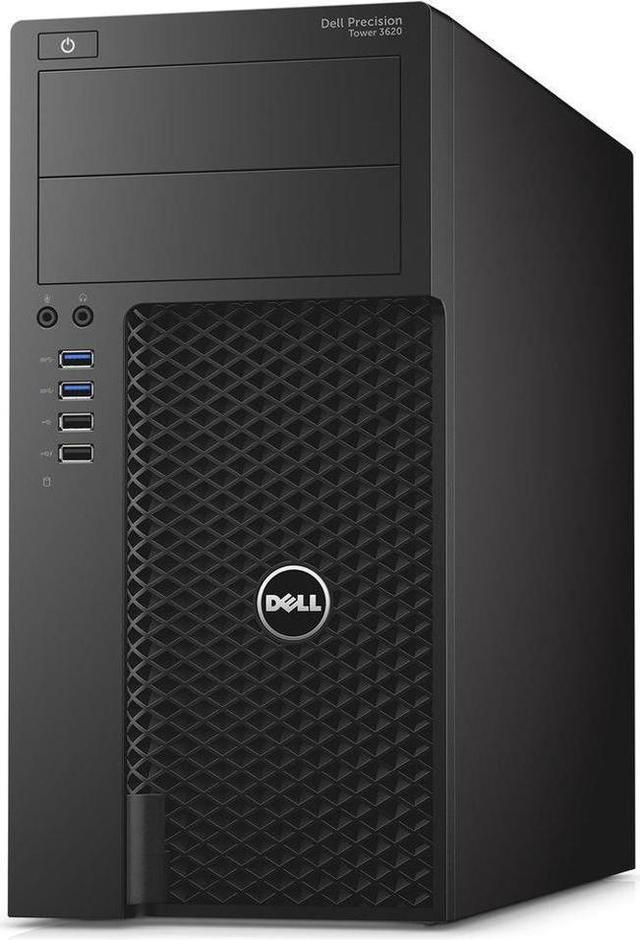
The Dell Precision 3620/T3620 features a compact mid-tower chassis that fits well into tight spaces. Its matte black finish avoids fingerprints and smudges, keeping your setup looking neat over time. The design is simple yet professional, avoiding flashy elements so it blends easily in any work environment.
You might appreciate how the modest size doesn’t compromise on internal space, allowing for future upgrades. The front panel’s subtle Dell logo adds a touch of brand identity without being distracting. Does your current desktop feel bulky or out of place? This model’s streamlined look might change that.
Port Accessibility
Ports on the Dell Precision 3620/T3620 are thoughtfully positioned for easy access. The front panel hosts USB 3.0 ports, an audio jack, and a media card reader, allowing you to plug in devices quickly without reaching behind the unit. This is a real time-saver if you frequently connect flash drives or headphones.
On the back, you’ll find a variety of USB ports, video outputs, and network connections arranged logically. This setup supports multiple monitors and peripheral devices, making it ideal for multitasking. Have you ever struggled with plugging in devices on your current PC? This design could reduce that frustration.
Durability And Materials
The materials used in the Dell Precision 3620/T3620 emphasize long-term reliability. The chassis is made from sturdy steel and plastic, combining strength with manageable weight. This means the desktop can handle being moved around without easily sustaining damage.
Inside, components are secured firmly to minimize vibrations and wear, which is important if your work demands heavy computing loads. The build quality suggests Dell expects this machine to be a dependable part of your setup for years. How confident do you feel about your current desktop’s durability?

Credit: www.amazon.com
Performance Specs
The Dell Precision 3620/T3620 desktop stands out with its solid performance specs tailored for professionals and power users. Whether you’re handling complex design projects, running multiple applications, or crunching large datasets, this machine is built to keep up without lag. Let’s break down what it offers in terms of processing power, graphics, memory, and storage to see if it fits your work needs.
Processor Options
The Precision 3620 comes with a range of Intel processors, including 6th and 7th Gen Intel Core and Xeon options. These processors deliver strong single-thread and multi-thread performance, essential for both everyday tasks and demanding workloads.
Choosing a Xeon processor gives you added stability and support for ECC memory, which can be crucial for error-sensitive applications. Have you considered how much processing power you actually need for your projects? Sometimes, a higher clock speed benefits creative work more than just adding cores.
Graphics Capabilities
This desktop supports professional-grade graphics cards like the NVIDIA Quadro series, designed specifically for CAD, 3D modeling, and video editing software. These GPUs are optimized for precision and reliability, not just raw gaming power.
If you’re into design or engineering, the ability to run multiple monitors at high resolutions can boost your workflow dramatically. Do you rely on graphics-intensive software? The right GPU can make a night-and-day difference in rendering times and visual accuracy.
Memory And Storage
The Precision 3620 supports up to 64GB of DDR4 RAM, allowing smooth multitasking and handling of large files without slowdown. You can start with a modest 8GB or 16GB and upgrade as your workload grows, which adds future-proofing.
Storage options include fast SSDs for quick boot times and data access, alongside traditional HDDs for bulk storage. Combining both types lets you keep your system responsive while storing extensive project files. Have you tested how much faster your work feels with an SSD compared to a standard hard drive?
User Experience
The Dell Precision 3620/T3620 Desktop Computer offers a seamless user experience that is sure to impress both tech enthusiasts and casual users alike. With its robust performance and intuitive design, you’ll find yourself getting more done with less hassle. Let’s explore how this desktop enhances your day-to-day interactions through its setup, software, and environmental management.
Setup And Installation
Setting up the Dell Precision 3620 is straightforward, even if you’re not a tech-savvy person. The components fit together easily, making assembly a breeze. Once powered on, the installation process guides you step-by-step, ensuring you’re ready to go in minutes.
Imagine not having to call tech support or spend hours looking up tutorials. The intuitive setup process saves time and reduces frustration, allowing you to focus on what matters most—your work or play.
Operating System And Software
The Dell Precision 3620 typically comes with Windows 10, offering familiarity and ease of use. It handles demanding applications smoothly, perfect for creative tasks like video editing or graphic design. You can also upgrade to Windows 11, opening doors to new features and enhanced security.
Think about how much easier it is to have all your favorite software ready to roll. The integration between hardware and software ensures your applications run efficiently, making multitasking a breeze.
Noise And Heat Management
One of the standout features is its noise management. The Dell Precision 3620 operates quietly, allowing you to concentrate without distractions. It’s perfect for environments where silence is golden, like home offices or study spaces.
But what about heat? The efficient cooling system ensures the desktop stays cool even during intensive tasks. This prevents overheating and maintains performance, extending the life of your machine. Isn’t it reassuring to know your computer can handle pressure without breaking a sweat?
Expandability
The Dell Precision 3620/T3620 desktop stands out for its impressive expandability, making it a solid choice if you want a machine that grows with your needs. Whether you’re handling demanding projects or simply want to future-proof your setup, this desktop offers plenty of room to add and upgrade components. Let’s break down what this means for you in real terms.
Upgrade Options
The Precision 3620 provides multiple upgrade paths, which is a big plus if you like customizing your system. It supports up to 64GB of DDR4 RAM, so you can easily boost your memory for smoother multitasking or heavy software use. You’ll find several PCIe slots available, allowing you to add powerful graphics cards or specialized expansion cards.
Storage is flexible too. You can install multiple drives, including SSDs and HDDs, giving you a chance to balance speed and capacity without replacing your entire setup. Have you ever run out of space mid-project? This desktop helps avoid that frustration.
Connectivity Features
The Dell Precision 3620 offers a strong set of connectivity options that suit various workflows. It includes USB 3.0 and USB 2.0 ports, an HDMI port, DisplayPort, and audio jacks, covering most peripheral needs. The Ethernet port ensures stable wired internet, while optional Wi-Fi adds wireless convenience.
These options mean you can connect multiple devices without hunting for adapters or hubs. Think about how much time you spend plugging and unplugging devices—this desktop reduces that hassle significantly.
Peripheral Support
Supporting a wide range of peripherals is another advantage of the Precision 3620. From multiple monitors to professional-grade input devices, this desktop accommodates your complete setup. It also supports external storage devices and specialized hardware, which is crucial if your work demands high-speed data transfer or precise controls.
If you’ve ever struggled with limited ports or compatibility issues, you’ll appreciate how this system simplifies adding printers, scanners, or external GPUs. How much smoother would your daily tasks run with a setup that adapts to your tools rather than forcing compromises?
Use Case Suitability
Understanding the use case suitability of the Dell Precision 3620/T3620 helps you decide if this desktop meets your specific needs. Whether you are tackling intense professional projects, gaming, or just browsing and working on everyday tasks, this machine’s capabilities vary. Let’s break down where it shines and where you might need to think twice.
Professional Workloads
The Dell Precision 3620/T3620 is designed primarily as a workstation, which means it handles demanding professional workloads well. It supports powerful Intel Xeon or Core processors and ECC memory, which reduces errors during critical tasks. If you work with 3D modeling, CAD software, or video editing, this system can keep up without frequent slowdowns.
What impressed me most was how smoothly it ran complex simulations and rendering tasks compared to my older PC. Its expandability options also let you add more RAM or professional-grade GPUs as your projects grow. However, if your work involves extremely heavy multitasking or very high-end graphics, consider upgrading components within this chassis.
Gaming Potential
This desktop wasn’t primarily built for gaming, but it can still deliver a decent experience with the right GPU installed. The case and power supply support many popular gaming graphics cards, allowing you to play modern titles at medium to high settings. Just keep in mind that the default configuration may lack the specialized cooling or RGB flair gamers often want.
In my experience, casual gaming sessions ran smoothly, but for competitive or VR gaming, you might feel limited without adding a stronger GPU and better cooling solutions. Are you okay with a workstation that doubles as a gaming machine, or do you prefer a dedicated gaming rig?
Everyday Tasks
For everyday computing like web browsing, office work, and streaming, the Precision 3620/T3620 is more than capable. It boots quickly and handles multiple browser tabs and office applications without hiccups. Its quiet operation also makes it a comfortable desktop for long hours of daily use.
If your routine mostly involves these lighter tasks, this system might be more powerful than necessary, but it gives you room to grow into more demanding uses later. Would you rather invest in a machine that’s ready for future challenges or pick something more budget-friendly now?

Credit: www.amazon.com
Price And Value
The price and value of the Dell Precision 3620/T3620 desktop make it a strong contender in its class. It offers a balanced mix of power and affordability. Buyers get solid performance without breaking the bank. This section breaks down the cost, compares it with rivals, and explores its worth over time.
Cost Analysis
The Dell Precision 3620 starts at a reasonable price point for a workstation. Base models come with good specs, suitable for many professional tasks. Upgrades like more RAM or a better graphics card add to the cost but improve performance. Overall, the price fits well with the features offered.
Comparison With Competitors
Compared to similar workstations, the Precision 3620 often costs less. Brands like HP and Lenovo offer machines with similar power but at higher prices. Some competitors provide more stylish designs or extra features. Yet, Dell’s focus on reliability and core specs gives it an edge in value.
Long-term Investment
The Dell Precision 3620 holds value well over time. Its sturdy build and upgrade options extend its lifespan. Users can increase RAM or storage easily to keep it current. This reduces the need to buy a new computer soon. It is a smart choice for those who want lasting performance.
Pros And Cons
Understanding the pros and cons of the Dell Precision 3620/T3620 helps in making a smart buying choice. This desktop has strengths that suit many users but also some downsides to consider.
Pros Of Dell Precision 3620/t3620
- Strong performance with Intel Xeon or Core processors.
- Expandable memory and storage options.
- Reliable build quality for long-term use.
- Good support for professional graphics cards.
- Multiple USB ports and connectivity options.
- Quiet operation even under heavy workload.
Cons Of Dell Precision 3620/t3620
- Design looks outdated compared to newer models.
- Higher price than some similar spec desktops.
- Limited upgrade paths for future CPU models.
- Average integrated graphics performance.
- Power supply may restrict very high-end GPUs.
- Somewhat bulky, not ideal for small spaces.
Credit: www.newegg.com
Frequently Asked Questions
What Are The Key Features Of Dell Precision 3620?
The Dell Precision 3620 features powerful Intel processors, expandable RAM, multiple storage options, and professional-grade graphics. It supports high-performance tasks and offers reliable build quality for demanding work environments.
Is Dell Precision 3620 Suitable For Heavy Workloads?
Yes, the Dell Precision 3620 is designed for heavy workloads. It handles complex applications like CAD, video editing, and 3D rendering efficiently with its robust hardware.
How Does Dell Precision 3620 Perform In Graphics Tasks?
Dell Precision 3620 excels in graphics tasks with dedicated professional GPUs. It delivers smooth performance for design, modeling, and visualization projects, enhancing productivity.
What Upgrade Options Does Dell Precision 3620 Offer?
The Dell Precision 3620 supports upgrades including RAM expansion, storage additions, and GPU enhancements. This flexibility ensures longevity and adaptability for evolving work needs.
Conclusion
The Dell Precision 3620/T3620 offers solid performance for work tasks. It runs smoothly and handles software without trouble. The design is sturdy and fits well in any office. Upgrading parts is easy if you need more power. This desktop stays reliable during long hours of use.
Overall, it suits professionals who want a dependable computer. A good choice for those needing steady, strong performance. Simple, efficient, and built to last.