
Have you ever wondered how your Wi Fi router actually connects all your devices to the internet? You rely on it every day for work, entertainment, and staying in touch.
But do you really know what happens behind the scenes when you hit “connect”? Understanding how a Wi Fi router works can help you get better speeds, improve your home network, and avoid frustrating drops in connection. Keep reading, and you’ll discover simple explanations that make complex tech easy to grasp—and practical tips you can use right now.

Credit: www.screenbeam.com
Wi Fi Router Basics
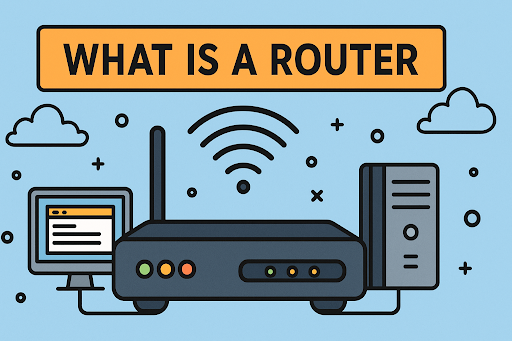
A Wi Fi router is a device that connects your home devices to the internet wirelessly. It sends and receives data between the internet and your gadgets. Understanding the basics helps you see how it keeps you connected every day.
Key Components
- Processor:Acts as the router’s brain, managing data traffic.
- Wireless Antennas:Send and receive Wi Fi signals to your devices.
- Ports:Connect wired devices or link to the modem.
- Firmware:The software that controls router functions.
- Power Supply:Provides energy for the router to work.
Role In Home Networks
The router links all your home devices to the internet. It creates a local network that lets devices talk to each other. This allows file sharing, printing, and streaming inside your home. It also protects your network from outside threats using security features.
Credit: www.xcitium.com
Signal Transmission
Understanding how your Wi-Fi router transmits signals can help you optimize your home network. Signal transmission is the process where your router sends and receives data using invisible waves. This section breaks down the core components that affect how these signals travel and reach your devices.
Radio Waves Explained
Your Wi-Fi router communicates by sending out radio waves, which are a type of electromagnetic wave. These waves carry data between the router and your devices without wires, allowing for wireless internet access.
Think of radio waves as the invisible messengers that shuttle information back and forth. The router converts digital data into these waves and your device then interprets them back into usable information.
Frequency Bands
Wi-Fi routers operate mainly on two frequency bands: 2.4 GHz and 5 GHz. The 2.4 GHz band covers a wider area but can be slower and more crowded because many devices use it.
On the other hand, the 5 GHz band offers faster speeds but has a shorter range. Choosing the right band can improve your network’s performance depending on your home’s size and the number of connected devices.
Range And Interference
The range of your Wi-Fi signal depends on factors like walls, furniture, and other obstacles. Interference from other electronic devices, like microwaves or cordless phones, can also weaken the signal.
Have you noticed your connection dropping in certain rooms? This often happens because of physical barriers or competing signals. Positioning your router strategically and minimizing interference can make a big difference in your Wi-Fi experience.
Data Flow Process
The data flow process inside a Wi-Fi router is the backbone of how your devices communicate over the internet. It involves several key functions working together to send and receive information accurately and quickly. Understanding this process can help you troubleshoot connection issues and optimize your home network.
Packet Switching
Data travels through the internet in small units called packets. Your router breaks down the information from your device into these packets before sending them out. Each packet carries part of the message along with the destination address.
Once the packets reach their destination, they are reassembled into the original message. This system allows multiple devices to share the same connection without interference. Have you ever noticed how streaming video keeps playing smoothly even if your Wi-Fi momentarily drops? That’s packet switching at work.
Routing Mechanisms
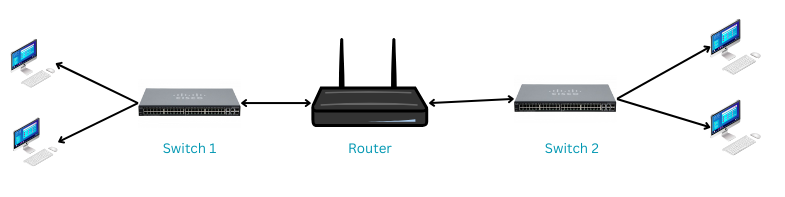
The router decides the best path for each data packet to reach its destination. It uses routing tables and algorithms to find the quickest and most efficient route. This process happens in milliseconds, so you experience little to no delay.
Your router also manages traffic within your local network. It knows which device requested what data and directs the packets accordingly. Ever wondered why your laptop gets priority when you’re video calling while others are browsing? That’s the router managing routes smartly.
Ip Address Assignment
Each device connected to your Wi-Fi needs a unique identifier called an IP address. The router assigns these addresses automatically using a system called DHCP (Dynamic Host Configuration Protocol). This ensures that data packets reach the right device on your network.
If two devices had the same IP address, data could get lost or sent to the wrong device. By handling IP assignments, your router keeps your network organized and secure. Next time you connect a new gadget, remember it’s your router quietly giving it an address behind the scenes.
Security Features
Your Wi-Fi router does more than just connect your devices to the internet—it acts as a gatekeeper, protecting your network from unauthorized access and cyber threats. The security features built into your router help keep your personal data safe and ensure that only trusted devices can use your connection. Understanding these features empowers you to take full control of your home network’s safety.
Encryption Protocols
Encryption scrambles the data sent between your devices and the router, making it unreadable to outsiders. Most routers support protocols like WPA2 or WPA3, with WPA3 offering stronger protection against hacking attempts.
Choosing a strong encryption protocol is like locking your front door with a high-quality lock. Without it, anyone nearby could intercept your information, from passwords to credit card numbers.
Have you checked which encryption your router uses? Upgrading to WPA3 can be a simple yet powerful step to boost your network’s security.
Firewall Functions
Your router’s firewall acts as a shield, monitoring incoming and outgoing traffic to block suspicious activity. It keeps harmful data packets from reaching your devices, reducing the risk of malware infections.
Think of the firewall as a security guard who only lets trusted visitors in. Without it, your network could be an open door to cyber attackers.
Enabling the firewall feature on your router is usually straightforward and can prevent many common threats before they reach you.
Access Controls
Access controls let you decide who can join your network and what they can do once connected. This includes setting up strong passwords, creating guest networks, and managing device permissions.
For instance, a guest network allows visitors to use your internet without accessing your personal files or smart home devices. This separation adds an extra layer of security.
Do you regularly review the devices connected to your router? Removing unknown devices and updating access settings can keep your network secure and running smoothly.
Advanced Router Technologies
A Wi-Fi router sends internet signals to your devices using radio waves. It connects to your modem and creates a wireless network at home or work. This allows multiple devices to access the internet without cables.
In the world of Wi-Fi, routers have evolved significantly. Advanced technologies have made them faster and more efficient. Understanding these technologies can enhance your internet experience. Let’s explore some of these innovations.Dual Band And Tri Band Routers
Routers now offer dual and tri-band capabilities. Dual-band routers use two frequencies: 2.4 GHz and 5 GHz. This reduces congestion and improves speed. Tri-band routers add an extra 5 GHz band. This is useful for homes with many devices. More bands mean less interference and smoother connections.Mu-mimo And Beamforming
MU-MIMO stands for Multi-User, Multiple Input, Multiple Output. This technology allows routers to communicate with multiple devices at once. Beamforming focuses the Wi-Fi signal directly to devices. This enhances signal strength and reduces dead zones. Together, they improve overall network performance.Mesh Networking
Mesh networking is perfect for large spaces. It uses multiple nodes to extend coverage throughout your home. Each node acts as a router, ensuring a strong signal everywhere. Unlike traditional routers, mesh systems avoid weak spots. This creates a seamless Wi-Fi experience across all rooms.Troubleshooting Connectivity
Troubleshooting connectivity issues with your Wi-Fi router can feel frustrating, especially when your online tasks depend on a steady connection. Understanding the common problems and knowing how to optimize your setup can save you time and improve your internet experience. Let’s look closely at what might be causing your connection troubles and how you can fix them effectively.
Common Issues
Many connectivity problems stem from simple causes that are easy to overlook. Signal interference from other electronics or thick walls can weaken your Wi-Fi, making pages load slowly or disconnect altogether.
Router placement plays a significant role; if it’s tucked away in a corner or behind furniture, the signal can’t spread well. Another frequent issue is outdated firmware, which can cause your router to perform poorly or lose connection unexpectedly.
Have you checked if your device is too far from the router? Distance often affects signal strength more than you realize. Also, too many devices connected simultaneously may overload your network, reducing speed for everyone.
Optimization Tips
Start by positioning your router in a central, elevated spot free from obstructions. This simple step can drastically improve your signal coverage at home or in the office.
Regularly updating your router’s firmware is crucial. Manufacturers release updates to fix bugs and improve performance, so check their website or app for the latest version.
Consider changing your Wi-Fi channel to avoid interference from neighbors’ networks. Most routers allow you to switch channels easily through the settings menu. Using the 5 GHz band instead of 2.4 GHz can also reduce congestion and increase speed, especially in crowded areas.
If many devices share your connection, try setting up Quality of Service (QoS) rules on your router. This feature prioritizes bandwidth for important activities like video calls or gaming, ensuring a smoother experience.
Have you tried restarting your router regularly? A quick reboot can clear temporary glitches and refresh your connection. Keeping these tips in mind will help you maintain a strong, reliable Wi-Fi connection every day.
Credit: www.uninets.com
Frequently Asked Questions
What Is The Primary Function Of A Wi-fi Router?
A Wi-Fi router connects multiple devices to the internet wirelessly. It routes data between your local network and the internet efficiently. It also assigns local IP addresses to devices, enabling smooth communication within the network.
How Does A Wi-fi Router Transmit Data Wirelessly?
A Wi-Fi router uses radio waves to send and receive data. It converts wired internet signals into wireless signals. Devices then connect through these signals to access the internet without cables.
Can A Wi-fi Router Improve Internet Speed?
Yes, a good Wi-Fi router can enhance internet speed. It manages data traffic and reduces interference. Modern routers support faster wireless standards, which improve overall network performance.
Why Is Wi-fi Router Placement Important?
Router placement affects signal strength and coverage. Positioning it centrally in your home reduces dead zones. Avoid placing it near thick walls or electronic devices that cause interference.
Conclusion
A Wi Fi router sends data between devices and the internet. It uses radio waves to connect gadgets wirelessly. This allows many devices to share one internet link. Routers also help keep your network safe from outsiders. Understanding how routers work helps you use them better.
Choose the right router for your home or office. Keep it updated to enjoy fast, secure internet. Wi Fi routers make online tasks easier and more flexible. Simple, yet powerful devices that keep you connected every day.