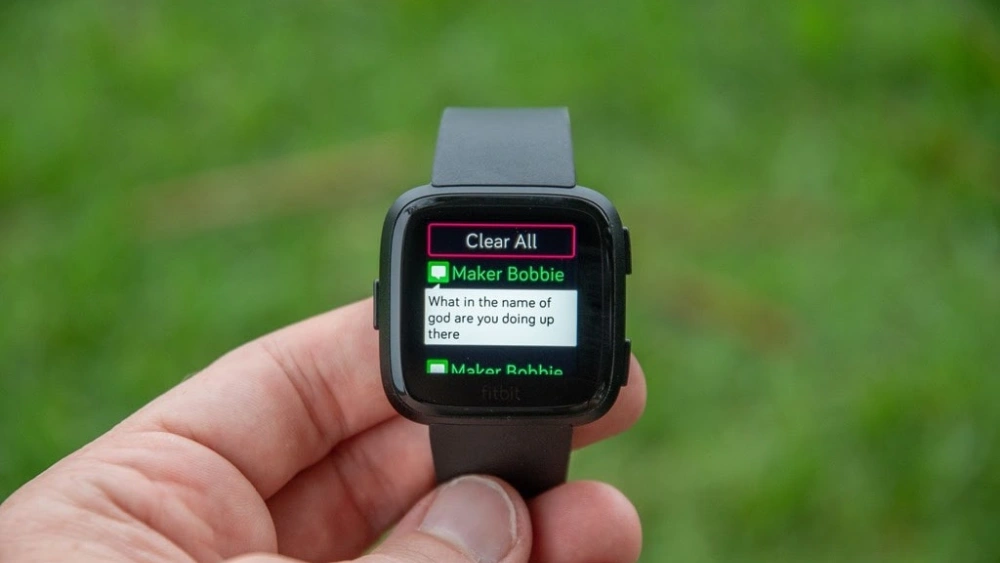
Have you ever wondered how to send a quick text without pulling out your phone? Your smartwatch can do just that—and more.
Imagine replying to messages right from your wrist, staying connected without missing a beat. You’ll discover simple, step-by-step ways to text on your smartwatch, making your life easier and more efficient. Ready to unlock this handy skill? Let’s dive in and transform the way you communicate.
Choosing Your Smartwatch
Choosing your smartwatch can feel overwhelming, especially with so many options available. The right watch not only fits your style but also enhances how you send and receive texts. Think about what matters most to you in a messaging device before making your choice.
Popular Smartwatch Models
Several smartwatches stand out for texting capabilities. The Apple Watch Series is known for its seamless integration with iPhones and user-friendly messaging apps. Samsung Galaxy Watch offers excellent Android compatibility and a variety of input methods.
Other options like Fitbit Versa and Garmin Venu focus more on fitness but still support basic texting. Consider what you want beyond texting, such as health tracking or battery life, to find the best fit.
Compatibility With Smartphones
Your smartwatch must work smoothly with your smartphone to text without hassle. Apple Watches pair exclusively with iPhones, which means no Android support. Samsung Galaxy Watches and many Wear OS devices work well with Android phones and offer some features with iPhones.
Ask yourself: Are you willing to switch your phone to get better smartwatch texting features? Or do you want a watch that works with your current phone? Compatibility can make or break your texting experience.
Key Features For Messaging
Look for features that make texting quick and easy on a small screen. Voice-to-text is a game-changer if typing on a tiny display feels frustrating. Some watches offer handwriting recognition or pre-set quick replies to speed up responses.
Notifications should be clear and actionable, letting you reply without pulling out your phone. Also, check if the watch supports popular messaging apps you use daily. Does it let you send multimedia messages or just text? These details impact your convenience.
Credit: www.tiktok.com
Setting Up Messaging Apps
Setting up messaging apps on a smartwatch lets you send and receive texts easily. It turns your watch into a handy communication tool. Before texting, you need to prepare your watch with the right apps and settings. This section explains how to install apps, sync with your phone, and customize notifications.
Installing Apps On Your Watch
Start by opening the app store on your smartwatch. Search for popular messaging apps like WhatsApp, Messenger, or the default SMS app. Choose the app that fits your needs. Tap the install button and wait for the download to finish. Some watches have limited apps, so check compatibility first.
Syncing With Your Phone
Syncing connects your smartwatch to your phone’s messaging system. Open the companion app on your phone. Follow the prompts to pair your watch and phone via Bluetooth. Grant necessary permissions for messages. Once synced, your watch will mirror your phone’s messages. You can reply directly from your watch screen.
Customizing Notifications
Adjust notification settings to control how messages alert you. On your watch, open the settings menu. Find the notifications section and select your messaging app. Choose alert types: sound, vibration, or silent. Customize notification previews for privacy. This way, you get notified without distractions or unwanted exposure.
Methods To Text On A Smartwatch
Texting on a smartwatch offers several convenient ways to stay connected without pulling out your phone. Each method suits different situations, whether you’re on the move or need a quick response. Understanding these options helps you choose the fastest and easiest way to send your message.
Using Voice Dictation
Talking to your smartwatch can be a game-changer, especially when your hands are busy. Most smartwatches have built-in voice recognition that converts your speech into text instantly.
Simply tap the microphone icon, speak clearly, and watch your words appear. It’s surprisingly accurate, but make sure to check your message before sending to avoid funny autocorrect mistakes. Have you tried sending a quick voice message during a walk or workout?
Tapping On The Keyboard
Some smartwatches come with a tiny keyboard that lets you type out messages. It’s perfect when you want full control over your wording or when voice dictation isn’t practical.
The keyboards are designed for quick typing with swipe gestures or predictive text to speed things up. While it might take a bit of getting used to, tapping on the screen can be surprisingly efficient once you get the hang of it.
Selecting Quick Replies
Quick replies are pre-written messages that save time and effort. You can choose from common phrases like “On my way” or “Can’t talk now” with just a tap.
Many smartwatches let you customize these replies, so your responses sound like you. This method is perfect when you need to answer fast without typing or speaking.
Sending Emojis And Stickers
Emojis and stickers add a fun, personal touch to your texts. Most smartwatches support a wide range of emojis you can insert with a few taps.
Some models even offer animated stickers, making your replies more expressive. Have you noticed how a simple emoji can change the tone of your message completely?
Tips For Faster Messaging
Texting on a smartwatch can be quick and smooth with the right tricks. Speed matters when you want to reply fast. Using simple tools built into your watch helps save time. Focus on ways to cut down typing and scrolling.
Creating Custom Replies
Custom replies let you send messages with one tap. Save common answers like “On my way” or “Thanks!” Your watch stores these replies for quick use. Change or add new replies anytime. This cuts down typing and speeds up chatting.
Using Voice Commands Effectively
Voice commands are faster than typing on a small screen. Speak clearly and use simple words. Pause briefly after speaking to let the watch catch your words. Use voice to start messages or reply fast. Review the message before sending to avoid errors.
Managing Message Threads
Keep your message threads tidy to find conversations quickly. Delete old or unimportant messages often. Use notifications to see new messages at a glance. Organize chats by priority, so urgent ones get your attention first. This way, you spend less time searching and more time texting.
Troubleshooting Common Issues
Troubleshooting texting issues on a smartwatch often involves checking Bluetooth connectivity and app permissions. Restarting the device can resolve minor glitches. Ensure your keyboard app is updated for smooth typing experiences.
Troubleshooting issues while texting on a smartwatch can be frustrating. Many smartwatch users face common problems that disrupt their communication. Understanding these issues can help in resolving them quickly.
Connection Problems
Smartwatches often rely on Bluetooth for connectivity. If your messages aren’t sending, check your Bluetooth settings. Ensure the watch is paired with your phone. Sometimes, simply toggling Bluetooth off and on can fix the issue. Another tip is to ensure your phone is within range. Thick walls or distance might interrupt the connection.
App Crashes
App instability can cause crashes. Keep your smartwatch software updated. Outdated software often leads to app malfunctions. If an app crashes, restart the smartwatch. This can clear temporary issues. Also, consider uninstalling and reinstalling the app. It helps in refreshing its data.
Delayed Notifications
Delayed notifications can occur due to synchronization problems. Check your notification settings. Confirm that all necessary permissions are enabled. If notifications are still delayed, restart both devices. This often synchronizes them better. Another suggestion is to check your internet connection. A weak connection can delay message alerts.

Credit: www.myticktalk.com
Privacy And Security
Privacy and security are key when texting on a smartwatch. Your messages often contain personal and sensitive information. Protecting this data helps avoid unwanted access and keeps your communication safe.
Protecting Your Messages
Smartwatches store messages locally and sync with your phone. Use encrypted messaging apps to keep conversations private. Avoid saving sensitive data on your device. Regularly delete old messages to reduce risk.
Managing Permissions
Check app permissions on your smartwatch. Limit access to only necessary apps and features. Disable permissions for apps that do not need messaging access. This reduces chances of data leaks or misuse.
Using Screen Locks
Enable screen locks on your smartwatch to prevent unauthorized use. Choose PINs, patterns, or biometric locks if available. Locks stop others from reading your messages if the watch is lost or stolen.
Future Trends In Smartwatch Messaging
Smartwatch messaging is evolving quickly, and the future holds exciting possibilities. You’ll find texting on these devices becoming faster, smarter, and more intuitive. These changes aim to make communication seamless, even when your hands are busy or your phone is out of reach.
Ai-powered Texting
Imagine your smartwatch suggesting replies based on your conversation style. AI-powered texting is making this a reality by learning your habits and preferences. This means your watch can help you respond quickly without typing a single word.
It also helps reduce errors by predicting what you want to say next. Some models even adapt over time, making your texting experience feel more natural. Wouldn’t it be great if your watch could finish your sentences, saving you precious time?
Improved Voice Recognition
Voice recognition on smartwatches is getting sharper and more reliable. You can speak your message, and the watch transcribes it accurately, even in noisy environments. This improvement means you can text while on the move without worrying about mistakes.
Better voice recognition also supports multiple languages and dialects, making it easier for everyone to use. Have you noticed how frustrating it can be when your device misunderstands you? Soon, that problem will be much less common.
Enhanced Connectivity
Future smartwatches will connect more seamlessly with other devices and networks. This means faster message delivery and better synchronization across your gadgets. You won’t miss a message, whether you’re using your watch, phone, or tablet.
Enhanced connectivity also opens doors to richer messaging features like sending images, voice notes, or quick video clips. How often do you wish your watch could do more than just send texts? The next generation of smartwatches aims to answer that need.

Credit: www.youtube.com
Frequently Asked Questions
How Do I Type Messages On A Smartwatch?
You can type messages using the smartwatch’s small keyboard or swipe features. Some watches support voice-to-text input for hands-free texting. Choose the method that suits your comfort and device capabilities for faster messaging.
Can I Reply To Texts Directly On My Smartwatch?
Yes, most smartwatches allow you to reply to texts directly. You can use preset replies, voice dictation, or an on-screen keyboard. This feature helps you respond quickly without needing your phone.
Is It Possible To Send Emojis Via Smartwatch Texting?
Absolutely. Smartwatches support emojis in messages. You can select emojis from the keyboard or use voice commands to add them, making your texts more expressive and fun.
What Smartwatches Support Texting Without A Phone Nearby?
Some smartwatches with cellular connectivity can send texts independently. These watches have their own SIM card or eSIM. This allows texting without relying on a paired smartphone.
Conclusion
Texting on a smartwatch makes staying connected easier. You can send quick replies or voice messages fast. Small screens do not stop you from chatting. Different apps help you write or dictate texts. Battery life and watch speed may affect texting.
Practice helps you get comfortable using your watch. Enjoy the convenience of texting right on your wrist. Keep exploring features to find what works best. Smartwatch texting brings a new way to communicate daily.