
Are you setting up a new internet connection and wondering if your wireless router comes with a Wi-Fi adapter? It’s a common question that can save you time, money, and frustration.
Understanding what’s included with your router helps you avoid unexpected extra purchases and ensures your devices connect smoothly. Keep reading to discover the simple truth about wireless routers and Wi-Fi adapters—so you can get online faster and smarter.
Wireless Router Basics
Understanding the basics of a wireless router helps clarify many common questions. A wireless router connects devices to the internet without wires. It creates a Wi-Fi network for your home or office. Knowing its features and functions makes choosing the right router easier.
What Is A Wireless Router?
A wireless router is a device that sends internet signals to your devices. It connects to your modem and creates a Wi-Fi network. Devices like phones, laptops, and tablets use this network to access the internet. The router manages data traffic between your devices and the internet.
Key Features Of Routers
- Wi-Fi Signal:Sends wireless internet signals within a certain range.
- Ethernet Ports:Allows wired connections for devices needing stable speeds.
- Security Settings:Protects your network with passwords and encryption.
- Dual-Band Support:Offers 2.4 GHz and 5 GHz frequencies for better performance.
- Guest Network:Creates a separate Wi-Fi for visitors to keep your main network safe.
Wi-fi Adapter Explained
Understanding what a Wi-Fi adapter does can clarify why it matters when setting up your internet connection. A Wi-Fi adapter is a device that helps your computer or other gadgets connect to a wireless network. Without it, your device wouldn’t be able to catch the Wi-Fi signals that your router sends out.
Role Of A Wi-fi Adapter
The Wi-Fi adapter acts like a bridge between your device and the wireless router. It receives the signals from the router and sends data back and forth, allowing you to browse the web, stream videos, or play games online. Without this adapter, your device can only connect to the internet through wired options, which are less convenient.
If you’ve ever tried to connect a desktop computer to Wi-Fi, you probably needed to add a Wi-Fi adapter since many desktops don’t come with one built-in. This small piece of hardware makes a big difference in how flexible and mobile your internet connection can be.
Types Of Wi-fi Adapters
Wi-Fi adapters come in several forms, each suited for different needs and devices:
- USB Wi-Fi Adapters:These plug into your computer’s USB port and are easy to install. They are a popular choice for laptops and desktops without built-in Wi-Fi.
- PCIe Wi-Fi Cards:Installed inside desktop computers, these cards offer better performance and stronger signals but require opening the case to install.
- Built-in Wi-Fi Adapters:Most modern laptops and smartphones already include Wi-Fi adapters integrated into their hardware, so you don’t need to add anything extra.
Choosing the right type depends on your device and how much effort you want to put into setup. Have you checked whether your device already has a Wi-Fi adapter before looking for one?
Router And Adapter Relationship
The relationship between a wireless router and a Wi-Fi adapter is often misunderstood. Many people assume they come as a package, but they serve distinct roles in your home network. Understanding how they work together can help you set up your internet connection more effectively.
Do Routers Include Wi-fi Adapters?
A wireless router itself does not come with a Wi-Fi adapter inside the box. The router’s job is to broadcast the wireless signal and manage the network traffic.
Devices like laptops, smartphones, and tablets need Wi-Fi adapters to receive this signal. Most modern devices have built-in adapters, but if you have a desktop or an older device, you might need to buy one separately.
Think about a time you tried to connect an older PC without Wi-Fi capability. You quickly realized that a USB Wi-Fi adapter was necessary to get online. This is a common situation many users face.
How Devices Connect To Routers
Devices connect to routers using their Wi-Fi adapters, which communicate wirelessly with the router’s signal. The adapter scans for available networks and lets you select yours.
Once connected, the adapter sends and receives data through the router to the internet. Without the adapter, your device cannot communicate with the router wirelessly.
- Built-in Wi-Fi adapters: Found in most modern laptops and smartphones.
- External Wi-Fi adapters: USB or PCI cards used for desktops or older devices.
Have you checked if your device has a Wi-Fi adapter before buying a new router? It’s a simple step that can save you from buying unnecessary equipment.

Credit: www.reddit.com
Using Routers Without Adapters
Using routers without Wi-Fi adapters is common in many setups. Some devices do not have built-in Wi-Fi capability. A wireless router can still manage your internet connection without an adapter inside the device. Understanding how to connect and use these routers helps maintain internet access across different devices.
Alternatives To Built-in Wi-fi
Many computers and older devices lack a built-in Wi-Fi adapter. External USB Wi-Fi adapters can solve this issue. These small devices plug into a USB port and provide wireless access. Another option is PCIe Wi-Fi cards for desktop computers. They fit inside the computer case and offer a strong wireless connection.
Using a smartphone as a hotspot can also help. It shares mobile data through Wi-Fi, allowing other devices to connect. This method requires a mobile data plan and may have limits.
Connecting Wired Devices
Wired connections remain reliable and fast. Devices without Wi-Fi can connect using Ethernet cables. Most routers have multiple Ethernet ports for this purpose. Plugging directly into the router avoids wireless interference. It also ensures a stable, low-latency connection.
Using switches expands the number of devices connected by wire. Switches connect to the router’s Ethernet port and provide more ports. This setup is ideal for home offices or gaming setups where speed matters. Ethernet cables come in different types like Cat5e and Cat6 for varying speeds.
Choosing The Right Equipment
When setting up your wireless network, selecting the right equipment can make all the difference in your connectivity experience. A common question arises: does a wireless router come with a Wi-Fi adapter? The answer can be a bit tricky. While many modern routers have built-in Wi-Fi capabilities, a separate adapter might be necessary for some devices. Understanding when and why you might need additional equipment can save you from future frustration.
When To Buy A Separate Wi-fi Adapter
Not all devices come equipped with built-in Wi-Fi capabilities. If your laptop or desktop doesn’t have wireless connectivity, purchasing a separate Wi-Fi adapter becomes essential. This compact device can quickly add wireless functionality, allowing you to connect to your network without the hassle of cables.
Think about the devices you use daily. Is your gaming PC struggling with slow internet speeds? A dedicated adapter might boost its performance. It’s also worth considering if you’re planning to upgrade your devices or move them to different locations in your home.
Compatibility Tips
Before buying a Wi-Fi adapter, ensure it’s compatible with your router and devices. Check the specifications; some routers support only specific frequencies or standards like 802.11ac or 802.11ax. Matching these will help avoid connectivity issues.
Explore user reviews and manufacturer’s guidelines. They often provide valuable insights into compatibility and performance. Remember, compatibility goes beyond just connecting—it’s about maintaining speed and stability.
Have you ever bought tech gear only to find it doesn’t work with your setup? Share your experiences and learn from others to make informed decisions.
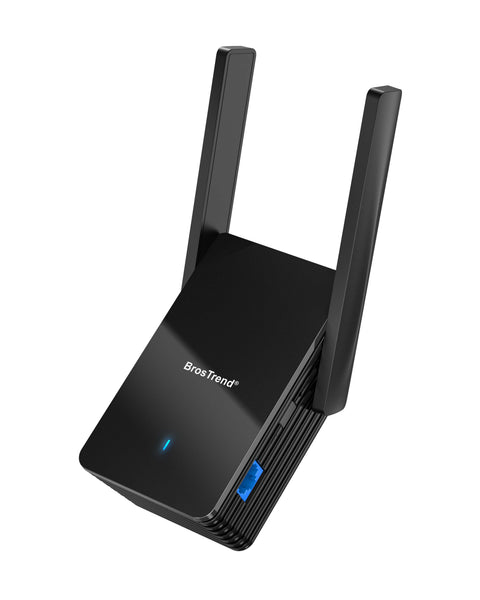
Credit: www.brostrend.com
Common Misconceptions
Many people confuse wireless routers and Wi-Fi adapters. This confusion causes wrong ideas about how they work. Clearing these common misconceptions helps to understand wireless networking better. Let’s explore some myths and facts.
Separating Router And Adapter Functions
A wireless router and a Wi-Fi adapter serve different roles. The router creates a wireless network in your home or office. It sends internet signals to devices connected to it. A Wi-Fi adapter lets a device connect to that wireless network.
Routers do not include Wi-Fi adapters inside them. Each device needs its own adapter to join a wireless network. Some devices have built-in adapters, like smartphones and laptops. Others, like desktop computers, may need an external adapter.
Myths About Wireless Connectivity
- Some believe a router automatically connects all devices. It only creates the network; devices must connect using adapters.
- Others think buying a router means no extra hardware is needed. Devices without adapters cannot access Wi-Fi even if the router is present.
- Many assume all routers come with adapters. Routers and adapters are sold separately in most cases.
Understanding these facts prevents confusion and helps in choosing the right equipment. Knowing the difference between routers and adapters makes setting up Wi-Fi easier.

Credit: www.amazon.com
Frequently Asked Questions
Does A Wireless Router Include A Wi-fi Adapter?
No, a wireless router does not include a Wi-Fi adapter. The router transmits Wi-Fi signals, but your device needs its own adapter to connect.
Can I Use A Router Without A Wi-fi Adapter?
You can use a router without a Wi-Fi adapter if your device connects via Ethernet. Without an adapter, Wi-Fi connection isn’t possible.
Do All Devices Need Wi-fi Adapters For Wireless Routers?
Yes, all devices require Wi-Fi adapters to connect wirelessly to routers. Most modern devices have built-in adapters for seamless connection.
Is A Wi-fi Adapter The Same As A Wireless Router?
No, a Wi-Fi adapter is a device that connects your computer to Wi-Fi. A wireless router broadcasts the Wi-Fi network signals.
Conclusion
A wireless router usually does not include a Wi-Fi adapter. You need a separate adapter to connect some devices. Most laptops and phones already have built-in adapters. Desktop computers may require an external adapter for Wi-Fi. Knowing this helps you set up your home network right.
Choose the right tools to enjoy fast, stable internet. Simple steps lead to better online experiences every day.