
Have you ever wondered if your DSLR can do more than just take stunning photos? What if you could capture high-quality videos with the same camera you already own?
Knowing whether your DSLR can record video might open up exciting new creative possibilities for you. You’ll discover the truth about DSLR video capabilities, how to make the most of them, and why this could change the way you create content forever.
Keep reading—you won’t want to miss these game-changing insights!
Dslr Video Capabilities
DSLR cameras are popular for photography but also offer strong video features. Many models record high-quality video, making them useful for creators. These cameras provide control over settings, helping capture great footage. Understanding DSLR video capabilities helps choose the right camera for your needs.
Video Resolution And Frame Rates
DSLRs often record in Full HD (1080p) or 4K resolution. Higher resolution means clearer and sharper videos. Frame rates like 24fps, 30fps, and 60fps affect video smoothness. Lower frame rates give a cinematic look. Higher frame rates create smooth motion, good for action shots.
Autofocus Performance In Video Mode
Autofocus in video mode varies by model. Some DSLRs use continuous autofocus for smooth focus changes. Others require manual focus during recording. Good autofocus helps keep subjects sharp without interruption. It is useful for moving subjects or quick scene changes.
Audio Input Options
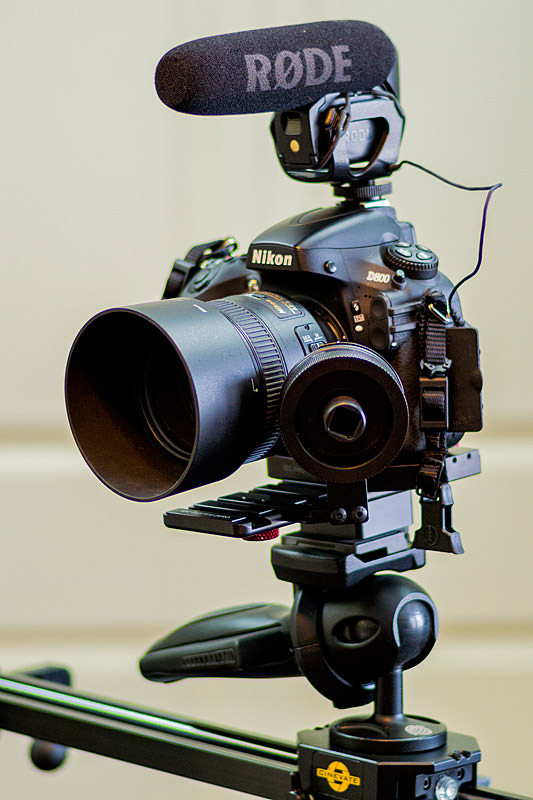
Audio quality is important for video. Many DSLRs have built-in microphones but they pick up camera noise. External microphone inputs allow better sound recording. Some models support headphone jacks to monitor audio live. This improves video sound clarity and control.

Credit: www.amazon.com
Essential Dslr Settings For Video
Capturing high-quality video with your DSLR requires more than just hitting the record button. Adjusting a few key settings can dramatically improve your footage, making it look professional and polished. Let’s dive into some essential DSLR settings that will help you take control of your video recording experience.
Choosing The Right Exposure
Exposure controls how light or dark your video appears, so getting it right is crucial. Use the aperture, shutter speed, and ISO settings together to balance the exposure perfectly.
- Aperture:A wider aperture (lower f-number) lets in more light and creates a shallow depth of field, great for focusing on your subject.
- Shutter Speed:For smooth motion, set your shutter speed to roughly double your frame rate (e.g., 1/50 for 24fps).
- ISO:Keep ISO as low as possible to reduce noise, but increase it if you’re shooting in low light.
Have you experimented with adjusting shutter speed to see how it affects motion blur in your videos?
White Balance Tips
White balance ensures your colors look natural and consistent, no matter the lighting. Avoid auto white balance if you want control—automatic adjustments can cause color shifts mid-shot.
- Use a preset based on your shooting environment, like daylight, tungsten, or fluorescent.
- Try manually setting the white balance using a gray card for accurate color reproduction.
- Keep a close eye on your footage’s colors during playback to catch any unwanted tints early.
Have you noticed how a slight white balance tweak can completely change the mood of your video?
Using Manual Focus For Precision
Relying on autofocus can lead to distracting focus shifts during recording. Manual focus lets you lock in sharpness exactly where you want it.
- Use your DSLR’s focus peaking or zoom-in feature to check focus precisely.
- Practice pulling focus smoothly if you want to shift focus between subjects.
- Remember, setting focus before you start recording saves headaches later.
Next time you shoot video, try manual focus and see how much more control you feel over your shots.
Lenses And Accessories
Choosing the right lenses and accessories can dramatically improve the video quality you get from your DSLR. These tools help you capture sharp images, smooth movements, and clear sound, all of which make your videos more professional and engaging. Let’s look at what you should consider adding to your kit.
Best Lenses For Video Shooting
The lens you pick affects your video’s look and feel. Prime lenses with wide apertures like f/1.8 or f/1.4 create beautiful background blur and perform well in low light. Zoom lenses offer flexibility, letting you adjust framing without moving the camera.
Some popular choices include:
- 50mm f/1.8:Affordable and great for portraits or interviews.
- 24-70mm f/2.8:Versatile for many shooting situations.
- Wide-angle lenses (e.g., 16-35mm):Ideal for landscapes or tight indoor spaces.
Stabilizers And Gimbals
Shaky footage can ruin your video’s impact. Stabilizers and gimbals keep your camera steady while you move. This makes your shots smooth and cinematic without needing expensive equipment.
Consider handheld gimbals for walking shots or small stabilizers if you shoot mostly on a tripod. These devices let you focus on composition and storytelling, not battling camera shake.
External Microphones And Audio Gear
Clear audio is just as important as sharp visuals. Built-in DSLR microphones often pick up unwanted noise and sound muffled. Adding an external microphone can transform your sound quality.
Options include:
- Shotgun microphones:Perfect for directional audio during interviews or events.
- Lavalier (lapel) mics:Great for hands-free recording when subjects move around.
- Audio recorders:Useful for capturing high-quality sound separately and syncing in post-production.
Which accessory has made the biggest difference in your video shoots? Trying out different lenses and audio gear can reveal new creative possibilities you might not expect.
Shooting Techniques For Cinematic Footage
Capturing cinematic footage with a DSLR is about more than just hitting the record button. It involves careful planning and intentional choices that shape the story you want to tell. Paying attention to shooting techniques can transform ordinary clips into compelling visuals that hold your viewer’s attention.
Framing And Composition
How you frame your shot sets the mood and guides the viewer’s eye. Use the rule of thirds to place your subject off-center, creating balance and interest. Don’t hesitate to experiment with angles—shooting slightly from above or below can add depth and emotion.
Think about the background and foreground too. Is there anything distracting? Sometimes simple is better, but a well-chosen background can add layers to your story. I once captured a street musician with blurred city lights behind him; it made the shot feel alive without pulling focus from the subject.
Smooth Camera Movements
Jerky footage can pull your audience out of the moment. Use a tripod or a gimbal to keep your camera steady during pans or tracking shots. Even handheld shots can look professional if you move slowly and deliberately.
Try practicing walking movements before filming. Notice how you can soften your steps and control your breathing to reduce shake. A slow push-in towards your subject often feels more engaging than a quick zoom.
Lighting For Video
Lighting shapes how your scene looks and feels. Natural light is a great starting point, but it changes quickly, so plan your shoot around the best times of day—usually early morning or late afternoon. If you’re indoors, position your subject near windows to make the most of soft, diffused light.
Adding a reflector or a small LED light can fill in shadows and highlight important details. I found that even a simple white poster board can bounce light effectively, brightening faces without harsh glare. What creative ways can you try to control light on your next shoot?
Post-production Tips
Post-production is a crucial step in video creation. It transforms raw footage into a polished product. DSLR cameras are capable of capturing stunning video, but editing is where the magic happens. With the right tools and techniques, you can enhance your video quality significantly.
Editing Software Recommendations
Choosing the right editing software can streamline your workflow. Popular options include Adobe Premiere Pro and Final Cut Pro. They offer robust features for precise editing. For beginners, DaVinci Resolve provides a free version with professional tools. Each software has unique strengths, so explore their features to find what suits your needs.
Color Grading Basics
Color grading adds mood and style to your video. Start by balancing the colors to match reality. Adjust shadows, midtones, and highlights for depth. Use LUTs (Look-Up Tables) for easy color transformations. Experiment with saturation and contrast to enhance visual appeal. Consistent grading can elevate your video’s aesthetic.
Enhancing Audio Quality
Good audio is vital for viewer engagement. Use external microphones for clear sound capture. In post-production, clean up background noise and enhance vocal clarity. Software like Audacity offers free tools for basic audio editing. Consider adding background music or sound effects for depth. Always balance audio levels to avoid distortion.

Credit: www.amazon.com
Common Challenges And Solutions
Recording video with a DSLR offers great image quality but comes with certain challenges. Understanding these issues helps create better videos and avoid frustration. Solutions often involve simple tools and smart habits.
Overheating Issues
DSLRs can get hot during long video sessions. Overheating may cause the camera to shut down suddenly.
- Use short recording clips instead of long continuous takes.
- Allow the camera to cool down between recordings.
- Record in a cool environment to reduce heat build-up.
- Remove any camera case or cover to improve airflow.
Battery Life Management
Video recording drains battery faster than still photos. Running out of power can interrupt your shoot.
- Carry extra fully charged batteries.
- Turn off unnecessary functions like Wi-Fi or GPS.
- Lower screen brightness to save power.
- Use an external power source for long sessions.
Handling Rolling Shutter
Rolling shutter creates a wobbly or skewed image during fast movement. It affects video quality.
- Move the camera slowly and steadily.
- Use a tripod or stabilizer to reduce shakes.
- Avoid fast pans or quick action shots.
- Choose cameras with faster sensor readout speeds if possible.
Credit: photographylife.com
Frequently Asked Questions
Can Dslrs Record High-quality Videos?
Yes, most DSLRs can record high-quality videos in Full HD and even 4K resolution. They offer manual controls for exposure, focus, and frame rates, making them ideal for professional video production.
How Long Can A Dslr Record Video Continuously?
DSLRs typically record video clips up to 29 minutes and 59 seconds. This limit is due to file size restrictions and sensor overheating concerns. Some models may offer longer recording times with external recorders.
Do All Dslr Cameras Support Video Recording?
Not all DSLRs support video recording. Most modern DSLRs include video features, but some entry-level or older models may lack this function. Always check the camera specifications before purchase.
What Lenses Are Best For Dslr Video Recording?
Prime lenses with wide apertures are preferred for DSLR video recording. They provide sharp images and excellent low-light performance. Zoom lenses offer flexibility but may compromise image quality slightly.
Conclusion
DSLR cameras can record good quality videos. They offer control over focus and settings. Many models support Full HD and 4K video. This makes them useful for beginners and pros. Keep in mind, some DSLRs may have limits on recording time.
Choosing the right camera depends on your needs and budget. Overall, DSLRs remain a popular choice for video creators. They combine still photo and video functions in one device. So, yes, DSLR cameras do record video well.