Are you struggling to get that deep, rich bass from your Vizio subwoofer when paired with your soundbar? Connecting these two devices might seem tricky at first, but once you know the right steps, you’ll unlock a powerful audio experience right in your living room.
In this guide, you’ll learn exactly how to connect your Vizio sub to your soundbar quickly and easily. Stick with me, and you’ll be enjoying booming sound that makes every movie, game, or song come alive like never before. Let’s dive in and get your setup sounding amazing!
Check Compatibility
Before you try to connect your Vizio subwoofer to a soundbar, it’s essential to check compatibility. Not all subs and soundbars work well together, and mismatched gear can cause weak bass or no connection at all. Understanding what models and specs align will save you time and frustration.
Identify Subwoofer Model
Start by finding the exact model number of your Vizio subwoofer. This information is usually on a label at the back or bottom of the unit. Knowing your sub’s model helps you look up its connection type and power requirements.
Different models use different connection methods—wireless, wired, or proprietary connectors. For example, some Vizio subs pair automatically with compatible soundbars via Bluetooth or Wi-Fi, while others need a physical cable. Have you checked if your sub uses the same connection type as your soundbar?
Match Soundbar Specifications
Next, compare your soundbar’s specifications with those of the subwoofer. Look for details like supported frequencies, output power, and connection ports. Soundbars designed to work with Vizio subs often list compatible models in their manuals or product pages.
Pay special attention to whether the soundbar supports a wireless subwoofer connection or requires a wired link. Also, check the maximum wattage the subwoofer can handle to avoid underpowering or overpowering issues. Does your soundbar’s bass output match or complement your subwoofer’s capabilities?
Gather Required Cables
Before connecting your Vizio subwoofer to a soundbar, gathering the right cables is essential. The type of connection you choose will determine which cables you need. Having these cables ready saves time and avoids frustration during setup.
Wired Connection Options
For a wired setup, the most common cable is the subwoofer RCA cable. This cable connects the subwoofer’s output to the soundbar’s subwoofer input. Make sure the cable is long enough to reach between your devices without stretching.
Another option is an optical audio cable, sometimes used if your soundbar supports it. This cable carries digital audio signals and can improve sound quality. Double-check your soundbar and subwoofer ports to confirm compatibility.
Many users overlook the importance of cable quality. Thicker cables with solid connectors reduce interference and signal loss. Have you ever noticed static or weak bass? The cable might be the culprit.
Wireless Connection Options
Wireless setups usually require no physical cables between the subwoofer and soundbar. However, some Vizio soundbars need a wireless transmitter kitsold separately. This kit pairs the subwoofer with the soundbar without clutter.
Ensure both devices support the same wireless standard. Interference from other electronics can cause dropouts. Placing your subwoofer and soundbar within a reasonable distance helps maintain a solid connection.
Have you considered using wireless for a cleaner look? It eliminates cable mess but demands good signal strength. If your room has thick walls or many devices, check if wireless will still perform well before you rely solely on it.
Connect Using Wired Method
Use an audio cable to connect the subwoofer’s output to the soundbar’s input. Make sure both devices are powered on and set to the correct input mode. This wired connection ensures clear, stable sound between your Vizio sub and soundbar.
Connecting your Vizio subwoofer to a soundbar using a wired method is a straightforward process that ensures stable audio quality. This method is ideal if you prefer a reliable connection without the complexities of wireless pairing. Before diving into the steps, make sure you have all the necessary cables and your devices are powered off to prevent any accidental damage.Locate Audio Output Ports
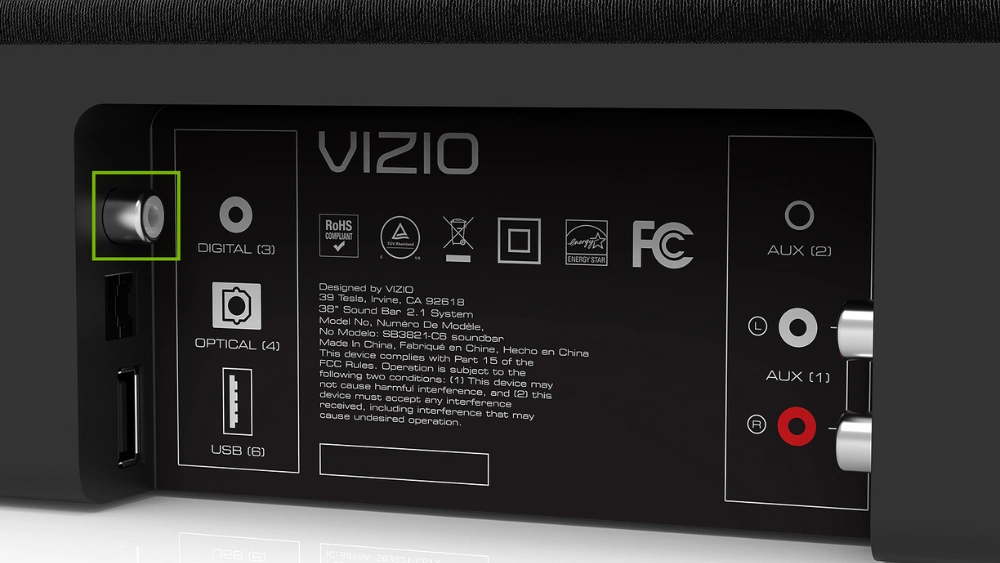
First, identify the audio output ports on your soundbar. These are typically labeled and located at the back or sides of the device. Look for ports such as RCA, AUX, or optical output, which are standard on most soundbars. If you’re unsure, consult the user manual for a detailed diagram. Have you ever tried locating these ports in dim lighting? It can be a bit challenging, so ensure the area is well-lit.Connect Subwoofer To Soundbar
Once you’ve located the audio output ports, it’s time to connect your subwoofer. Use the appropriate cable that matches the port type. For RCA connections, you’ll find red and white ports—make sure these correspond to the same colors on your subwoofer’s input. Optical cables require a bit more finesse; make sure it clicks securely into the port. Have you considered how the length of your cable can affect placement? It’s worth thinking about if you’re setting up in a large room.Secure Cable Connections
Now, ensure your connections are secure. Tug gently on the cables to check they’re firmly plugged into both devices. Loose connections can lead to poor audio quality or interruptions. It’s like when a loose shoe lace ruins a perfect walk; similarly, a loose cable can disrupt your listening experience. Double-check each connection to avoid future hassle. Have you ever experienced the frustration of audio cutting out mid-movie? A secure connection helps you avoid that scenario. Feel free to share your own setup experiences or any tips you’ve found helpful in achieving the best sound quality.
Credit: greensafaris.com
Connect Using Wireless Method
Connecting your Vizio subwoofer to the soundbar wirelessly offers a clean setup without extra cables. This method uses Bluetooth or Wi-Fi to link the devices. It allows more flexibility in placement and keeps your space tidy.
The process involves activating wireless options, pairing both devices, and checking the connection status. Follow these steps carefully to enjoy deep bass with clear sound.
Activate Bluetooth Or Wi-fi
Start by turning on the soundbar and subwoofer. Access the soundbar’s settings menu using the remote control. Locate the Bluetooth or Wi-Fi option and enable it. Some Vizio models automatically search for wireless devices once Bluetooth or Wi-Fi is active.
Make sure the subwoofer is also in pairing mode. Usually, pressing and holding the pairing button on the subwoofer activates this mode. A blinking light often indicates readiness to connect.
Pair Subwoofer With Soundbar
On the soundbar’s menu, select the option to add or pair a new device. The soundbar will scan for available wireless connections nearby. Choose your subwoofer from the list of detected devices. Confirm the pairing request if prompted.
The devices will communicate and establish a secure connection. Keep them close during this process to avoid interference or disconnection.
Confirm Connection Status
Once paired, the soundbar usually shows a confirmation message on screen. The subwoofer’s indicator light may turn solid or change color to show it is connected. Play some audio to test the bass output and sound quality.
If sound or bass is weak or missing, repeat the pairing steps. Make sure both devices remain powered on and within range. A stable wireless connection ensures the best audio experience.
Adjust Sound Settings
Adjusting your sound settings is key to getting the best audio experience from your Vizio subwoofer and soundbar. Without fine-tuning, you might miss out on the rich bass that makes movies and music come alive. Small tweaks can make a big difference in how your system sounds.
Access Soundbar Audio Menu
Start by grabbing your soundbar remote and pressing the menu or settings button. Navigate to the audio or sound settings section—this is where you control how your soundbar and subwoofer work together. If you’re unsure, the user manual usually has a clear guide on accessing this menu.
Look out for options like “Subwoofer,” “Bass,” or “Speaker Settings.” You want to make sure the subwoofer is enabled if there’s an on/off toggle. Have you ever found your subwoofer silent just because it was accidentally turned off? This simple check saves a lot of frustration.
Set Subwoofer Volume Levels
Once in the menu, find the subwoofer volume or bass level setting. Start with a moderate volume—not too high, not too low. Increasing the subwoofer’s volume too much can overpower your soundbar and make the audio unbalanced.
Adjust the volume in small steps and listen carefully after each change. You want the bass to feel powerful but not muddy. Personally, I prefer setting my subwoofer volume around 60-70% of the max; it keeps the bass tight without overwhelming dialogue.
Test Bass Output
After setting the volume, test the bass output with different audio types—try a bass-heavy song, a movie scene with explosions, and some dialogue. This variety helps you hear how the subwoofer performs across different sounds.
Does the bass feel punchy and clear, or does it sound distorted or weak? If it’s distorted, lower the subwoofer volume slightly. If it’s too weak, try increasing it a bit more. Keep adjusting until the bass complements your soundbar perfectly without taking over.

Credit: www.youtube.com
Troubleshoot Common Issues
Troubleshooting common issues helps keep your Vizio subwoofer and soundbar working well together. Many problems come from simple setup or connection errors. Identifying these issues saves time and improves your listening experience.
Check power sources and cables first. Make sure all devices are turned on and properly connected. Resetting devices sometimes clears minor glitches. Keep your soundbar and subwoofer firmware updated for best performance.
No Sound From Subwoofer
Confirm the subwoofer is plugged into power and switched on. Check the audio cable or wireless connection between the sub and soundbar. Increase the subwoofer volume in the soundbar settings menu. Test the soundbar with other audio sources to isolate the issue. Try turning off and on both devices to reset connections.
Connection Drops
Move the subwoofer closer to the soundbar if using wireless connection. Remove obstacles that block signal paths. Ensure no other wireless devices cause interference. Restart both devices to refresh the connection. Use a wired connection if wireless problems persist.
Audio Delay Problems
Audio delay can happen due to wireless lag or device settings. Adjust the audio sync or delay settings on the soundbar menu. Restart devices to clear temporary delays. Reduce the distance between subwoofer and soundbar. Check for firmware updates to fix delay bugs.

Credit: www.youtube.com
Frequently Asked Questions
How Do I Connect A Vizio Subwoofer To A Soundbar?
To connect a Vizio subwoofer, use the wireless pairing button on both devices. Press and hold the subwoofer’s button, then the soundbar’s. Wait until the LED indicator shows a successful connection.
Can I Use A Wired Connection For Vizio Sub And Soundbar?
Most Vizio soundbars connect wirelessly to their subwoofers. However, if your model supports a wired connection, use an RCA cable to link the subwoofer to the soundbar’s sub out port.
What To Do If Vizio Subwoofer Won’t Connect?
First, ensure both devices are powered on. Reset the subwoofer by unplugging it for 30 seconds. Try pairing again by pressing the wireless pairing buttons on both devices.
Does The Vizio Soundbar Control Subwoofer Volume?
Yes, the soundbar remote typically controls the subwoofer’s volume. Adjust the bass level using the soundbar’s settings menu or remote to get balanced sound output.
Conclusion
Connecting your Vizio sub to the soundbar is simple and quick. Just follow the right steps, and you’ll enjoy better sound. Check your cables and settings carefully before starting. This helps avoid common problems and saves time. A good connection means clearer bass and richer audio.
Enjoy watching movies and music with deeper sound. Keep your setup neat and secure for best results. Now, you can easily enhance your home audio experience.